- When
- 12 November 2026, from India
- Plan
- 14-day Creator trial, card needed
- Signed up with LinkedIn and connected my profile
- I tried
- Refine on a one-line draft. Refine “under 1,300 characters, in my style”. The calendar and the Analyze page. Cancelling and deleting the account.
- Not tested
- The voice writing assistant and style guide, locked on the trial.
Typefully vs Buffer One writes the post, one schedules it.
Both post to LinkedIn through its official sign-in, and neither asked what I post about. Typefully is a clean editor for six networks whose AI wrote a full post from my one line, from $99 a year. Buffer is a scheduler for 12 networks, free for 3 channels, with LinkedIn stats from day one, and its AI only reworks your text. I used Buffer on 10 November and Typefully on 12 November 2026, with the same idea.
 By Kaustubh Katdare · Founder, Wiral.SocialPrices checked 20 November 2026 · features researched 20 November 2026My Typefully review on the community
Pick Typefully if
you want an AI that turns your line into a full post, a calm editor with a realistic phone preview, and X and Threads alongside LinkedIn, for $99 a year.
- Starts at
- Free plan, paid from $8.25 a month
- Free trial
- 14 days, card needed
Pick Buffer if
you write your own posts and want free, simple scheduling across many networks, with LinkedIn stats and a comments inbox from day one.
- Starts at
- Free plan, paid from $6 a month
- Free trial
- 14 days
5 differences that matter.
- 1
The same idea, two AIs
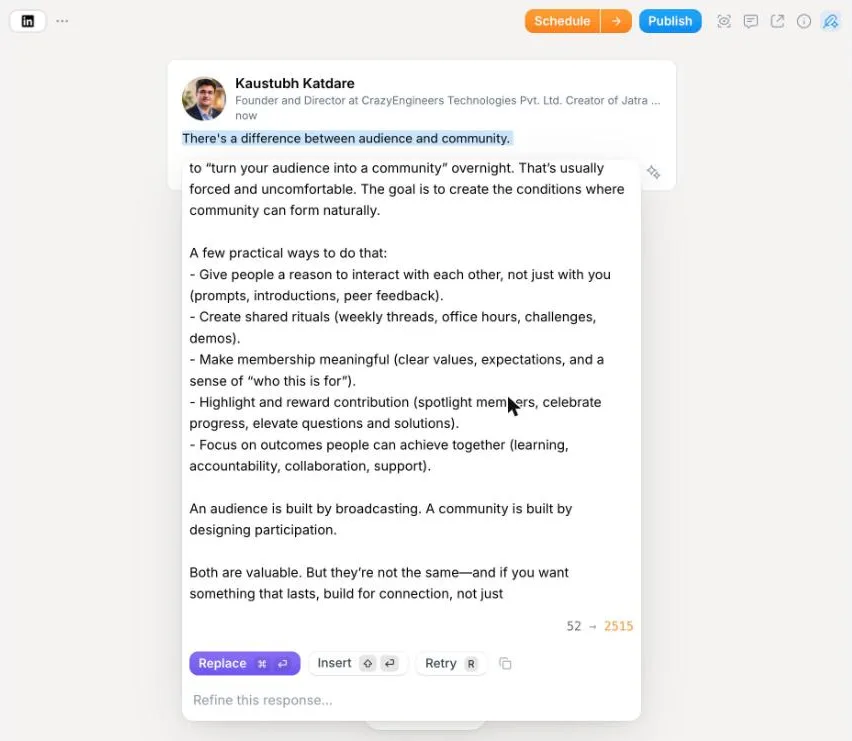
TypefullyRefine read my one line and wrote a full post: 2,515 characters, three numbered reasons and five tips. Good, and too long. It asked nothing first.
BufferAsked to expand the idea in my post into a full post, the AI Assistant asked me to share the idea, twice. Insert put that question into my post.
- 2
Price and trial
TypefullyFree is 10 posts a month with no AI. Creator is $99 a year, yearly only. The 14-day trial took my card.
BufferFree for 3 channels, with AI. Essentials is $6 a channel a month ($5 yearly); a profile and page count as two. The free plan asked me for no card.
- 3
LinkedIn stats
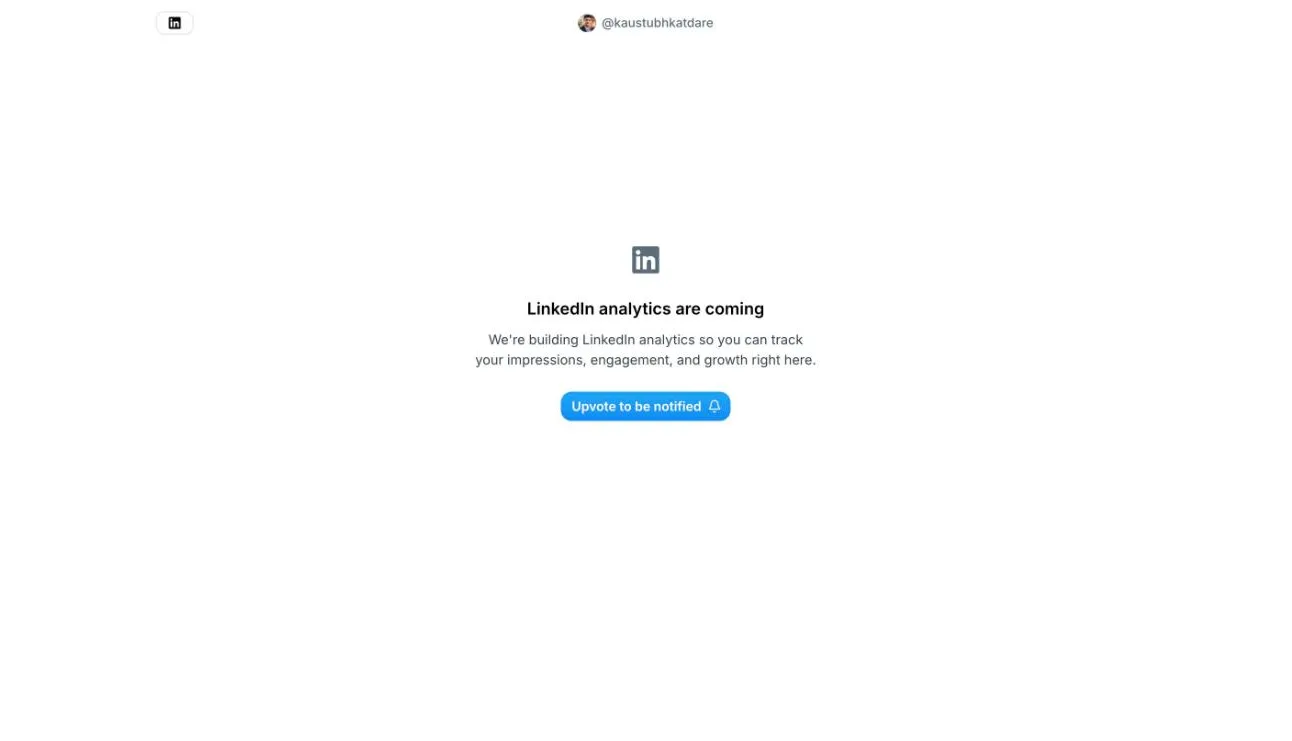
TypefullyNone yet. Analytics cover X; for LinkedIn the page says “coming”.
BufferMy last 30 days the moment I connected, on the free plan, with the top 5 posts and a comments inbox.
- 4
Networks
TypefullySix text networks: X, LinkedIn, Threads, Bluesky, Mastodon and Substack Notes.
Buffer12, adding Instagram, Facebook, TikTok, YouTube, Pinterest and Google Business Profile.
- 5
Leaving
TypefullyDeletion is scheduled; mine was set 60 days out, though the policy says 30. Remove it from LinkedIn yourself.
BufferDelete Account sits at the bottom of Settings, Profile. Remove it from LinkedIn yourself too.
First-hand
Same idea, two days apart.
Kaustubh KatdareFounder, Wiral.Social
I gave both tools one line: there’s a difference between audience and community. Then I asked each AI for a full post with a nice flow from start to end.
Buffer asked me to share the idea. It was right there in the post. I pressed Insert and its question went into my post. It still wants me to do all the thinking and hard work.
Typefully wrote the post. Buffer didn’t write, Typefully did, and it did a good job. I’d post it. But it was 2,515 characters, and I expected some back and forth with the writer first. It just built a long post. The assistant that learns your voice was locked on my trial.
Neither one asked who I am or what I post about. Both wait for you to bring the idea. That’s the toughest part, and neither solves it.
So pick by what you need. An AI that writes from your line, and a lovely editor: Typefully. Free scheduling and LinkedIn stats: Buffer. Ideas brought to you and posts in your voice is why I built Wiral.
My own trial
Inside Typefully, screen by screen.
Screenshots I took myself. The numbered notes take turns; tap one to see its part.
Typefully’s AI: a whole post.
It wrote the post without a question. 2,515 characters from 52.
Typefully’s LinkedIn stats.
Coming. Buffer showed me 30 days of mine on its free plan.
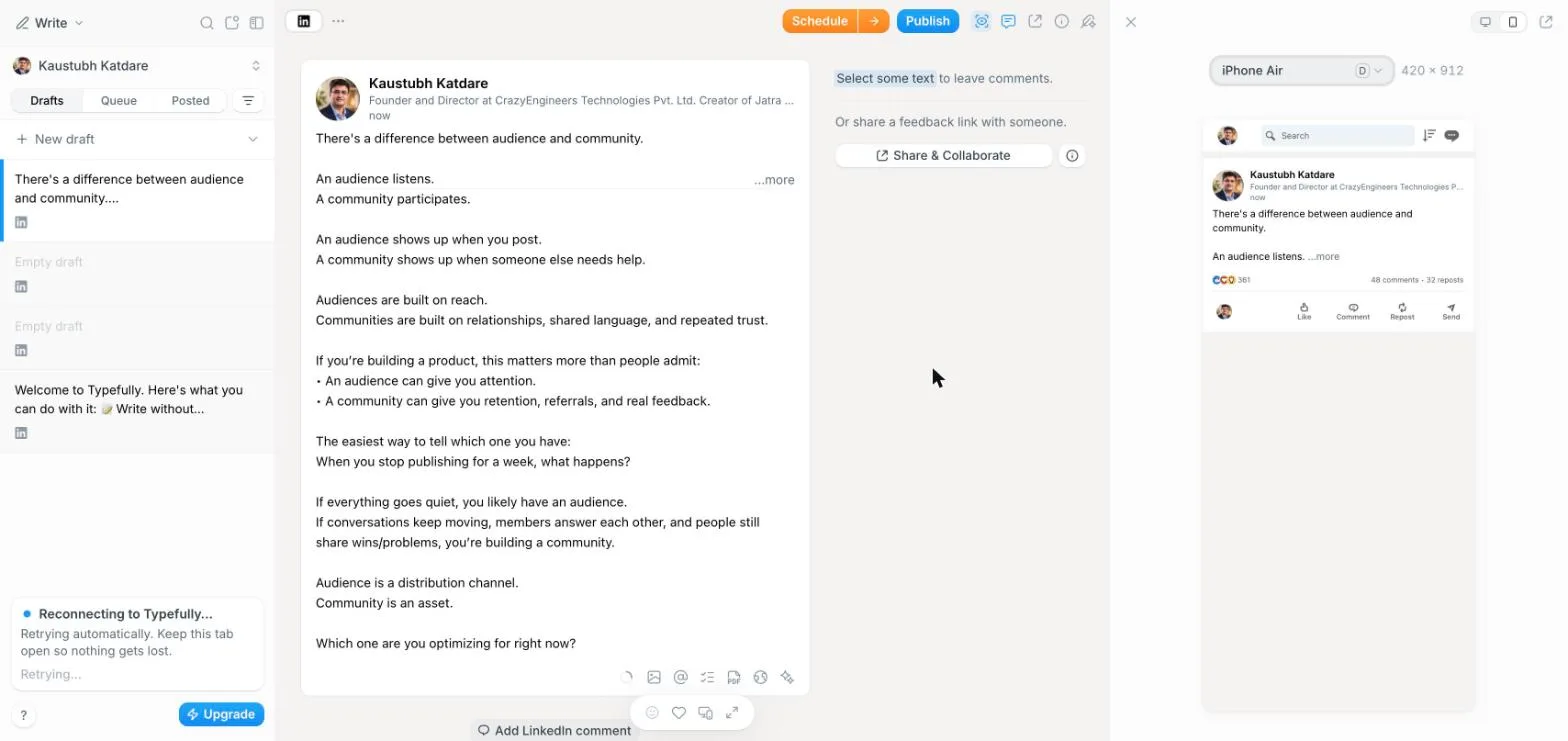
Where Typefully is ahead.
A realistic preview on seven phone sizes. Buffer shows one LinkedIn preview beside the composer.
Every feature, side by side.
| Side by side | TypefullyFree plan, paid from $8.25 a month | BufferFree plan, paid from $6 a month |
|---|---|---|
| Price and trial | ||
| Starts at | Free plan, paid from $8.25 a month | Free plan, paid from $6 a month |
| Free trial | 14 days, card needed | 14 days |
| How it connects to LinkedIn | LinkedIn’s own sign-inHelp centre says person mentions are limited because of LinkedIn API limits, which shows it posts through the LinkedIn API. | LinkedIn’s own sign-inYou sign in to LinkedIn and authorise Buffer; the help article refers to LinkedIn's API and its limits (no polls, no Groups, 50 posts per 24 hours). |
| Writing | ||
| Writes posts with AI | YesWriting Assistant chat in the editor plus quick edits (rewrite, improve, make it punchier). | YesAI Assistant in the composer generates, rephrases, shortens and expands posts, switches between more casual and more formal, and adapts to each channel. |
| Learns your voice | YesLearns style from writing samples you add and posts you write in Typefully; editable style guide in Settings. | NoNo voice setup for posts. |
| Suggests post ideas | YesTypefully says it has a library of prompts and content ideas; I didn't come across it in my trial (12 Nov 2026), and onboarding asked nothing about me, my work or my topics. | YesAI suggestions for writer's block, plus an Ideas board (100 ideas on Free, unlimited on paid). |
| Ideas from viral posts | Not statedNot stated on the site. | Not statedNot stated on the site. |
| Posting | ||
| Schedules posts | YesOn every plan, including Free. | Yes |
| Posting queue or calendar | YesCalendar on every plan; queue tab on mobile. | Yes |
| Adds a first comment | YesListed under LinkedIn features on every plan, including Free. | YesPaid plans only. |
| Posts to company pages | Yes | YesCompany and Showcase Pages; you must be a Super Admin of the Page to connect it. |
| Visuals | ||
| Makes carousels | YesUpload and schedule PDF carousels. | YesUploads one LinkedIn PDF document (carousel) per post, up to 100MB and 300 pages, on web; a document title is required. |
| Images and video | YesAttach images, GIFs and videos. | YesAttach up to 20 images, or one video (up to 30 minutes, 1GB), or one GIF per LinkedIn post. |
| Feed preview | YesRealistic preview on seven phones (iPhone SE to 17 Pro Max, Galaxy S25, Pixel 10) plus desktop, cut at LinkedIn's "…more", with made-up reactions for the look; the editor also marks the fold (Kaustubh, 12 Nov 2026). | YesThe composer shows a per-channel preview of how the post will look. |
| Growth | ||
| Post stats | NoHelp centre (11 Aug 2026): analytics cover X only; LinkedIn analytics are being worked on. | YesBasic analytics (post stats, Insights, follower growth) for both LinkedIn profiles and Pages. |
| Help with comments | YesAuto-plug, auto-retweets, auto-DMs, reply to tweets. | YesCommunity inbox to reply to comments, with AI reply suggestions (5 a week on Free, unlimited on paid), saved replies and comment insights. |
| Leads and outreach | Not statedNot stated on the site. | NoNone of the 26 listed integrations is a CRM, and Buffer's own Buffer vs Agorapulse article names HubSpot and Salesforce syncing as an Agorapulse feature. |
| Team and client accounts | YesBusiness plan: unlimited users, teams, roles, permissions, shared drafts, comments, up to 50 social sets. | YesTeam plan: unlimited users, approval workflows, custom access and branded reports. |
| Getting set up | ||
| Needs a Chrome extension | NoNo Typefully writing or scheduling extension in the Chrome Web Store. | NoOptional. |
| Native mobile app | NoProgressive web app you add to the home screen; no native phone app. | YesiOS and Android. |
Neither quite right?
Where Wiral.Social fits.
If you want the idea brought to you and the post written the way you’d write it, Wiral.Social is the third option. Wiri sends ideas from your topics each morning, writes three ready posts from one line, checks the post before it goes out, and posts at your times. It connects with LinkedIn’s official sign-in, starts at $9 a month, and the 14-day trial needs no card.
- Starts at
- From $9 a month
- Free trial
- 14 days, no card
Ideas, waiting for you.
Your own ideas, Wiri’s picks from your topics and formats that keep doing well. You never start from a blank page.
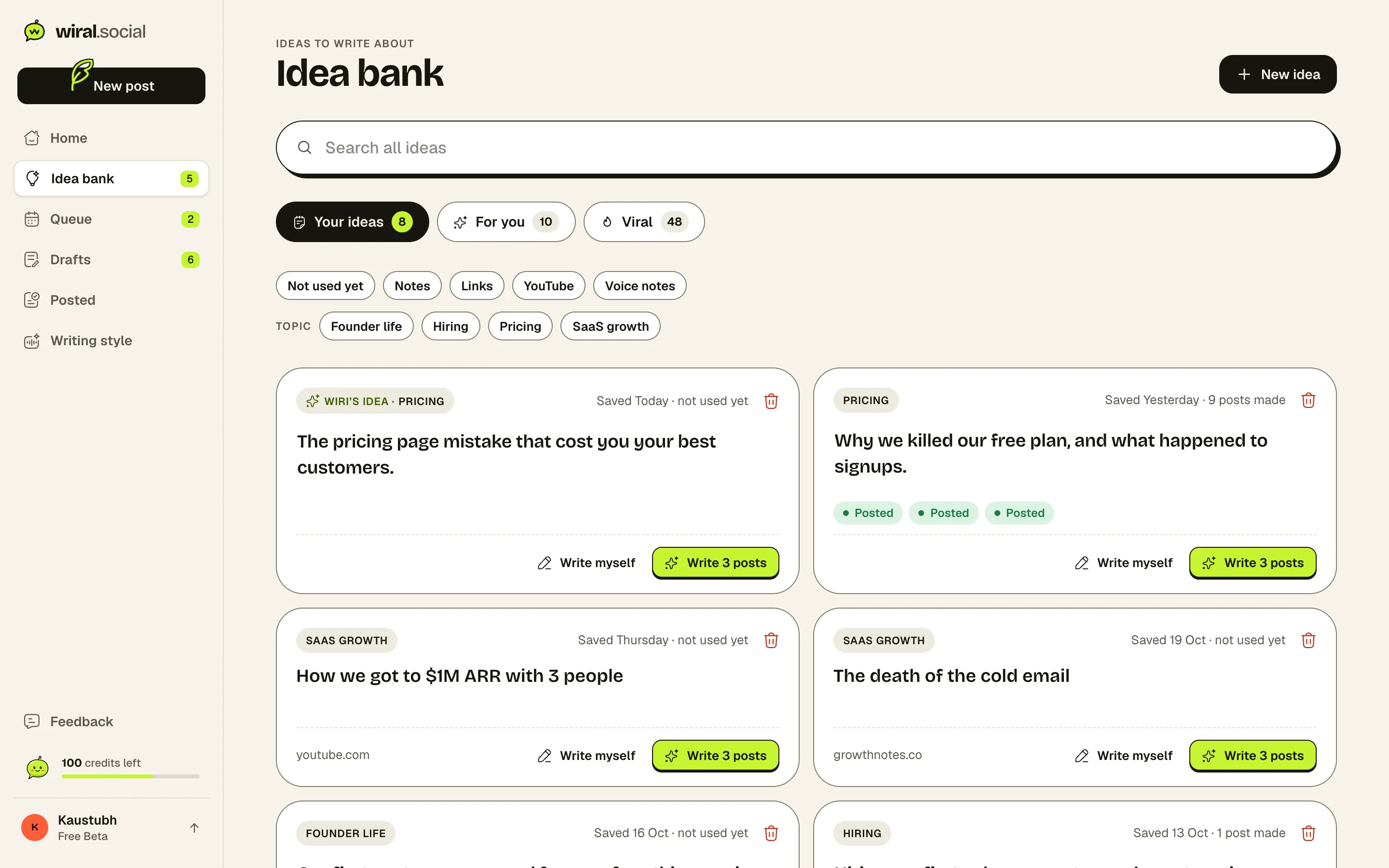
Three posts, from one line.
Every idea comes back as three finished posts in your voice. Keep one, tweak a word, queue it.
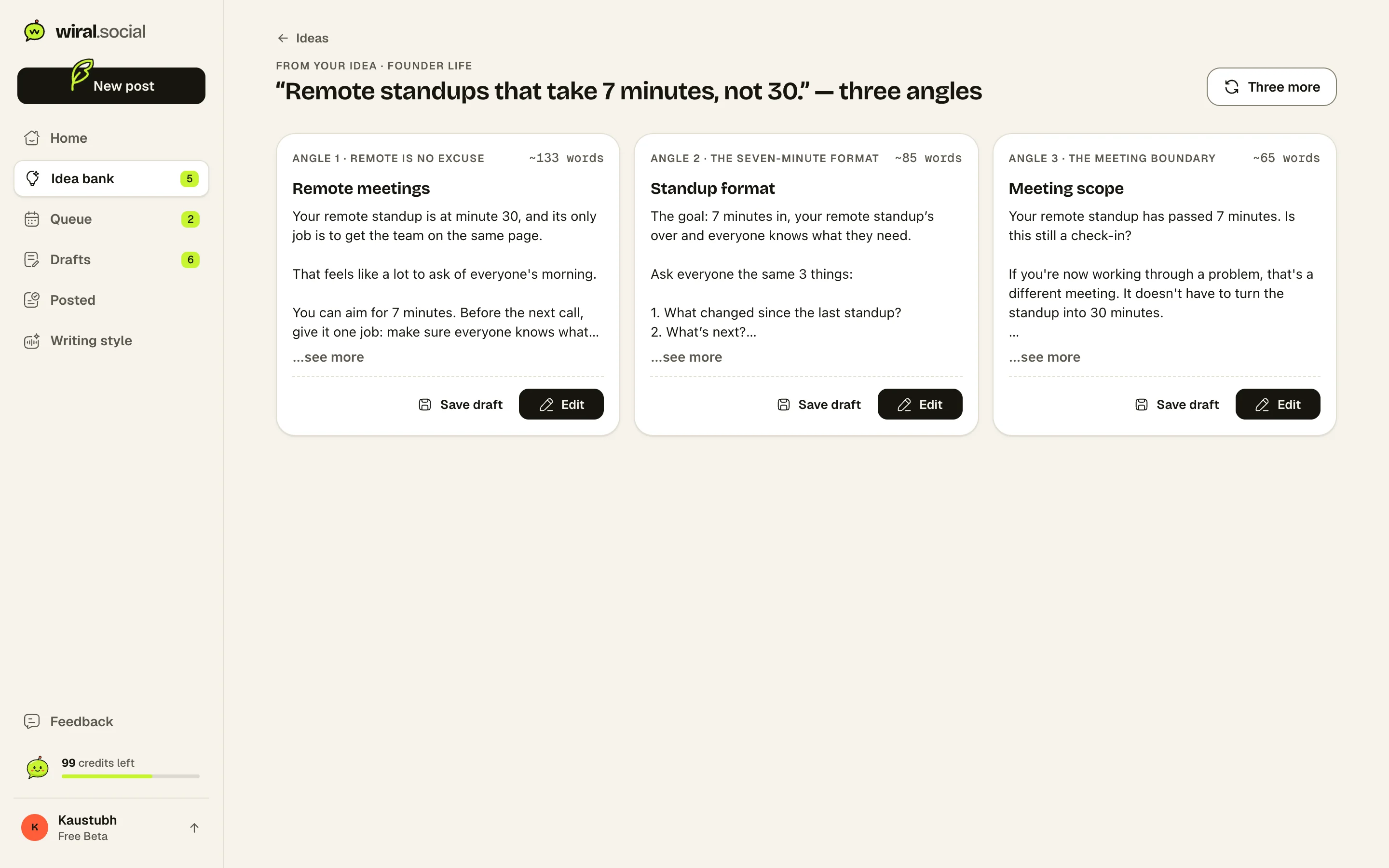
Where Wiral.Social is behind: Post stats and an automatic first comment are only in a small invite-only beta so far. Personal profiles only, no company pages yet. No team accounts or outreach tools. Ask for what you need
Try Wiral.Social with LinkedIn14 days, no card20% off for life until 24 NovemberNever posts without you
Not ready to sign up? Test the writing with the free post generator, see how the AI post writer learns your voice, or compare plans.
Plans and prices.
As listed on Typefully and Buffer’s own pricing pages, 20 November 2026.
Typefully plans
- FreeFree
10 posts a month, 1 social set, 1 user
- Creator$8.25/mo yearly
1000 posts a month, 1 social set, 1 user, AI writing, X analytics, unlimited media uploads
- Business$20/mo
1500 posts a month, per social set (up to 50), unlimited users, teams, roles, comments, Slack notifications, higher AI usage
Trial: 14 days, card needed. Refund on request within 14 days of purchase; after that, case by case.
Buffer plans
- FreeFree
Up to 3 channels, 1 user, 10 scheduled posts per channel
- Essentials$6/mo
Per channel. 1 user, unlimited scheduled posts, first comment, full analytics and reports
- Team$12/mo
Per channel. Unlimited users, approval workflows, access levels, branded reports
Trial: 14 days. Refund within 7 days of starting a monthly plan, or within 30 days of starting an annual plan
What reviewers say.
What people say about Typefully
“Typefully drafts and schedules posts for X, LinkedIn, Threads, Bluesky, Mastodon and Substack Notes”
A good fit for text-led publishing with a shared writing process; cost grows with each extra social identity on Business.Best Social Media Scheduler (BSMS)
- The most common praise is the clean, easy interface, mentioned in 9 Product Hunt reviews
- Several users like cross-posting the same draft to LinkedIn and X in one go
- Team collaboration sometimes fails, and working across separate free accounts is awkward
- Users miss Instagram support and note it is built for text-heavy networks
What people say about Buffer
“Buffer remains one of the most accessible social media management tools on the market”
Rated 4 out of 5: one of the easiest social tools to use, priced per channel so small teams pay little, though not the most feature-packed.TechRadar (Rob Clymo)
“Buffer's real standout feature is its value for money.”
Picked as the best app for plain social media scheduling, mainly for value for money; the free plan covers about a week of posts for a small business.Zapier (Andrew Kunesh, Tim Brookes)
- Users praise how easy and intuitive scheduling is; a common wish is for more complete analytics
- Most negative Capterra reviews are about bugs: posts not going out and channels needing to be reconnected
- Teams say shared access makes onboarding and working together easy
- One reviewer reports posts failing to publish every week; another wants an exact per-network preview before posting; another says cost climbs with each added platform
Is Typefully better than Buffer?
For writing, yes: Typefully’s AI wrote a full post from my one line, and Buffer’s asked me to share the idea. For free scheduling across many networks, LinkedIn stats and a comments inbox, Buffer.
Which is cheaper, Typefully or Buffer?
For scheduling alone, Buffer: free for 3 channels, then $6 a channel a month. Typefully’s Free plan covers 10 posts a month with no AI; Creator is $99 a year, about $8.25 a month, billed yearly only.
Which has better LinkedIn stats, Typefully or Buffer?
Buffer. It showed my last 30 days on the free plan the moment I connected. Typefully has no LinkedIn stats yet; its Analyze page says they’re coming.
Do Typefully and Buffer need a card to try?
Typefully’s 14-day trial took my card. Its Free plan needs none but has no AI. Buffer’s free plan asked me for no card, AI included.
Do Typefully and Buffer learn your writing voice?
Typefully says its Writing Assistant does, but it was locked on my Creator trial. Buffer has no voice setup for posts; it says only its comment replies learn your voice.
Who owns Typefully now?
Stan announced it bought Typefully on 10 November 2026. Two days later the app and prices were unchanged.
See if it sounds like you.
Try Wiral.Social with LinkedIn14 days, no card20% off for life until 24 NovemberNever posts without you
Not ready to sign up? Test the writing with the free post generator, see how the AI post writer learns your voice, or compare plans.
How I tested
- When
- 10 November 2026, from India
- Plan
- Free plan, no card
- My LinkedIn profile and the Wiral Social company page, through Buffer’s LinkedIn sign-in
- I tried
- The AI Assistant on a two-line idea. Turning a saved idea into a post. The inbox of LinkedIn comments. Insights, with my last 30 days of LinkedIn stats.
- Not tested
- Generate Ideas. Templates. AI reply suggestions in full.
Anything I couldn’t try myself comes from the tool’s own pages, listed in the sources below.
Sources: 41 pages. Prices checked on 20 November 2026, features researched on 20 November 2026. Prices are in US dollars, billed monthly unless marked yearly.
Typefully
- typefully.com/
- typefully.com/pricing
- startups.fm/startups/typefully
- typefully.com/privacy
- prnewswire.com/news-releases/stan-acquires-typefully-as-content-creation-and-distribution-become-a-founders-biggest-advantage-302934372.html
- support.typefully.com/en/articles/8728077-what-and-where-can-i-publish-with-typefully
- support.typefully.com/en/articles/8717716-manage-billing-invoices
- support.typefully.com/en/articles/14756434-writing-assistant
- typefully.com/linkedin
- support.typefully.com/en/articles/11970191-create-and-schedule-linkedin-pdf-carousels
- support.typefully.com/en/articles/8718168-publish-cross-post-to-linkedin
- support.typefully.com/en/articles/8718148-analytics-page-metrics
- chromewebstore.google.com/search/typefully
- support.typefully.com/en/articles/8717325-install-on-mobile
- g2.com/products/typefully/reviews
- capterra.com/p/10015231/Typefully/
- trustpilot.com/review/typefully.com
- producthunt.com/products/typefully/reviews
- support.typefully.com/en/articles/13974129-how-to-mention-companies-and-people-on-linkedin
- support.typefully.com/en/articles/8718444-privacy-policy
- typefully.com/blog/post-mortem-security-incident-june-9th-2026
Buffer
- buffer.com/pricing
- buffer.com/about
- buffer.com/
- buffer.com/pricing.md
- support.buffer.com/articles/refund-policy-d1GbglDfJa
- support.buffer.com/articles/using-buffers-ai-assistant-qbBulfw9sn
- buffer.com/ai-assistant
- support.buffer.com/en-us/articles/using-templates-in-buffer-Gbn93vR56i
- buffer.com/linkedin
- support.buffer.com/en-us/articles/scheduling-posts-4Qdld7giAZ
- support.buffer.com/articles/using-linkedin-with-buffer-K7tRkGD3mH
- support.buffer.com/articles/scheduling-posts-4Qdld7giAZ
- buffer.com/extras
- buffer.com/resources/introducing-buffers-ai-assistant/
- g2.com/products/buffer/reviews
- capterra.com/p/143492/Buffer/reviews/
- trustpilot.com/review/buffer.com
- chromewebstore.google.com/detail/buffer/noojglkidnpfjbincgijbaiedldjfbhh
- softwareadvice.com/social-media/buffer-profile/reviews/
- chromewebstore.google.com/detail/buffer/noojglkidnpfjbincgijbaiedldjfbhh/reviews
“I’ve made Wiral my personal assistant, and I love it. It’s clever, and I hope it can extend to other social platforms so I can use it beyond LinkedIn.”