Buffer vs AuthoredUp Two tools for people who write every word.
Neither one writes your posts for you. Buffer is a scheduler for 12 networks, free for 3 channels, connected through LinkedIn’s official sign-in, with an AI that reworks your text. AuthoredUp is a LinkedIn editor with a feed preview, hooks and detailed post stats, $19.95 a month, and posting and stats need its Chrome extension. I tried AuthoredUp on 5 November and Buffer on 10 November 2026.
 By Kaustubh Katdare · Founder, Wiral.SocialPrices checked 5 November 2026 · features researched 26 October 2026Read my full Buffer review
you write your own posts and want them scheduled across LinkedIn and other networks, with stats and a comments inbox, without installing anything. Free for 3 channels.
- Starts at
- Free plan
- Free trial
- 14 days
you handwrite every LinkedIn post, care about formatting and the feed preview, want detailed stats on your own posts, and are fine installing a Chrome extension.
- Starts at
- From $19.95 a month
- Free trial
- 14 days, no card
5 differences that matter.
- 1
Writing help
BufferAn AI Assistant that expands, rephrases and shortens your text. Asked for a full post from my idea, it asked me to share the idea.
AuthoredUpNo AI writing yet; Coauthor is a closed beta. A strong editor with formatting, a feed preview, and fill-in-the-blank hooks and endings.
- 2
How it connects to LinkedIn
BufferLinkedIn’s official sign-in. Posting, scheduling, stats and comments all worked in the web app, no extension.
AuthoredUpThrough its Chrome extension. Without it you can’t post, scheduled posts sit unassigned, stats stay at zero, and carousels, polls and video are locked.
- 3
Price and trial
BufferFree for 3 channels. Essentials is $6 a channel a month ($5 yearly), and a profile and page count as two. The free plan asked me for no card.
AuthoredUp$19.95 a month for one profile ($16.63 yearly), company pages included. 14-day trial, no card.
- 4
Stats
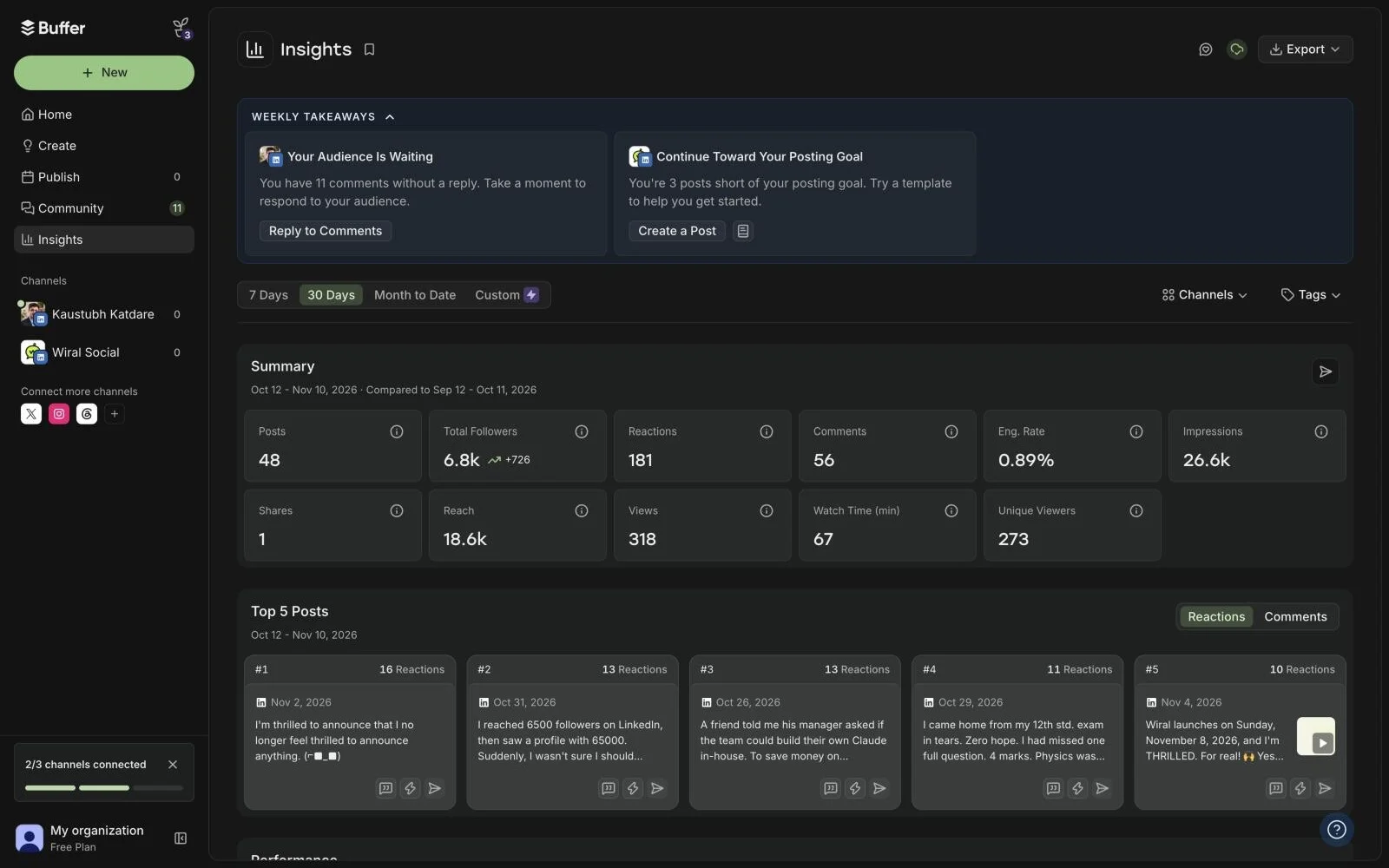
BufferMy last 30 days on the free plan the moment I connected: posts, followers, impressions, reach and the top 5 posts.
AuthoredUpDetailed stats on your own posts, and few tools go deeper, once the extension is connected.
- 5
Networks
Buffer12, from LinkedIn and X to Instagram, TikTok and YouTube.
AuthoredUpLinkedIn only.
Both left the thinking to me.
Kaustubh KatdareFounder, Wiral.Social
AuthoredUp asked me to connect LinkedIn through its browser extension before I’d seen the product. Frankly speaking, I don’t like installing extensions, so I skipped it, and there wasn’t much left. Its AI is still in beta. I had to do all the thinking, and that is not what I signed up for.
Buffer connected through LinkedIn’s own sign-in and everything worked. But when I asked its AI for a full post from my idea, it asked me to share the idea. Same feeling: it still wants me to do all the thinking and hard work.
If you write every word yourself, both are honest tools. Buffer is free and covers more networks, and its Insights page is very well made. AuthoredUp has the better editor and deeper stats, if you’re happy with the extension.
Who are they for? People who have the time to handwrite every post. An AI ghostwriter that knows your style and topics, and checks the post with you, is a different thing, and it’s why I built Wiral.
Inside Buffer, screen by screen.
Screenshots I took myself. The numbered notes take turns; tap one to see its part.
Buffer’s AI: share the idea.
My idea was already in the post. It asked for it anyway.

Buffer’s stats, no extension.
My last 30 days, the moment I connected through LinkedIn’s sign-in.
Every feature, side by side.
| Side by side | BufferFree plan | AuthoredUpFrom $19.95 a month |
|---|---|---|
| Price and trial | ||
| Starts at | Free plan | From $19.95 a month |
| Free trial | 14 days | 14 days, no card |
| How it connects to LinkedIn | LinkedIn’s own sign-inYou sign in to LinkedIn and authorise Buffer; the help article refers to LinkedIn's API and its limits (no polls, no Groups, 50 posts per 24 hours). | Chrome extension in your LinkedIn sessionWorks through its Chrome extension inside your own LinkedIn session. |
| Writing | ||
| Writes posts with AI | YesAI Assistant in the composer generates, rephrases, shortens and expands posts, switches between more casual and more formal, and adapts to each channel. | YesCoauthor AI assistant is in closed beta. |
| Learns your voice | NoNo voice setup for posts. | YesCoauthor is described as learning your voice from your own posts; closed beta. |
| Suggests post ideas | YesAI suggestions for writer's block, plus an Ideas board (100 ideas on Free, unlimited on paid). | NoNo idea generator listed. |
| Ideas from viral posts | Not statedNot stated on the site. | NoNo built-in viral post database. |
| Posting | ||
| Schedules posts | Yes | YesUses LinkedIn native scheduling through the extension; no scheduler of its own. |
| Posting queue or calendar | Yes | YesCalendar of scheduled and published posts with reminders. |
| Adds a first comment | YesPaid plans only. | NoNot listed in the plan comparison; the company has a no-automation policy. |
| Posts to company pages | YesCompany and Showcase Pages; you must be a Super Admin of the Page to connect it. | YesUnlimited pages you admin at no extra charge, with page dashboards. |
| Visuals | ||
| Makes carousels | YesUploads one LinkedIn PDF document (carousel) per post, up to 100MB and 300 pages, on web; a document title is required. | NoNo carousel maker. |
| Images and video | YesAttach up to 20 images, or one video (up to 30 minutes, 1GB), or one GIF per LinkedIn post. | YesAttach images, GIFs, video, documents, polls and events. |
| Feed preview | YesThe composer shows a per-channel preview of how the post will look. | YesDesktop and mobile, light and dark mode, with the "see more" fold. |
| Growth | ||
| Post stats | YesBasic analytics (post stats, Insights, follower growth) for both LinkedIn profiles and Pages. | YesDeep: dashboard, follower growth timeline, period comparisons, best type/day/length, post-vs-post compare, saves, sends, reach, profile views, historic posts, CSV and API. |
| Help with comments | YesCommunity inbox to reply to comments, with AI reply suggestions (5 a week on Free, unlimited on paid), saved replies and comment insights. | NoNo engage feed or comment assistant; reminders to come back and reply only. |
| Leads and outreach | NoNone of the 24 listed integrations is a CRM, and Buffer's own Buffer vs Agorapulse article names HubSpot and Salesforce syncing as an Agorapulse feature. | No |
| Team and client accounts | YesTeam plan: unlimited users, approval workflows, custom access and branded reports. | YesBusiness plan: roles, unlimited non-posting members, shared drafts, team analytics. |
| Getting set up | ||
| Needs a Chrome extension | NoOptional. | YesThe extension is the core product; publishing, scheduling and stats collection run through it. |
| Native mobile app | YesiOS and Android. | NoProgressive Web App you add to the home screen; no native app. |
Where Wiral.Social fits.
If you’d rather not write every word, Wiral.Social is the third option. Type one line and Wiri writes three takes in your voice, checks the post before it goes out, and posts at your times. It connects with LinkedIn’s official sign-in, no extension, starts at $9 a month, and the 14-day trial needs no card.
- Starts at
- From $9 a month
- Free trial
- 14 days, no card
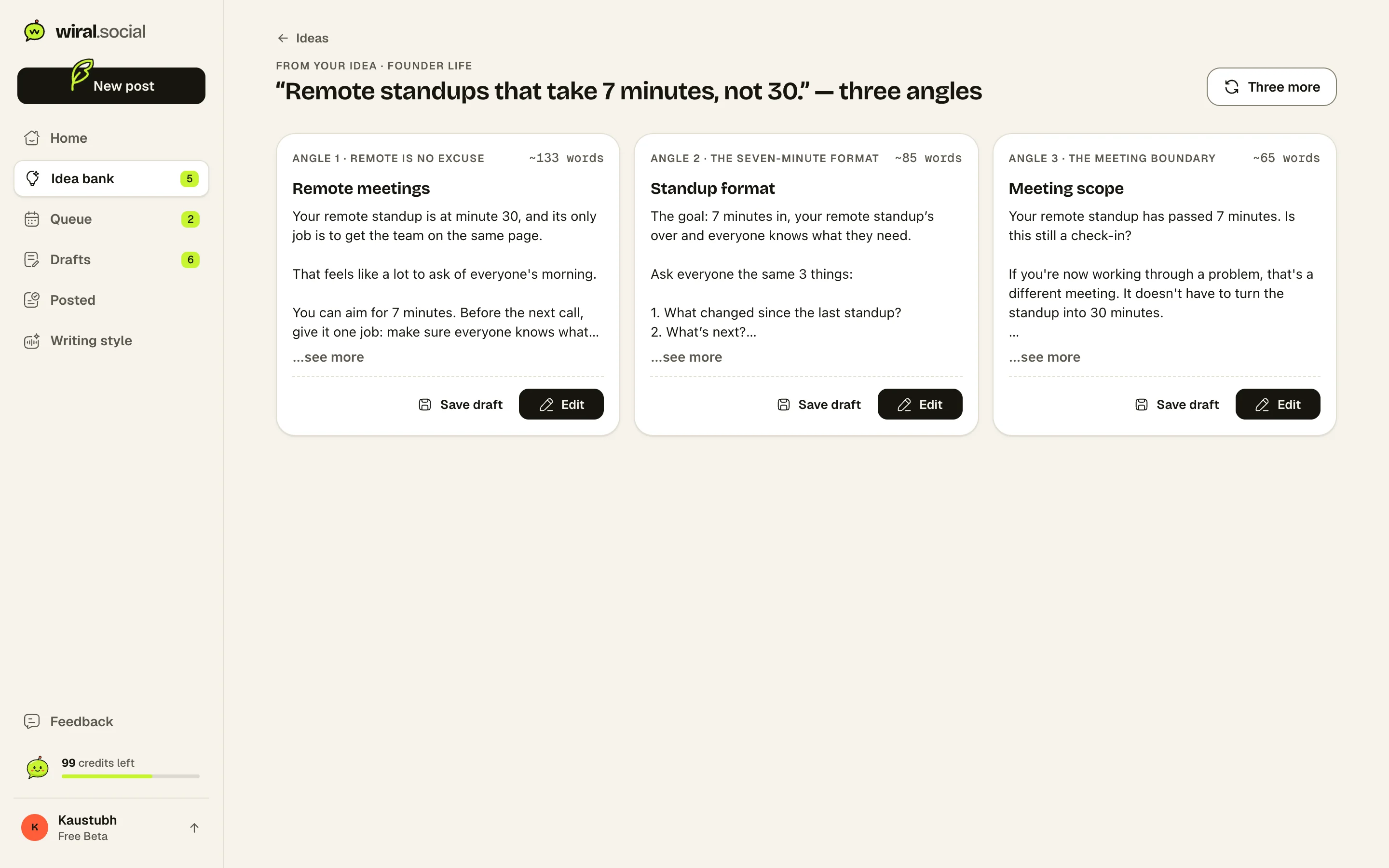
Three posts, from one line.
Every idea comes back as three finished posts in your voice. Keep one, tweak a word, queue it.
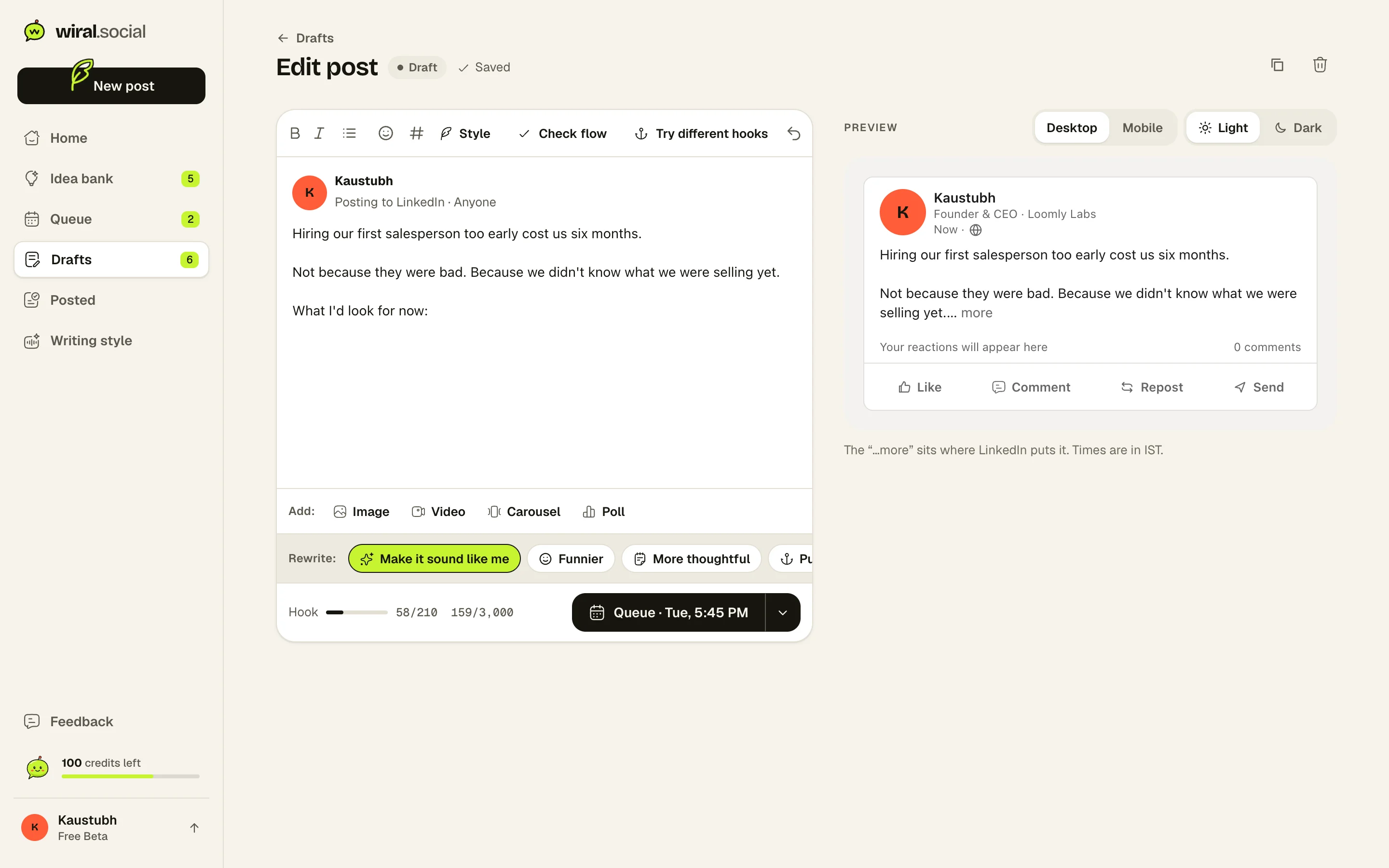
Change it your way, see it as LinkedIn will.
Fix a word yourself, or tell Wiri what to change. The preview shows exactly where LinkedIn cuts the post with “…more”.
Where Wiral.Social is behind: Post stats and an automatic first comment are waiting on LinkedIn’s approval. Personal profiles only, no company pages yet. No team accounts or outreach tools. Ask for what you need
Plans and prices.
As listed on Buffer and AuthoredUp’s own pricing pages, 5 November 2026.
Buffer plans
- FreeFree
Up to 3 channels, 1 user, 10 scheduled posts per channel
- Essentials$6/mo
Per channel. 1 user, unlimited scheduled posts, first comment, full analytics and reports
- Team$12/mo
Per channel. Unlimited users, approval workflows, access levels, branded reports
Trial: 14 days. Refund within 7 days of starting a monthly plan, or within 30 days of starting an annual plan
AuthoredUp plans
- Individual$19.95/mo
1 LinkedIn profile, unlimited company pages, drafts and snippets, editor with preview, hooks and endings, analytics, saved posts, analytics API.
- Business$14.95/mo
Per profile, minimum 3 profiles ($44.85 a month). Adds organisation management, roles, draft collaboration, team analytics and calendar.
- Custom GrowthAsk them
Contact sales; minimum 10 profiles, billed annually, onboarding and invoicing.
Trial: 14 days, no card. Fees are non-refundable; cancelling stops renewal at the end of the paid period. Pro-rated refund only if the service is discontinued.
What reviewers say.
What people say about Buffer
“Buffer remains one of the most accessible social media management tools on the market”
Rated 4 out of 5: one of the easiest social tools to use, priced per channel so small teams pay little, though not the most feature-packed.TechRadar (Rob Clymo)
“Buffer's real standout feature is its value for money.”
Picked as the best app for plain social media scheduling, mainly for value for money; the free plan covers about a week of posts for a small business.Zapier (Andrew Kunesh, Tim Brookes)
- Users praise how easy and intuitive scheduling is; a common wish is for more complete analytics
- Most negative Capterra reviews are about bugs: posts not going out and channels needing to be reconnected
- Teams say shared access makes onboarding and working together easy
- One reviewer reports posts failing to publish every week; another wants an exact per-network preview before posting; another says cost climbs with each added platform
What people say about AuthoredUp
“That's the main problem AuthoredUp solves.”
A long-time user says it solves not knowing how a post will look in the feed before it goes live.Product Hunt (launch comment by Lars Kamp)
- Users say the drafts, preview, hooks, readability counts and post reuse help them write on LinkedIn consistently
- One user likes having publishing and personal-profile analytics in one tool, which most schedulers cannot show
- Customer service and a team that listens to users get praise
- One user said LinkedIn sync broke for weeks: some posts vanished and carousels and polls did not show in the calendar
Is Buffer better than AuthoredUp?
For scheduling across networks, a free plan and no extension, Buffer. For a LinkedIn editor with a feed preview and deep stats on your own posts, AuthoredUp. Neither writes posts from an idea.
Which is cheaper, Buffer or AuthoredUp?
Buffer. It’s free for 3 channels, then $6 a channel a month. AuthoredUp is $19.95 a month for one profile, or $16.63 billed yearly.
Does AuthoredUp need a Chrome extension? Does Buffer?
AuthoredUp does: posting, scheduling and stats run through its extension. Buffer connects through LinkedIn’s official sign-in, and everything worked without its extension.
Do Buffer and AuthoredUp write posts with AI?
Not really. Buffer’s AI reworks text you’ve written, and asked me to share the idea when I asked for a full post. AuthoredUp’s AI, Coauthor, is a closed beta.
Which has better LinkedIn stats, Buffer or AuthoredUp?
AuthoredUp goes deeper on your own posts, once the extension is connected. Buffer showed my last 30 days on the free plan, with no extension.
See if it sounds like you.
Sources: 40 pages. Prices checked on 5 November 2026, features researched on 26 October 2026. Prices are in US dollars, billed monthly unless marked yearly.
- buffer.com/pricing
- buffer.com/about
- buffer.com/
- buffer.com/pricing.md
- support.buffer.com/articles/refund-policy-d1GbglDfJa
- support.buffer.com/articles/using-buffers-ai-assistant-qbBulfw9sn
- buffer.com/ai-assistant
- support.buffer.com/en-us/articles/using-templates-in-buffer-Gbn93vR56i
- buffer.com/linkedin
- support.buffer.com/en-us/articles/scheduling-posts-4Qdld7giAZ
- support.buffer.com/articles/using-linkedin-with-buffer-K7tRkGD3mH
- support.buffer.com/articles/scheduling-posts-4Qdld7giAZ
- buffer.com/extras
- buffer.com/resources/introducing-buffers-ai-assistant/
- g2.com/products/buffer/reviews
- capterra.com/p/143492/Buffer/reviews/
- trustpilot.com/review/buffer.com
- chromewebstore.google.com/detail/buffer/noojglkidnpfjbincgijbaiedldjfbhh
- softwareadvice.com/social-media/buffer-profile/reviews/
- chromewebstore.google.com/detail/buffer/noojglkidnpfjbincgijbaiedldjfbhh/reviews
- platform.authoredup.com/auth/sign-up
- authoredup.com/
- authoredup.com/about-us
- authoredup.com/terms-and-conditions
- authoredup.com/pricing
- help.authoredup.com/articles/how-do-i-cancel-trial
- help.authoredup.com/articles/collect-advanced-post-stats
- help.authoredup.com/articles/linkedin-scheduling-native-how-it-works
- help.authoredup.com/articles/authoredup-mobile-app
- help.authoredup.com/articles/why-no-automation
- help.authoredup.com/articles/individual-business-plan-differences
- chromewebstore.google.com/detail/authoredup/dkkmpkpjimkollpfgbbglcikcmgmdlhn
- help.authoredup.com/articles/language-support
- help.authoredup.com/articles/how-to-connect-and-use-mcp
- help.authoredup.com/articles/do-you-take-my-cookie
- g2.com/products/authoredup/reviews
- capterra.com/search/?query=authoredup
- trustpilot.com/review/authoredup.com
- chromewebstore.google.com/detail/authoredup/dkkmpkpjimkollpfgbbglcikcmgmdlhn/reviews
- producthunt.com/products/authoredup
“I use Wiral to turn my ideas into posts, find ideas when I’m stuck, make carousels and image cards, and keep a steady schedule. Before, I hardly ever posted because it took ages and nobody noticed my posts.”