Buffer vs Wiral.Social A scheduler, or a writer.
Both post to LinkedIn through its official sign-in. Buffer is a scheduler for 12 networks, with good stats and a comments inbox, free for 3 channels and $6 a channel after that. Its AI reworks text you already wrote. Wiral.Social writes the whole post from one line, in your voice, then checks it before you post, from $9 a month with a 14-day trial and no card. I used Buffer on 10 November 2026. I built Wiral, so I’m biased; the facts come with sources.
 By Kaustubh Katdare · Founder, Wiral.SocialPrices checked 10 November 2026 · features researched 26 October 2026Read my full Buffer review
you write your own posts, or write them in ChatGPT or Claude, and want one place to schedule them across LinkedIn, X, Instagram and more, with good stats and a comments inbox. Free for 3 channels.
- Starts at
- Free plan
- Free trial
- 14 days
you want LinkedIn posts written for you from a quick thought, in your voice and checked before they go out, with carousels and a posting queue, from $9 a month and no card to try it.
- Starts at
- From $9 a month
- Free trial
- 14 days, no card
5 differences that matter.
- 1
Who writes the post
BufferYou do. The AI Assistant expands, rephrases, shortens or changes the tone of text you already have. When I asked it to write a full post from the idea in my composer, it asked me to share the idea.
Wiral.SocialWiri does. Give it a line, a link or a voice note and you get three finished posts in your voice, using what Wiri learned about you in a two-minute chat.
- 2
Learning your voice
BufferNo voice setup for posts. Buffer says its AI replies to comments learn your voice. The post assistant gave me general sentences and two hashtags.
Wiral.SocialWiri keeps a plain page of what it knows about you, your stories and your topics, and keeps learning from what you keep and change. You can read and edit every line.
- 3
Before you post
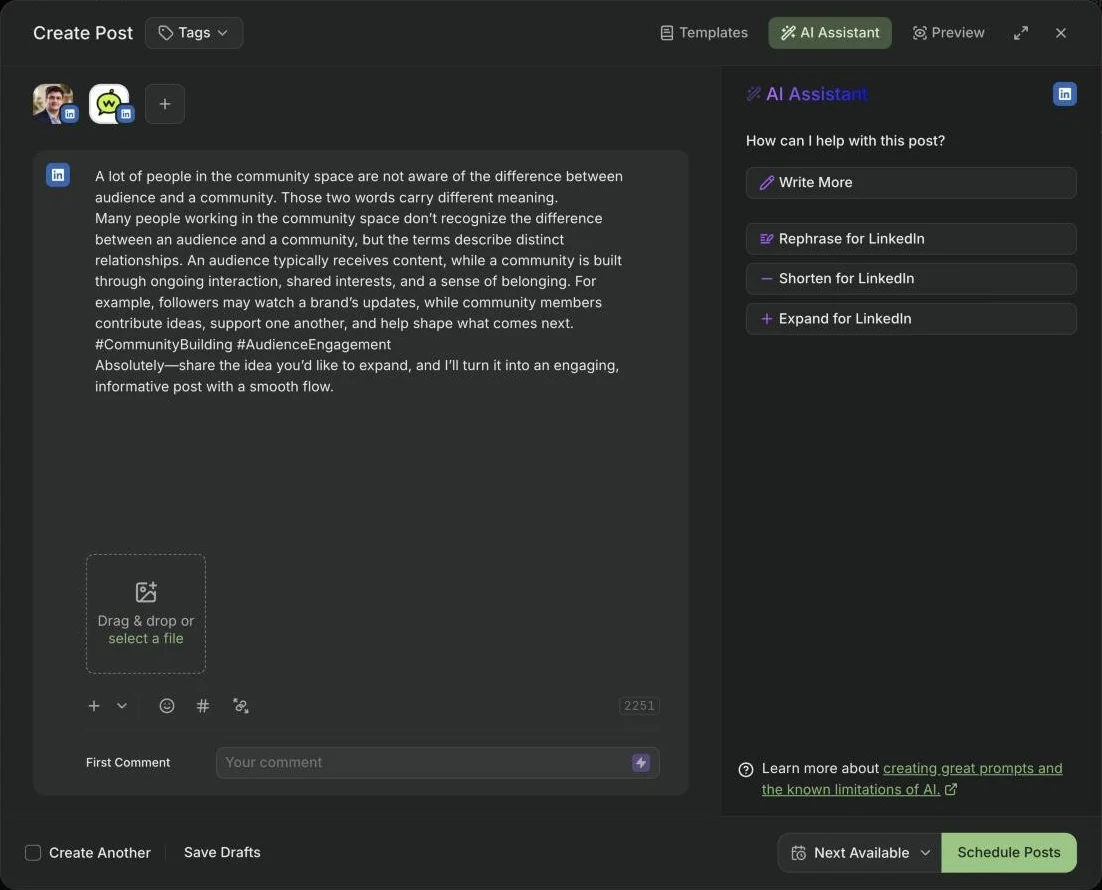
BufferInsert adds the AI’s text under what’s already there, even a question meant for you, and nothing flags it before you schedule.
Wiral.SocialWiri checks every post before it goes out: over LinkedIn’s limit, an opening too long for the “…more” cut, too many hashtags, links that cut reach, and any fact that wasn’t in your idea.
- 4
Price and trial
BufferFree for 3 channels with 10 scheduled posts each. Essentials is $6 a channel a month ($5 billed yearly), and a LinkedIn profile and page count as two channels. Paid plans have a 14-day trial; the free plan asked me for no card.
Wiral.Social$9 to $49 a month across six plans, AI writing on every plan, and posting is unlimited even if you never use the AI. 14-day trial, no card, and a full refund within 14 days of your first payment.
- 5
Where Buffer is ahead
Buffer12 networks, LinkedIn stats from the day you connect, a comments inbox with suggested replies, a first comment on paid plans, company pages and team approvals.
Wiral.SocialWiral is LinkedIn only, with no post stats or automatic first comment yet (both wait on LinkedIn’s approval), no company pages and no team accounts.
The same idea, in Buffer.
Kaustubh KatdareFounder, Wiral.Social
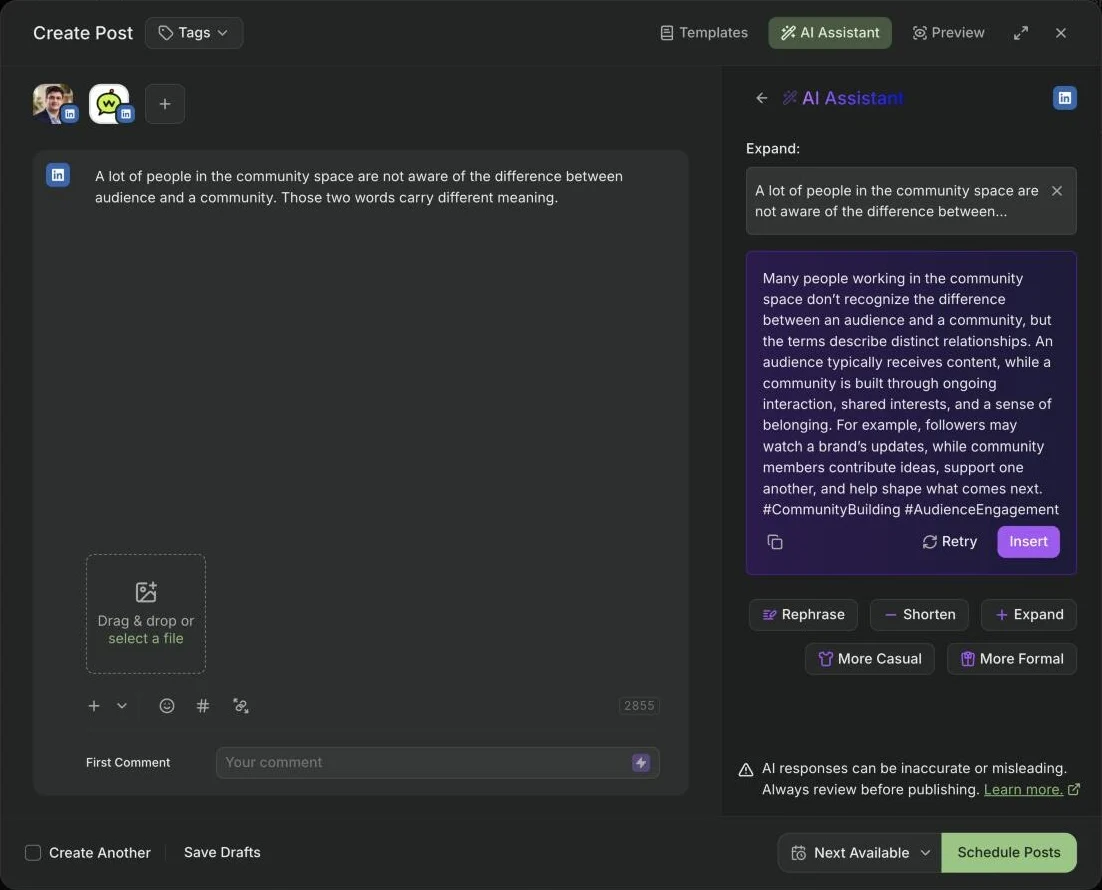
I gave Buffer one idea: a lot of people in the community space don’t know the difference between an audience and a community. Those two words mean different things.
I asked the AI Assistant to expand it. It gave back three sentences that said the same thing in other words. I pressed Insert, expecting it to replace my text. It just added the block under my idea. I found that a bit weird.
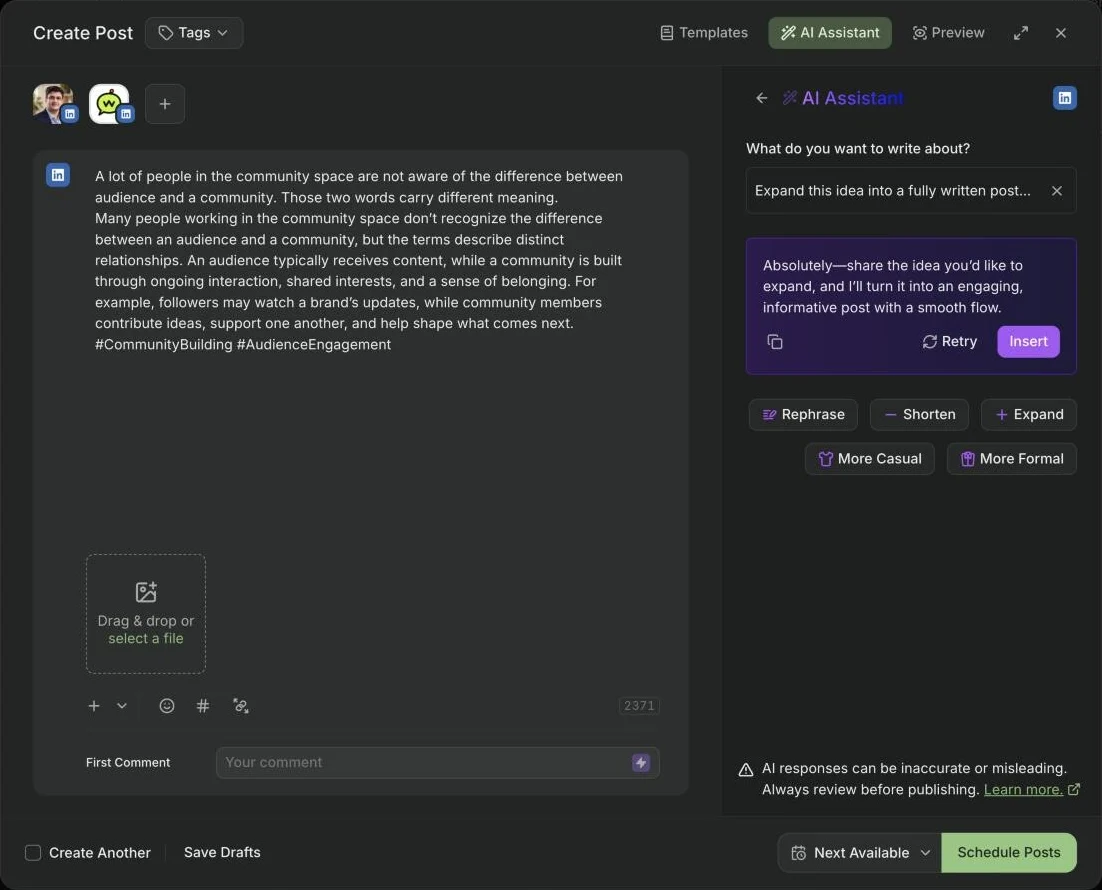
So I opened it as a post and asked the AI to write the whole thing, with a nice flow from start to end. It replied: share the idea you’d like me to expand. The idea was right there in the post. Insert put that question into my post too.
Read end to end, the post wasn’t ready for any network. I wouldn’t post it on my profile. A few minutes in, I still hadn’t published anything. It still wants me to do all the thinking and hard work.
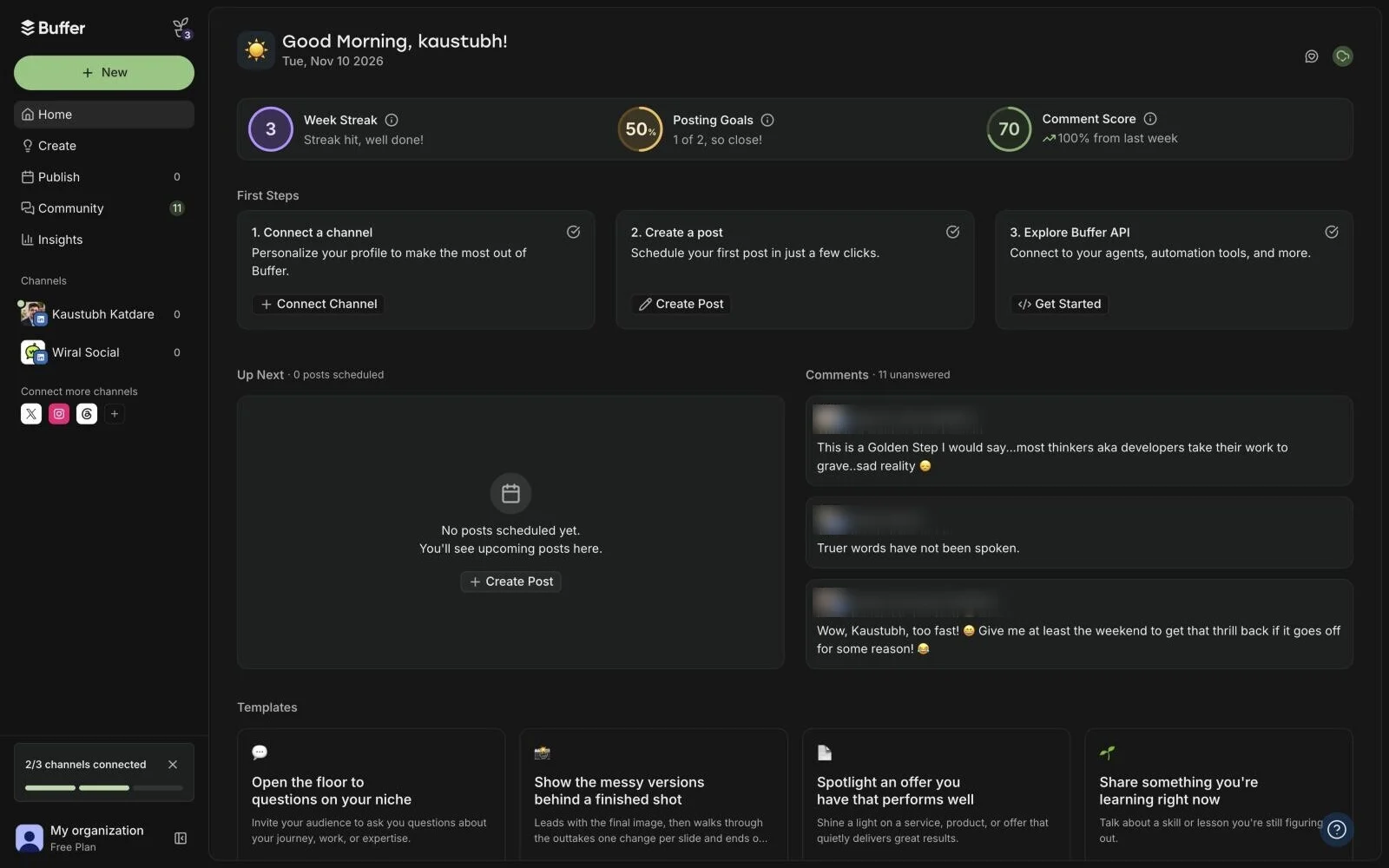
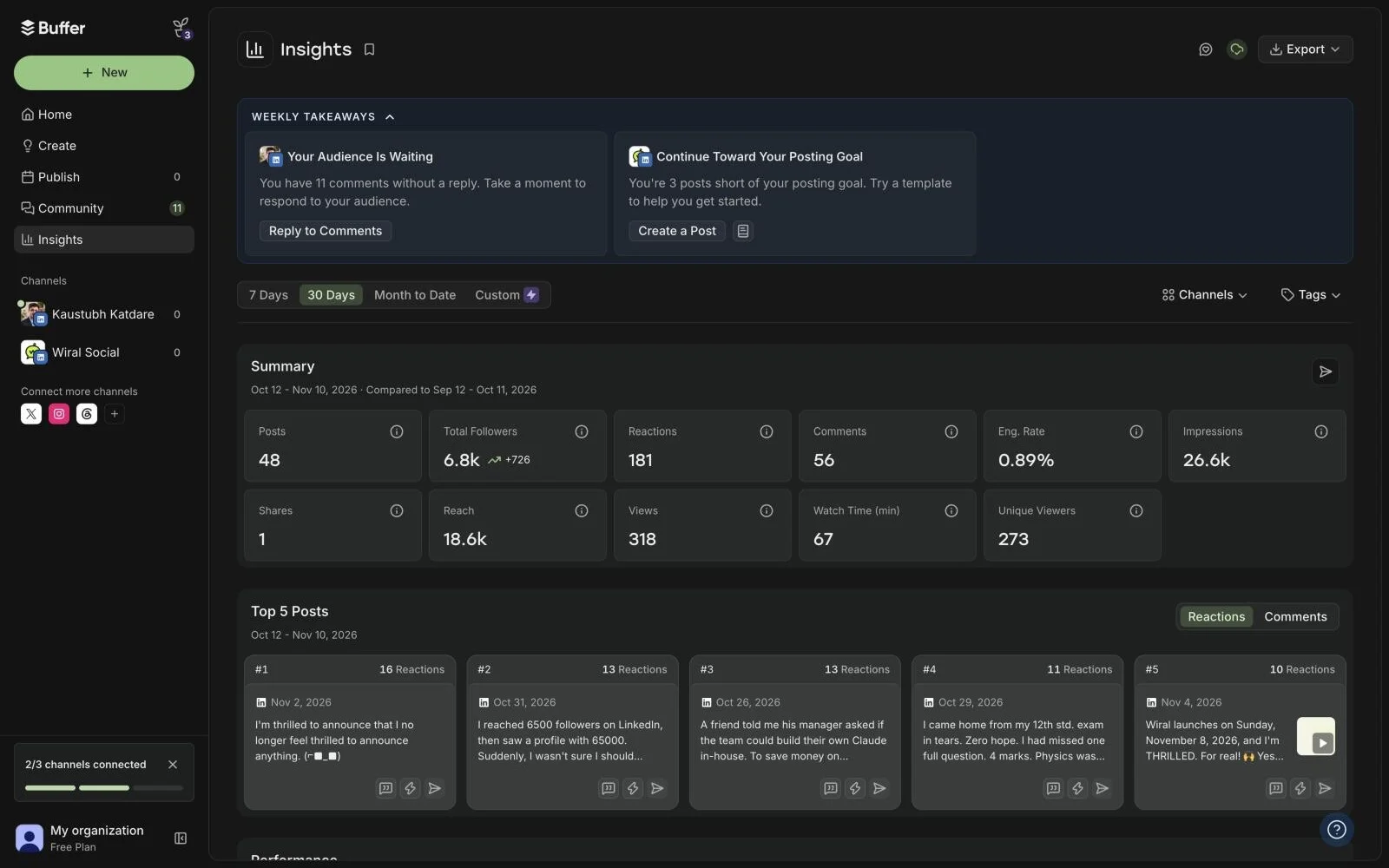
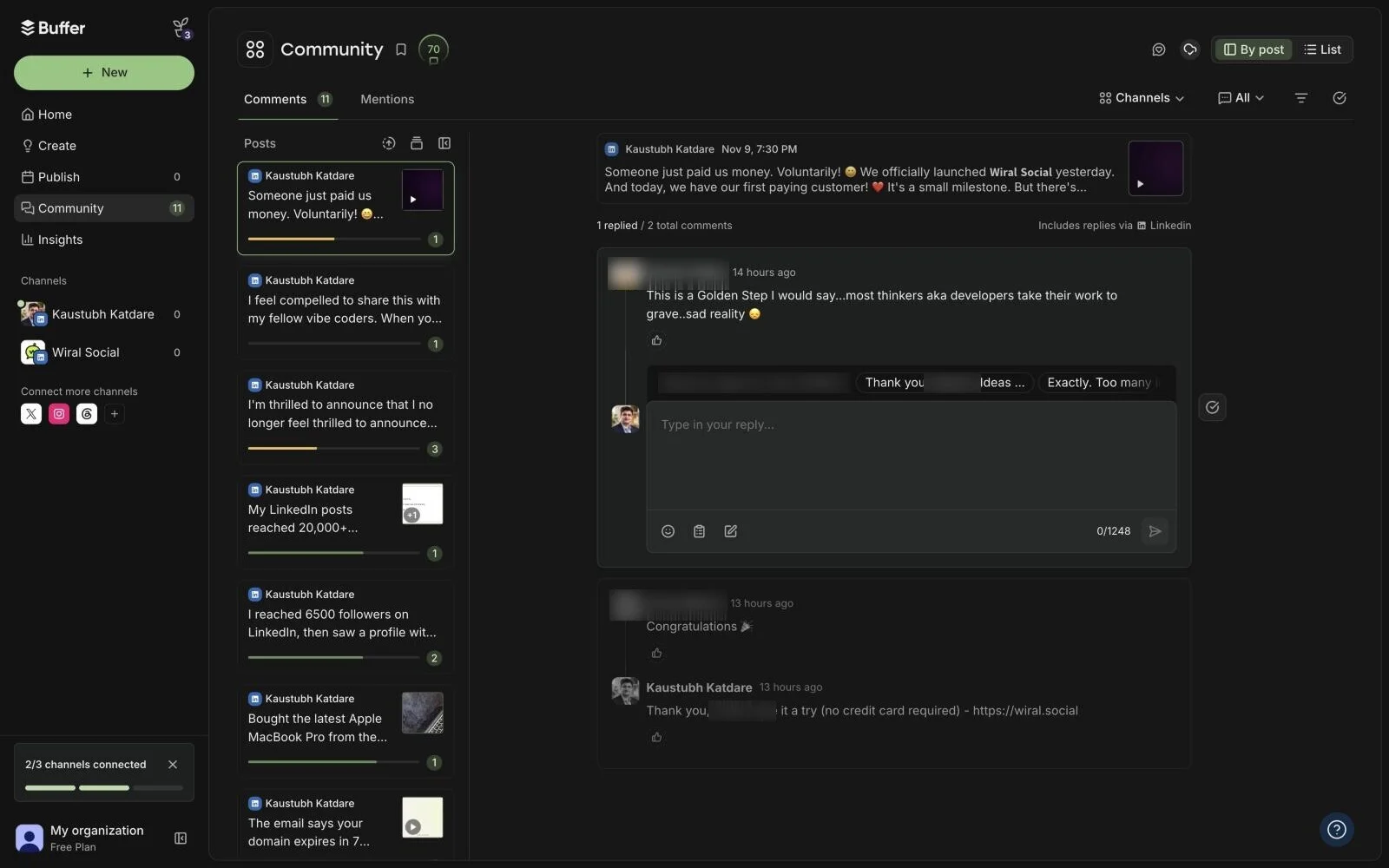
To be fair, the rest is well made. Insights showed my last 30 days the moment I connected, and the comments inbox pulled in 11 replies I owed people. If you’re a natural writer, or you write in ChatGPT or Claude and just want a scheduler, Buffer is the right place. If you want to publish on LinkedIn with minimal effort, that’s why I built Wiral.
Inside Buffer, screen by screen.
Screenshots I took myself. The numbered notes take turns; tap one to see its part.
Write the post? Share the idea.
My idea was already in the post. It asked for it anyway, both times I tried.
Insert, whatever it says.
The AI’s question went straight into my post, under everything else.
Expand, for LinkedIn.
Four correct, general sentences and two hashtags. Nothing in it sounds like me.
A busy home page.
Streaks, goals, scores, first steps, templates and blog posts. The streak said three weeks, and I hadn’t posted through Buffer once.
What it does well.
Insights filled with my last 30 days the moment I connected. This is genuinely useful.
Comments, in one place.
Every unanswered comment on my posts, with suggested replies to start from.
Every feature, side by side.
Wiral.Social is ours, so its column is marked. Where it’s behind, the table says so.
| Side by side | BufferFree plan | Wiral.SocialOurs |
|---|---|---|
| Price and trial | ||
| Starts at | Free plan | From $9 a month |
| Free trial | 14 days | 14 days, no card |
| How it connects to LinkedIn | LinkedIn’s own sign-inYou sign in to LinkedIn and authorise Buffer; the help article refers to LinkedIn's API and its limits (no polls, no Groups, 50 posts per 24 hours). | Official LinkedIn sign-inSigns in with LinkedIn and posts through LinkedIn’s official sharing permission. |
| Writing | ||
| Writes posts with AI | YesAI Assistant in the composer generates, rephrases, shortens and expands posts, switches between more casual and more formal, and adapts to each channel. | YesThree takes on every idea, written by Wiri. |
| Learns your voice | NoNo voice setup for posts. | YesLearns from your posts and a few questions; you can see and remove what it learned. |
| Suggests post ideas | YesAI suggestions for writer's block, plus an Ideas board (100 ideas on Free, unlimited on paid). | YesDaily picks from your topics. |
| Ideas from viral posts | Not statedNot stated on the site. | YesA Viral tab of ideas drawn from posts that did well. |
| Posting | ||
| Schedules posts | Yes | YesIts own scheduler, posting through LinkedIn’s official sharing. |
| Posting queue or calendar | Yes | YesWeekly posting slots, any time zone. |
| Adds a first comment | YesPaid plans only. | NoWaiting on LinkedIn’s approval. |
| Posts to company pages | YesCompany and Showcase Pages; you must be a Super Admin of the Page to connect it. | NoPersonal profiles only. |
| Visuals | ||
| Makes carousels | YesUploads one LinkedIn PDF document (carousel) per post, up to 100MB and 300 pages, on web; a document title is required. | YesCarousel maker with templates. |
| Images and video | YesAttach up to 20 images, or one video (up to 30 minutes, 1GB), or one GIF per LinkedIn post. | YesImage cards and template videos. |
| Feed preview | YesThe composer shows a per-channel preview of how the post will look. | YesFeed preview with the “…more” cut. |
| Growth | ||
| Post stats | YesBasic analytics (post stats, Insights, follower growth) for both LinkedIn profiles and Pages. | NoPost stats are waiting on LinkedIn’s approval. |
| Help with comments | YesCommunity inbox to reply to comments, with AI reply suggestions (5 a week on Free, unlimited on paid), saved replies and comment insights. | No |
| Leads and outreach | NoNone of the 24 listed integrations is a CRM, and Buffer's own Buffer vs Agorapulse article names HubSpot and Salesforce syncing as an Agorapulse feature. | No |
| Team and client accounts | YesTeam plan: unlimited users, approval workflows, custom access and branded reports. | No |
| Getting set up | ||
| Needs a Chrome extension | NoOptional. | NoWorks in any browser, no extension. |
| Native mobile app | YesiOS and Android. | NoWorks in your phone’s browser. |
How it works, screen by screen.
Real screens from the app. The numbered notes take turns; tap one to see its part.
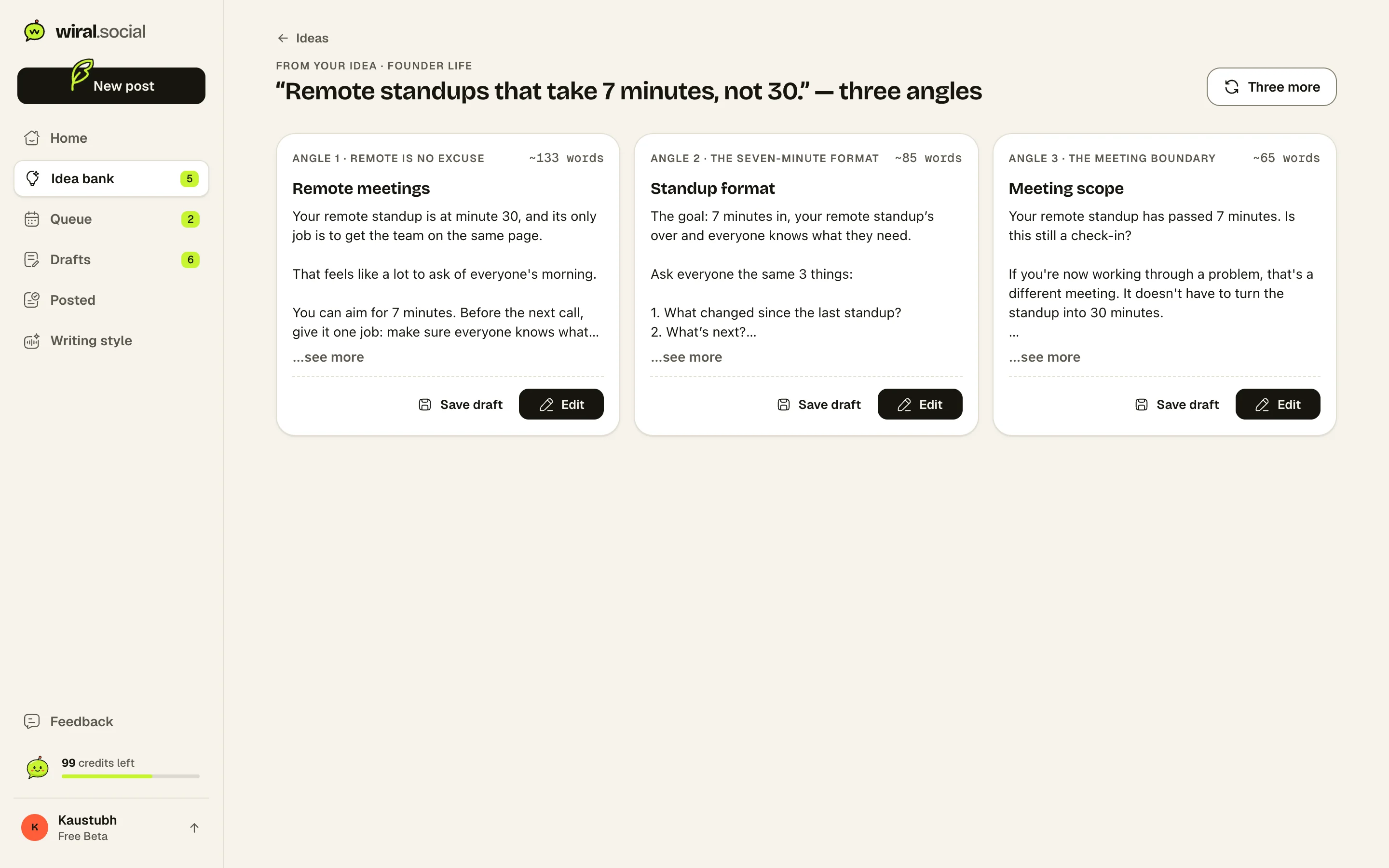
One thought in, three posts out.
Type what’s on your mind, paste a link or record a voice note. Wiri writes three different angles, in your voice, and you keep the one that sounds like you.
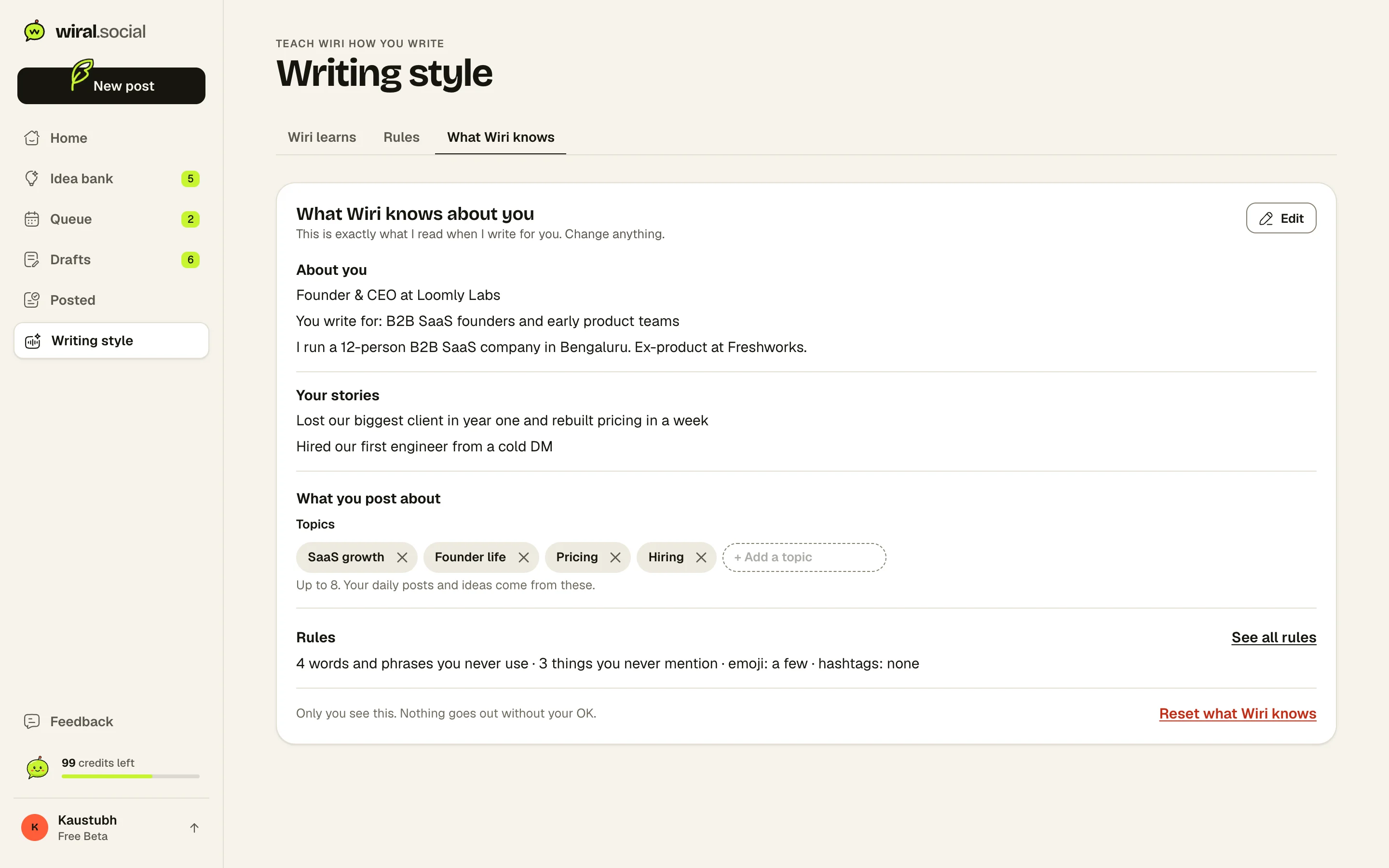
It knows what you sound like.
A two-minute chat or a few old posts, and Wiri keeps a plain page of what it knows about you. You can read every line, change it or delete it.
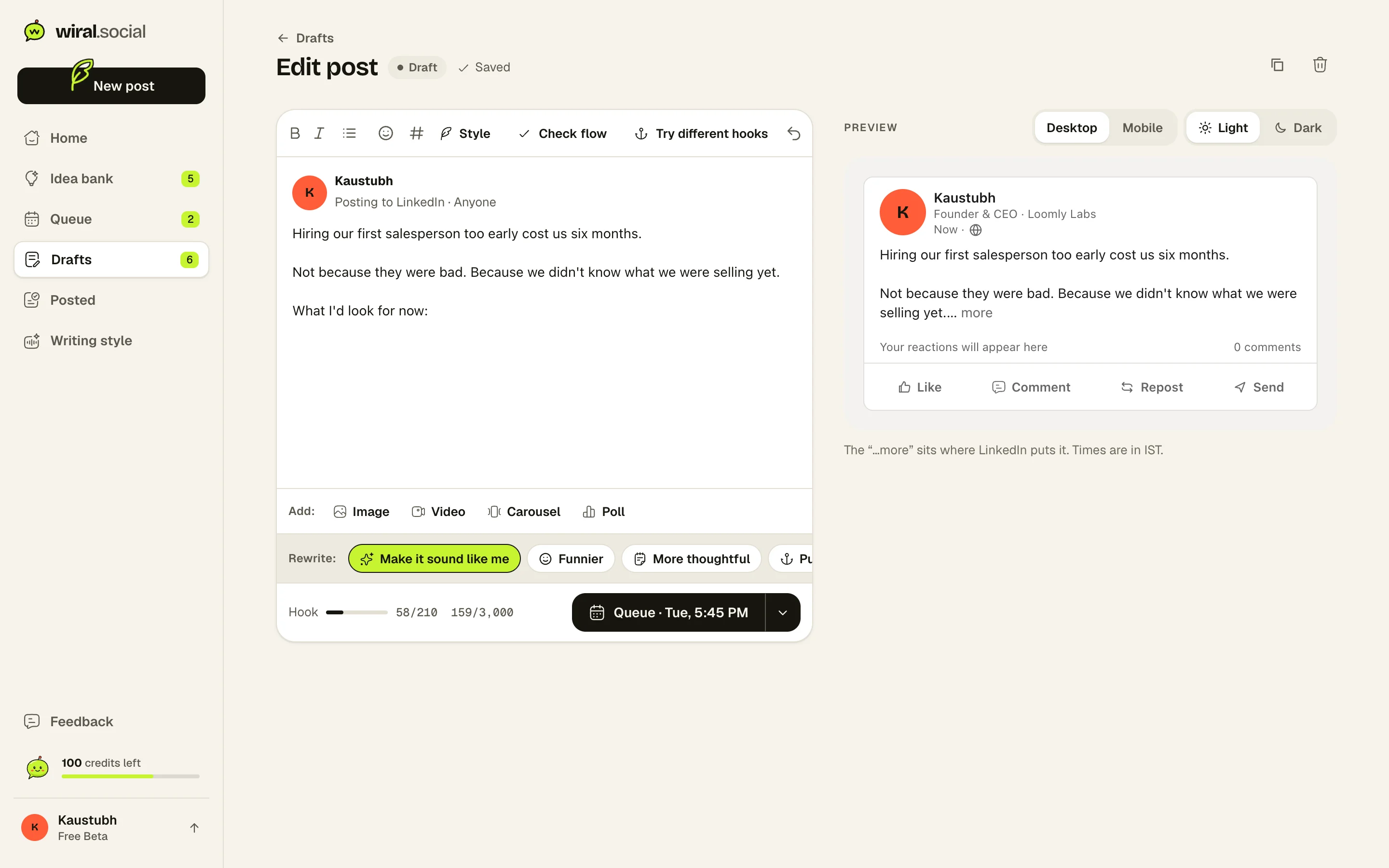
Change it your way, see it as LinkedIn will.
Fix a word yourself, or tell Wiri what to change in your own words. The preview shows exactly where LinkedIn cuts the post with “…more”.
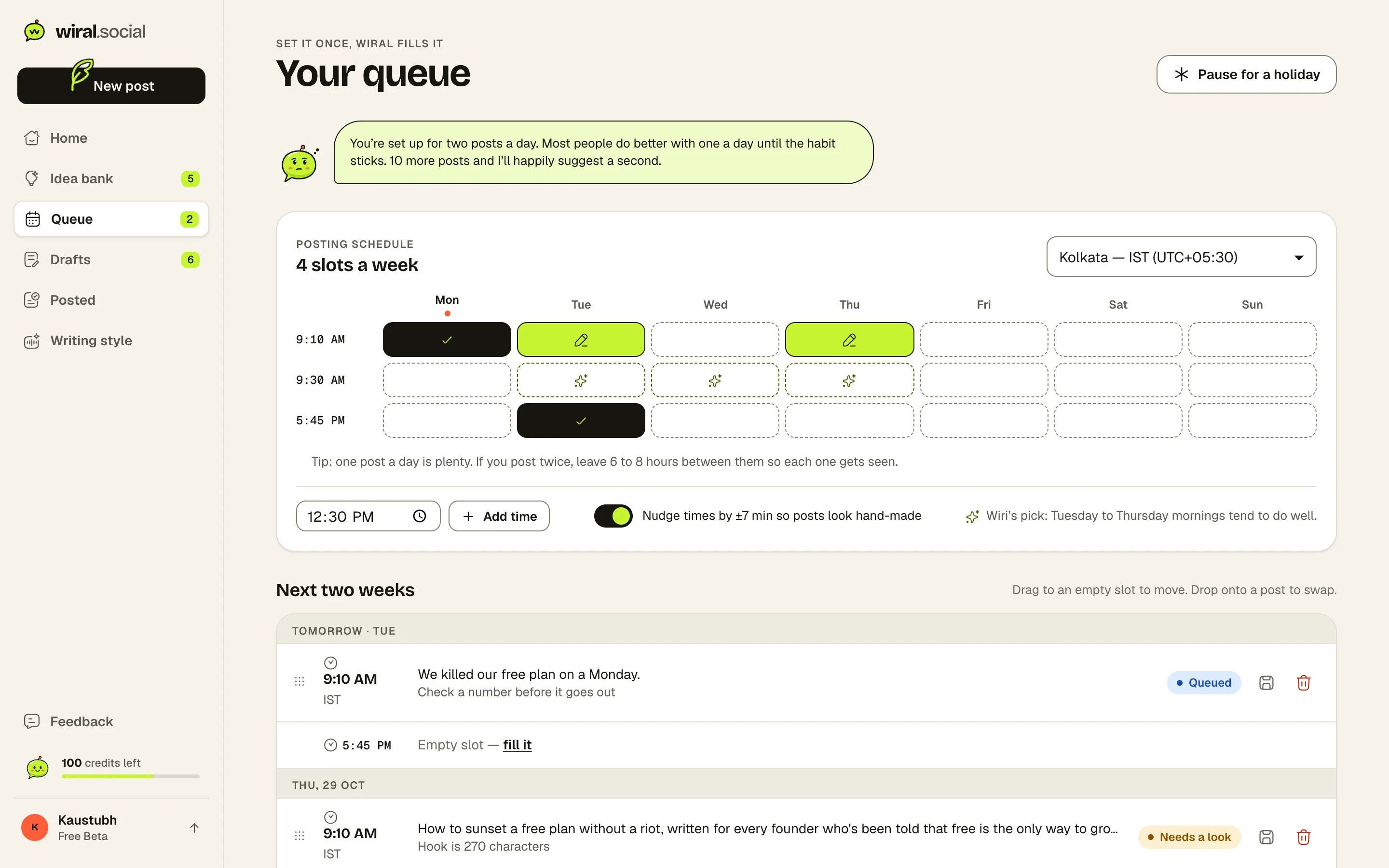
A queue that fills itself.
Set your weekly slots once. Every post you queue goes out at its time, through LinkedIn’s official sharing.
Where Wiral.Social is behind: Post stats and an automatic first comment are waiting on LinkedIn’s approval. Personal profiles only, no company pages yet. No team accounts or outreach tools. Ask for what you need
Plans and prices.
As listed on Buffer and Wiral.Social’s own pricing pages, 10 November 2026.
Buffer plans
- FreeFree
Up to 3 channels, 1 user, 10 scheduled posts per channel
- Essentials$6/mo
Per channel. 1 user, unlimited scheduled posts, first comment, full analytics and reports
- Team$12/mo
Per channel. Unlimited users, approval workflows, access levels, branded reports
Trial: 14 days. Refund within 7 days of starting a monthly plan, or within 30 days of starting an annual plan
Wiral.Social plans
- Starter$9/mo
60 AI credits a month. Text posts, polls and your own images, 500 MB storage.
- Starter+$12/mo
85 AI credits a month. A taste of the Green zone: 3 premium carousel templates and 5 AI image cards a month, videos up to 1 minute.
- Growth$19/mo
135 AI credits a month. Every carousel template, colours and fonts, AI image cards, videos up to 3 minutes.
- Growth+$25/mo
180 AI credits a month. Growth, plus 10 advanced image styles a month, 1 saved brand template, videos up to 5 minutes.
- Pro$39/mo
280 AI credits a month. Advanced image styles, saved brand templates, videos up to 10 minutes, priority email support.
- Pro+$49/mo
355 AI credits a month. Everything in Pro, videos up to 15 minutes, 50 GB storage.
Trial: 14 days, no card. Full refund within 14 days of your first payment, no questions needed. Cancel any time.
What reviewers say.
What people say about Buffer
“Buffer remains one of the most accessible social media management tools on the market”
Rated 4 out of 5: one of the easiest social tools to use, priced per channel so small teams pay little, though not the most feature-packed.TechRadar (Rob Clymo)
“Buffer's real standout feature is its value for money.”
Picked as the best app for plain social media scheduling, mainly for value for money; the free plan covers about a week of posts for a small business.Zapier (Andrew Kunesh, Tim Brookes)
- Users praise how easy and intuitive scheduling is; a common wish is for more complete analytics
- Most negative Capterra reviews are about bugs: posts not going out and channels needing to be reconnected
- Teams say shared access makes onboarding and working together easy
- One reviewer reports posts failing to publish every week; another wants an exact per-network preview before posting; another says cost climbs with each added platform
Is Wiral.Social a good Buffer alternative?
For writing LinkedIn posts, yes. Wiri writes the whole post from one line, in your voice, and checks it before you post, from $9 a month with no card to try it. If you post to many networks, or need stats, a comments inbox, company pages or team approvals today, Buffer has them and Wiral doesn’t.
Can Buffer’s AI write a full LinkedIn post?
Not from an idea, in my test. It expands, rephrases and shortens text you already wrote. When I asked it to write a full post from the two lines in my composer, it asked me to share the idea, on both tries.
Is Buffer free for LinkedIn?
Yes, for up to 3 channels, with 10 scheduled posts per channel at a time and 30 days of stats. Signing up asked me for no card. A LinkedIn profile and a LinkedIn page count as two channels.
Which is cheaper, Buffer or Wiral.Social?
For scheduling alone, Buffer. It’s free for 3 channels, then $6 a channel a month ($5 billed yearly). Wiral.Social starts at $9 a month and writes the posts too.
Does Wiral.Social show LinkedIn stats like Buffer?
Not yet. Post stats need LinkedIn’s approval, which Wiral is waiting on. Buffer showed my last 30 days of LinkedIn stats on the free plan the moment I connected.
What does Buffer ask for when you connect LinkedIn?
LinkedIn listed 14 permissions, including your post stats, profile analytics, your connections’ data for mentions, and posting, editing and deleting for you. You can remove it later in LinkedIn’s settings.
Are these screenshots real?
Yes. I signed up for Buffer’s free plan on 10 November 2026 and connected my LinkedIn profile and the Wiral Social page. Commenters’ names are blurred.
See if it sounds like you.
Sources: 20 pages. Prices checked on 10 November 2026, features researched on 26 October 2026. Prices are in US dollars, billed monthly unless marked yearly.
- buffer.com/pricing
- buffer.com/about
- buffer.com/
- buffer.com/pricing.md
- support.buffer.com/articles/refund-policy-d1GbglDfJa
- support.buffer.com/articles/using-buffers-ai-assistant-qbBulfw9sn
- buffer.com/ai-assistant
- support.buffer.com/en-us/articles/using-templates-in-buffer-Gbn93vR56i
- buffer.com/linkedin
- support.buffer.com/en-us/articles/scheduling-posts-4Qdld7giAZ
- support.buffer.com/articles/using-linkedin-with-buffer-K7tRkGD3mH
- support.buffer.com/articles/scheduling-posts-4Qdld7giAZ
- buffer.com/extras
- buffer.com/resources/introducing-buffers-ai-assistant/
- g2.com/products/buffer/reviews
- capterra.com/p/143492/Buffer/reviews/
- trustpilot.com/review/buffer.com
- chromewebstore.google.com/detail/buffer/noojglkidnpfjbincgijbaiedldjfbhh
- softwareadvice.com/social-media/buffer-profile/reviews/
- chromewebstore.google.com/detail/buffer/noojglkidnpfjbincgijbaiedldjfbhh/reviews
“I’d tell a friend Wiral makes LinkedIn easier to keep up with: I can write from my stories when I have time, then generate and schedule posts in one place. I can’t do without it now, and engagement’s gone 10x.”