Buffer vs Supergrow A free scheduler, or posts from an AI interview.
Both connect to LinkedIn through its official sign-in, and neither wrote a post from my one-line idea. Buffer is a scheduler for 12 networks, free for 3 channels, with good stats and a comments inbox. Supergrow is LinkedIn only and writes from an AI interview called PostCast, with a first comment, a Kanban board and team approvals, at $39 a month with a 7-day trial that asks for a card. I tried Supergrow on 7 November and Buffer on 10 November 2026.
 By Kaustubh Katdare · Founder, Wiral.SocialPrices checked 7 November 2026 · features researched 26 October 2026Read my full Buffer review
you write your own posts and want cheap scheduling across LinkedIn and other networks, with good stats and a comments inbox. Free for 3 channels, no card.
- Starts at
- Free plan
- Free trial
- 14 days
you’d rather talk than type, will sit through an AI interview, and want a first comment, a Kanban board and team approvals in one $39 plan.
- Starts at
- From $39 a month
- Free trial
- 7 days, card needed
5 differences that matter.
- 1
Where the post comes from
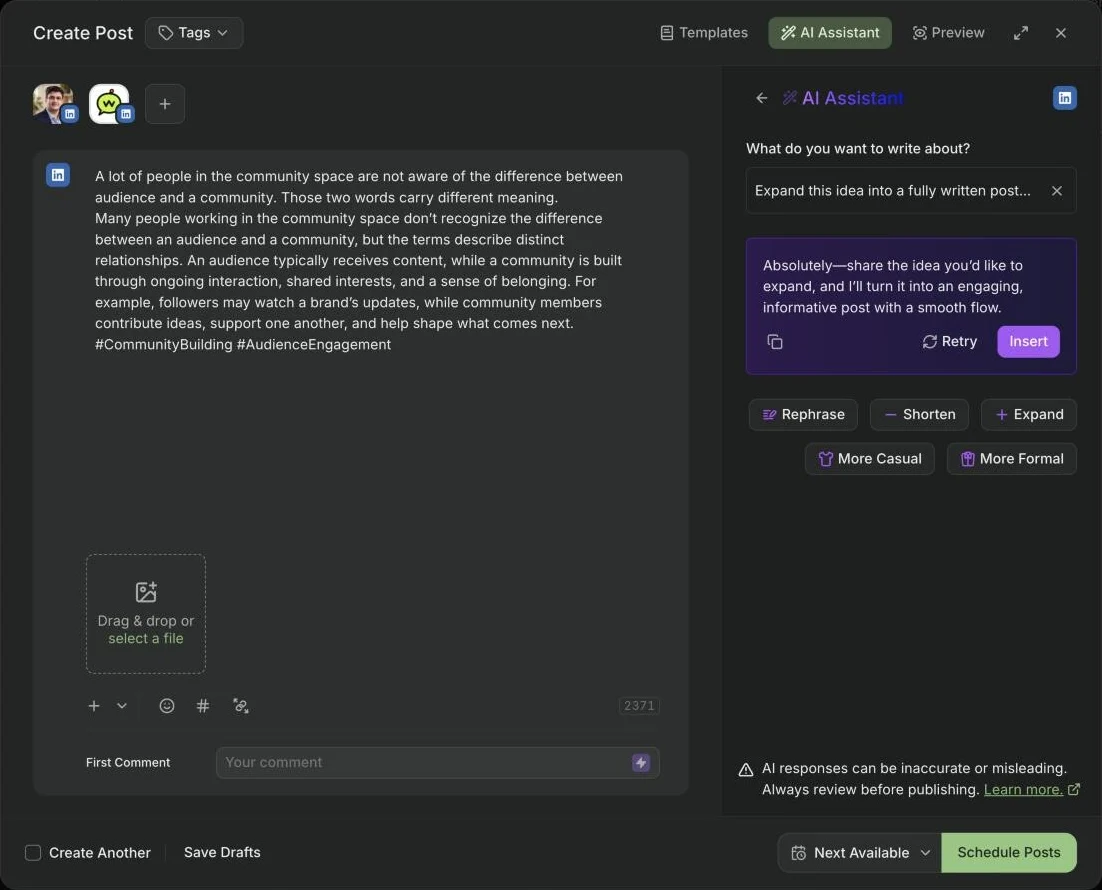
BufferFrom you. The AI Assistant expands, rephrases and shortens your text. Asked for a full post from my idea, it asked me to share the idea.
SupergrowMostly from PostCast, an AI interview on one topic (10 to 15 minutes on its site, 30 in the app), plus repurposing from videos, articles and PDFs. My one-line idea got “Failed to rewrite”.
- 2
Price and trial
BufferFree for 3 channels. Essentials is $6 a channel a month ($5 yearly), and a profile and page count as two. The free plan asked me for no card.
Supergrow$39 a month for one LinkedIn account ($31 yearly), $199 for Teams of 5. The 7-day trial asks for a card during sign-up. Refunds only for billing errors.
- 3
Planning your posts
BufferAn Ideas board, a queue and a calendar, with recommended times from a weekly posting goal.
SupergrowA Kanban board from draft to published, a calendar, and a Viral Posts search for ideas.
- 4
Stats and comments
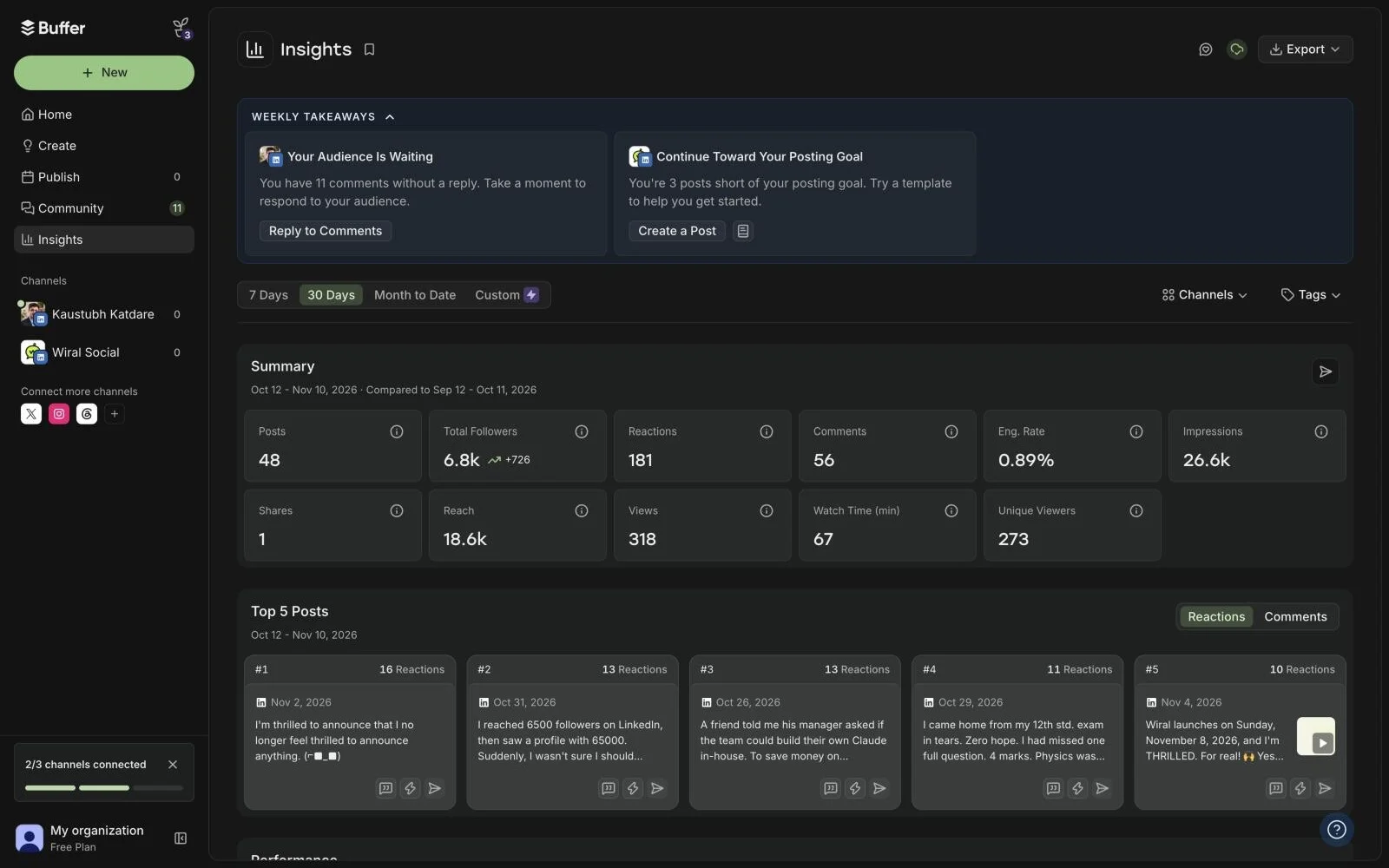
BufferLinkedIn stats from the day you connect, even on Free, and an inbox of unanswered comments with suggested replies.
SupergrowProfile and post stats with a weekly report, and Engage for comments.
- 5
Networks and teams
Buffer12 networks. The Team plan adds unlimited users and approvals, priced per channel.
SupergrowLinkedIn only. Teams adds approvals, an organisation dashboard and per-member voice profiles, for 5 accounts.
Same idea, no post from either.
Kaustubh KatdareFounder, Wiral.Social
Supergrow asked for my card before I could write a word. Then my one-line idea got “Failed to rewrite”, and its posts came from a 30-minute AI interview instead. They were inspired by what I said, but partly made up. I cancelled the same day.
Buffer asked for no card. But when I asked its AI to write a full post from my idea, it asked me to share the idea, which was already in the post. It still wants me to do all the thinking and hard work.
Both do some things well. Supergrow’s Kanban board and Viral Posts are genuinely good. Buffer’s Insights showed my last 30 days the moment I connected, and its comments inbox is very useful.
So pick by what you need. Free scheduling and good stats: Buffer. Interviews, a first comment and team approvals: Supergrow. Posts in your own voice from a single line is why I built Wiral.
Inside Buffer, screen by screen.
Screenshots I took myself. The numbered notes take turns; tap one to see its part.
Buffer’s AI: share the idea.
My idea was already in the post. Supergrow asked me to select some text instead.
Buffer’s stats, on the free plan.
My last 30 days, the moment I connected. Very well made.
Every feature, side by side.
| Side by side | BufferFree plan | SupergrowFrom $39 a month |
|---|---|---|
| Price and trial | ||
| Starts at | Free plan | From $39 a month |
| Free trial | 14 days | 7 days, card needed |
| How it connects to LinkedIn | LinkedIn’s own sign-inYou sign in to LinkedIn and authorise Buffer; the help article refers to LinkedIn's API and its limits (no polls, no Groups, 50 posts per 24 hours). | LinkedIn’s own sign-inEach person connects with LinkedIn OAuth from Workspace Settings; site says it is a LinkedIn Verified Partner and needs no browser extension to post or engage. |
| Writing | ||
| Writes posts with AI | YesAI Assistant in the composer generates, rephrases, shortens and expands posts, switches between more casual and more formal, and adapts to each channel. | YesPost generator, Postcast AI interviewer (3-5 drafts from a 10-15 minute talk, per the site; in the app on 7 Nov 2026 the interviewer opened with "about 30 minutes" and a 30:00 clock), repurposing from YouTube, articles and PDFs. |
| Learns your voice | NoNo voice setup for posts. | YesContent DNA learns from existing LinkedIn posts and writing. |
| Suggests post ideas | YesAI suggestions for writer's block, plus an Ideas board (100 ideas on Free, unlimited on paid). | YesIdea generator by topic; weekly suggested articles with a Hot Take Score. |
| Ideas from viral posts | Not statedNot stated on the site. | Not statedNot listed on the pricing or feature pages, and the old /swipe-files page now redirects to the home page. |
| Posting | ||
| Schedules posts | Yes | Yes |
| Posting queue or calendar | Yes | YesWeek, month and list calendar, recurring queue slots, Kanban pipeline. |
| Adds a first comment | YesPaid plans only. | Yes |
| Posts to company pages | YesCompany and Showcase Pages; you must be a Super Admin of the Page to connect it. | YesConnected through a profile that is a page admin. |
| Visuals | ||
| Makes carousels | YesUploads one LinkedIn PDF document (carousel) per post, up to 100MB and 300 pages, on web; a document title is required. | YesTemplates, text to carousel, brand kit, publishes directly without a PDF export. |
| Images and video | YesAttach up to 20 images, or one video (up to 30 minutes, 1GB), or one GIF per LinkedIn post. | YesCreative Studio for images, infographics and carousels; upload images and video. |
| Feed preview | YesThe composer shows a per-channel preview of how the post will look. | YesTerms list preview as part of publishing. |
| Growth | ||
| Post stats | YesBasic analytics (post stats, Insights, follower growth) for both LinkedIn profiles and Pages. | YesPer-post impressions, likes, comments, reshares, engagement rate; follower growth and profile views; weekly AI report; company page analytics; team analytics on Teams. |
| Help with comments | YesCommunity inbox to reply to comments, with AI reply suggestions (5 a week on Free, unlimited on paid), saved replies and comment insights. | YesEngage lists and Focus Mode feed with AI comment drafts; every action is manual, no auto-engage. |
| Leads and outreach | NoNone of the 24 listed integrations is a CRM, and Buffer's own Buffer vs Agorapulse article names HubSpot and Salesforce syncing as an Agorapulse feature. | NoNo lead database or CRM on the pricing page; Engage lists are for engagement only. |
| Team and client accounts | YesTeam plan: unlimited users, approval workflows, custom access and branded reports. | YesTeams plan: 5 accounts, approvals, organisation dashboard. |
| Getting set up | ||
| Needs a Chrome extension | NoOptional. | NoThe old Supergrow listing now resolves to an empty, untitled Chrome Web Store page (no longer available). |
| Native mobile app | YesiOS and Android. | YesVoice Notes page says "Web app, iOS, and Android, all in sync" for recording. |
Where Wiral.Social fits.
If you want posts from a quick thought, without an interview or rewriting everything yourself, Wiral.Social is the third option. Type one line and Wiri writes three takes in your voice, checks the post before it goes out, and posts at your times. It connects with LinkedIn’s official sign-in, starts at $9 a month, and the 14-day trial needs no card.
- Starts at
- From $9 a month
- Free trial
- 14 days, no card
Three posts, no interview.
Every idea comes back as three finished posts in your voice. Keep one, tweak a word, queue it.
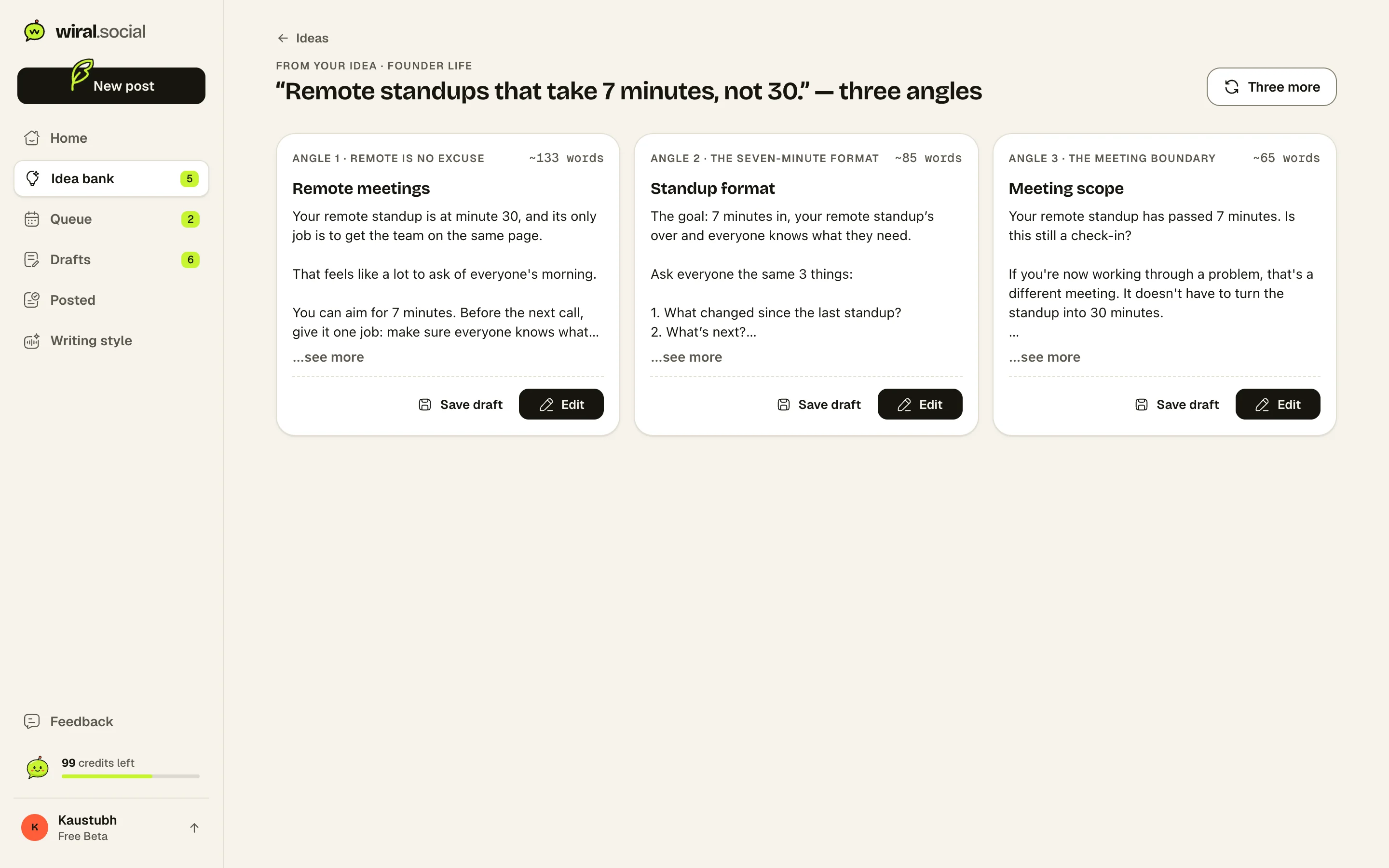
Real details, in your voice.
Wiri writes from a page of what it knows about you. You can read every line, change it or delete it.
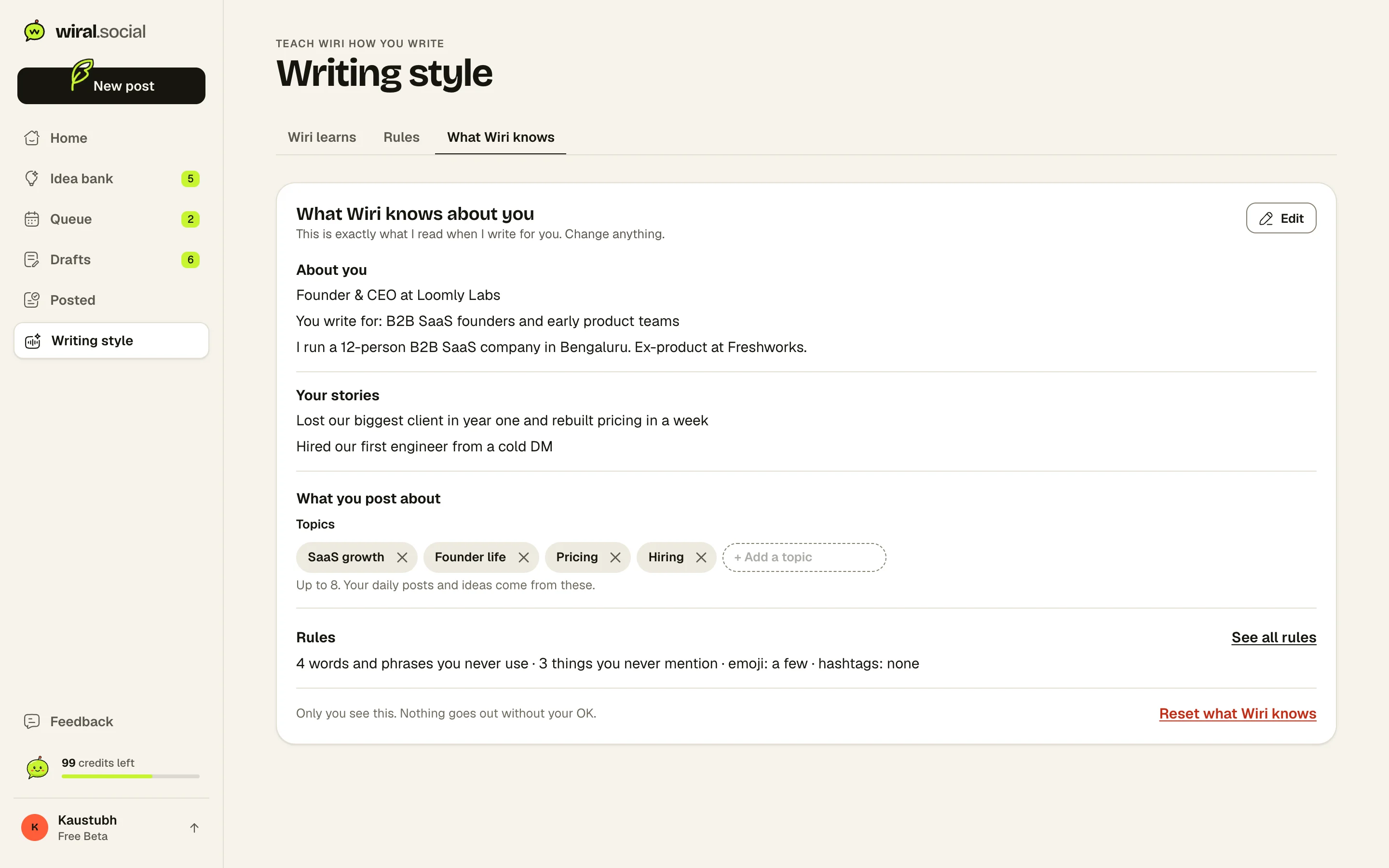
Where Wiral.Social is behind: Post stats and an automatic first comment are waiting on LinkedIn’s approval. Personal profiles only, no company pages yet. No team accounts or outreach tools. Ask for what you need
Plans and prices.
As listed on Buffer and Supergrow’s own pricing pages, 7 November 2026.
Buffer plans
- FreeFree
Up to 3 channels, 1 user, 10 scheduled posts per channel
- Essentials$6/mo
Per channel. 1 user, unlimited scheduled posts, first comment, full analytics and reports
- Team$12/mo
Per channel. Unlimited users, approval workflows, access levels, branded reports
Trial: 14 days. Refund within 7 days of starting a monthly plan, or within 30 days of starting an annual plan
Supergrow plans
- Pro$39/mo
1 LinkedIn account, Content DNA, unlimited Postcast AI interviews, repurposing, scheduling, Kanban, auto first comment, carousel maker, Engage, MCP, profile analytics, weekly report.
- Teams$199/mo
5 accounts, Content DNA per member, approval workflows, organisation dashboard, publish on behalf of members, team analytics, leaderboard, Slack notifications.
- EnterpriseAsk them
Custom pricing for more than 5 accounts, API, SLA, invoice billing, volume pricing.
Trial: 7 days, card needed. No refunds; billing errors reviewed case by case.
What reviewers say.
What people say about Buffer
“Buffer remains one of the most accessible social media management tools on the market”
Rated 4 out of 5: one of the easiest social tools to use, priced per channel so small teams pay little, though not the most feature-packed.TechRadar (Rob Clymo)
“Buffer's real standout feature is its value for money.”
Picked as the best app for plain social media scheduling, mainly for value for money; the free plan covers about a week of posts for a small business.Zapier (Andrew Kunesh, Tim Brookes)
- Users praise how easy and intuitive scheduling is; a common wish is for more complete analytics
- Most negative Capterra reviews are about bugs: posts not going out and channels needing to be reconnected
- Teams say shared access makes onboarding and working together easy
- One reviewer reports posts failing to publish every week; another wants an exact per-network preview before posting; another says cost climbs with each added platform
What people say about Supergrow
- A G2 reviewer (4/5, Mar 2026) likes scheduling with the calendar view, the simple setup and responsive support
- The same G2 reviewer says analytics have not worked well and wants better views of performance over time and top posts
- Earlier G2 reviewers (5/5, Nov 2023) call it a simple, powerful tool for growing a personal brand on LinkedIn
- The only Product Hunt review, from a SaaS founder, says it made creating and scheduling LinkedIn posts much faster
Is Buffer better than Supergrow?
For scheduling across networks, stats and a free plan, Buffer. For posts from an AI interview, a first comment and team approvals on LinkedIn, Supergrow.
Which is cheaper, Buffer or Supergrow?
Buffer. It’s free for 3 channels, then $6 a channel a month. Supergrow Pro is $39 a month, or $31 billed yearly, for one LinkedIn account.
Do Buffer and Supergrow need a card to try?
Buffer’s free plan asked me for no card. Supergrow’s 7-day trial asked for card details during sign-up, before I could create anything.
Can Buffer or Supergrow write a post from one idea?
Not in my tests. Buffer’s AI asked me to share the idea that was already in the post. Supergrow said “Failed to rewrite” and asked me to select some text.
Do Buffer and Supergrow need a Chrome extension?
No. Both connect through LinkedIn’s official sign-in.
See if it sounds like you.
Sources: 46 pages. Prices checked on 7 November 2026, features researched on 26 October 2026. Prices are in US dollars, billed monthly unless marked yearly.
- buffer.com/pricing
- buffer.com/about
- buffer.com/
- buffer.com/pricing.md
- support.buffer.com/articles/refund-policy-d1GbglDfJa
- support.buffer.com/articles/using-buffers-ai-assistant-qbBulfw9sn
- buffer.com/ai-assistant
- support.buffer.com/en-us/articles/using-templates-in-buffer-Gbn93vR56i
- buffer.com/linkedin
- support.buffer.com/en-us/articles/scheduling-posts-4Qdld7giAZ
- support.buffer.com/articles/using-linkedin-with-buffer-K7tRkGD3mH
- support.buffer.com/articles/scheduling-posts-4Qdld7giAZ
- buffer.com/extras
- buffer.com/resources/introducing-buffers-ai-assistant/
- g2.com/products/buffer/reviews
- capterra.com/p/143492/Buffer/reviews/
- trustpilot.com/review/buffer.com
- chromewebstore.google.com/detail/buffer/noojglkidnpfjbincgijbaiedldjfbhh
- softwareadvice.com/social-media/buffer-profile/reviews/
- chromewebstore.google.com/detail/buffer/noojglkidnpfjbincgijbaiedldjfbhh/reviews
- supergrow.ai/pricing
- supergrow.ai/
- choppingblock.ai/companies/supergrow
- help.supergrow.ai/en/articles/14704837-how-does-billing-work-in-supergrow
- help.supergrow.ai/en/articles/12608973-how-to-get-a-refund
- supergrow.ai/features/linkedin-post-generator
- supergrow.ai/linkedin-post-ideas
- supergrow.ai/features/linkedin-post-scheduling
- supergrow.ai/features/linkedin-carousel-maker
- help.supergrow.ai/en/articles/15458846-getting-started-with-creative-studio
- supergrow.ai/tos
- supergrow.ai/features/analytics
- help.supergrow.ai/en/articles/8711772-how-do-i-connect-my-linkedin-account-to-supergrow
- help.supergrow.ai/en/articles/13648061-how-to-publish-from-your-linkedin-company-page
- supergrow.ai/features/linkedin-engagement
- chromewebstore.google.com/detail/gjpdbigebbbdciapaflndjkbhapgpkpa
- supergrow.ai/features/voice-notes
- help.supergrow.ai/en/articles/13762079-how-to-change-my-output-language
- g2.com/products/supergrow/reviews
- capterra.com/
- trustpilot.com/review/supergrow.ai
- help.supergrow.ai/en/articles/15451935-why-can-t-i-add-another-linkedin-account
- kleo.so/blog/supergrow-review
- ghostwriting-ai.com/comparisons/supergrow-review
- producthunt.com/products/supergrow/reviews
- magicpost.in/blog/supergrow-review
“I use Wiral to turn my ideas into posts, find ideas when I’m stuck, make carousels and image cards, and keep a steady schedule. Before, I hardly ever posted because it took ages and nobody noticed my posts.”