6 picks · November 2026

Typefully alternatives that bring the ideas too.

The short answer: Wiral.Social if you want ideas waiting for you and posts in your voice, Buffer for free scheduling with LinkedIn stats, Taplio for a viral post library and outreach, Postwise if X and Threads matter as much as LinkedIn, Supergrow if you’d rather talk through an AI interview, and AuthoredUp if you write every word and want deep stats. I’ve used all six. Wiral.Social is mine, and it’s marked.

At a glance.

ToolBest forStarts atFree trialConnects with
1. Wiral.SocialOursIdeas and posts made for you, in your voiceFrom $9 a month14 days, no cardOfficial LinkedIn sign-in
2. BufferFree scheduling with LinkedIn statsFree plan14 daysLinkedIn’s own sign-in
3. TaplioAI writing plus a viral library and outreachFrom $39 a month7 days, card neededChrome extension in your LinkedIn session
4. PostwiseAI drafts for X, LinkedIn and ThreadsFrom $37 a month7 days, no cardLinkedIn’s own sign-in
5. SupergrowPosts from an AI interview, with team toolsFrom $39 a month7 days, card neededLinkedIn’s own sign-in
6. AuthoredUpWriting every word yourself, with deep statsFrom $19.95 a month14 days, no cardChrome extension in your LinkedIn session
Typefully, for referencea clean editor and multi-network schedulingFree plan14 days, card neededLinkedIn’s own sign-in

Why people look past Typefully.

1

It waits for your idea

Onboarding asked nothing about me or my topics, and no ideas showed up. Coming up with the idea is still your job.

2

“Writes like you” is locked

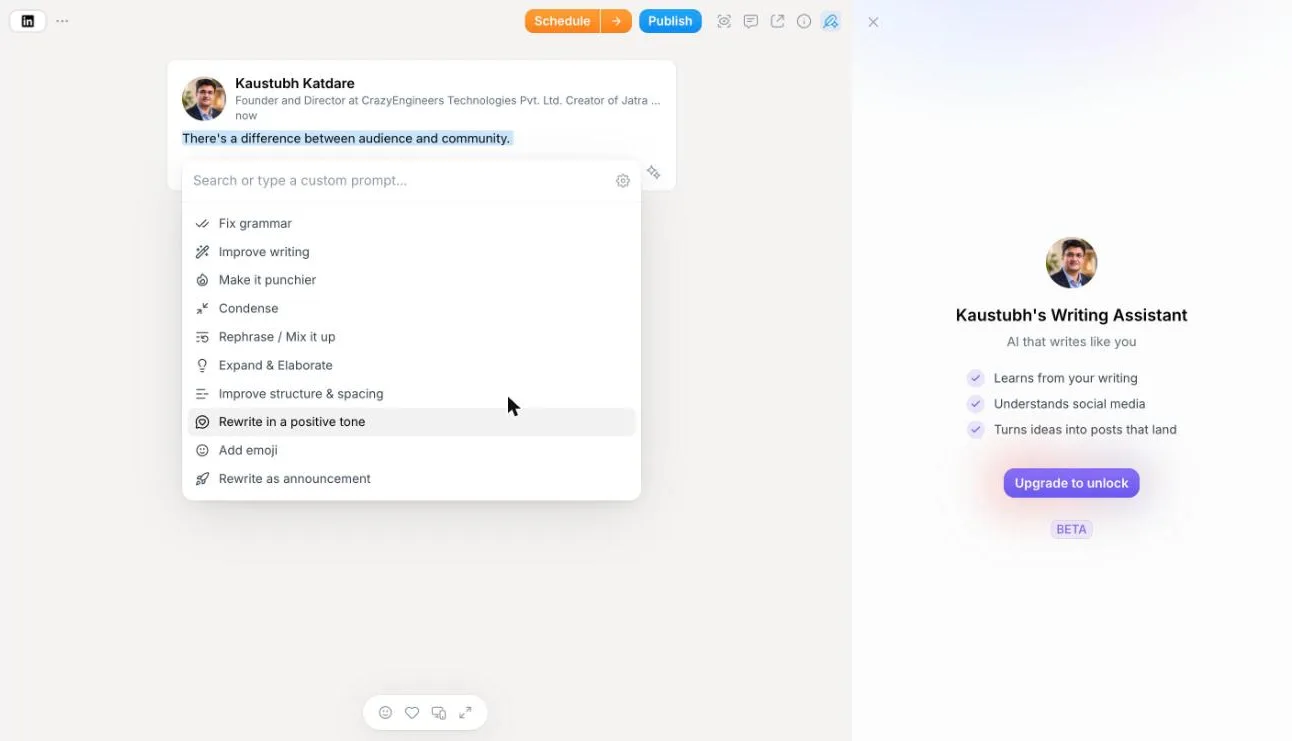
The voice assistant said Upgrade to unlock on the Creator trial, after it took my card.

3

No LinkedIn stats

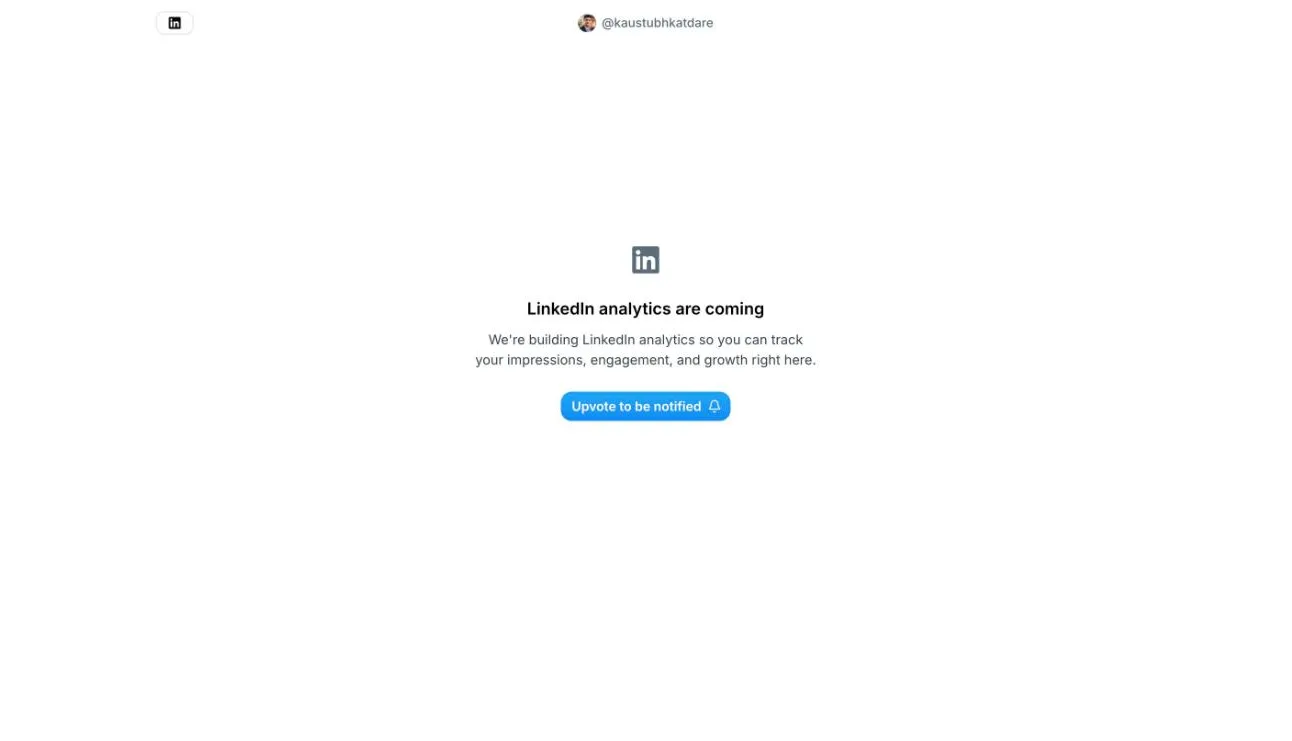
Analytics cover X. For LinkedIn, the page says analytics are coming.

4

Slow to let go

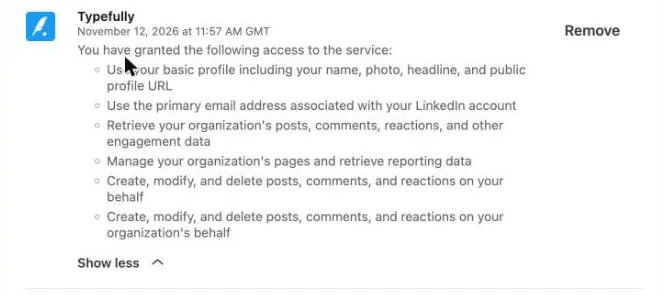
Deletion was set for 60 days later, though the policy says 30, and LinkedIn access stayed until I removed it.

First-hand

What I found in one afternoon.

Kaustubh KatdareFounder, Wiral.Social

I signed up on 12 November with LinkedIn. One click, no password. The plan step pushed a 14-day trial of Creator, and the trial wanted my card. Free was a small link at the bottom, with no AI.

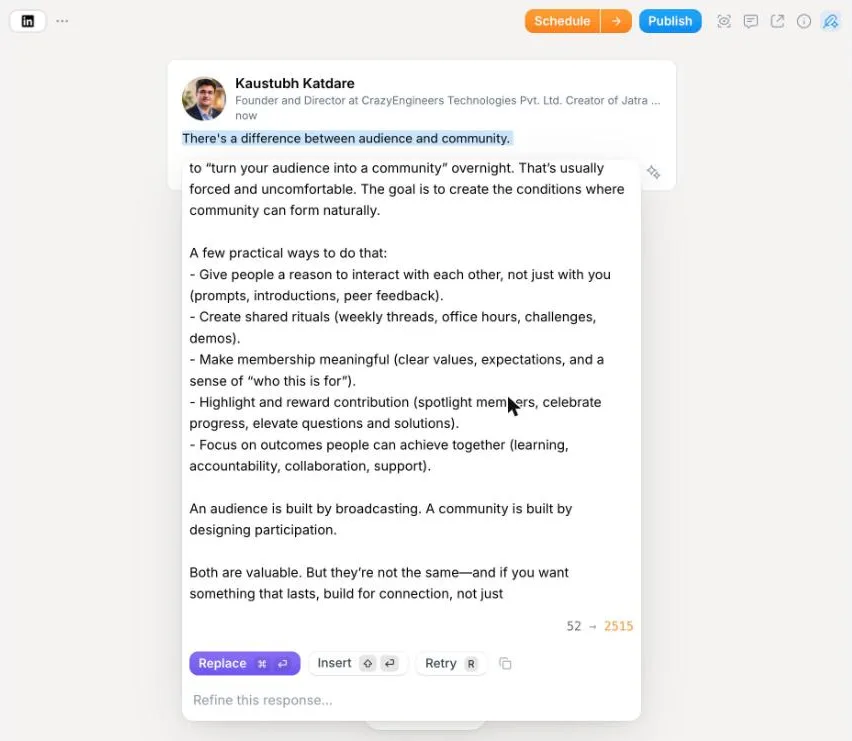
I gave it one line: there’s a difference between audience and community. Its AI wrote the whole post, 2,515 characters, and it was good. I’d post it. But it never asked me a thing, and it was too long. Asked for my style, it couldn’t know it. The assistant that learns your voice was locked, even on a trial I paid to start.

It also never asked who I am or what I post about. Typefully wants me to do the thinking and hard work. It gives me nothing on its own.

Who is it for? People who already have the idea and want a calm place to write it, mostly on X. The realistic phone preview is a good part. If you want the idea brought to you, or LinkedIn stats, try one of these.

My own trial

Inside Typefully, screen by screen.

Screenshots I took myself. The numbered notes take turns; tap one to see its part.

One line in, a long post out.

A good post, with no questions first. 2,515 characters from 52.

Typefully’s Refine panel under a one-line LinkedIn draft, showing a long post it wrote, a 52 to 2515 character count, and Replace, Insert and Retry buttons.
From my own Typefully account, 12 November 2026.

“Writes like you”, after you pay.

Locked on the Creator trial, with my card already in.

Typefully’s Refine menu of quick edits next to the Writing Assistant panel, which says “Upgrade to unlock” during the Creator trial.
From my own Typefully account, 12 November 2026.

LinkedIn stats, coming.

For LinkedIn, the Analyze page has an upvote button and nothing else.

Typefully’s Analyze page for a LinkedIn account: “LinkedIn analytics are coming” with an Upvote to be notified button.
From my own Typefully account, 12 November 2026.

Still on your LinkedIn.

After I deleted my account, Typefully could still post, edit and delete for me until I removed it.

LinkedIn’s Permitted services settings after the Typefully account was deleted, still listing Typefully with permission to create, modify and delete posts, comments and reactions.
From my own Typefully account, 12 November 2026.

6 alternatives, honestly.

Each one with what it’s good at and where it falls short. Prices are the lowest monthly plan.

1

Wiral.SocialOurs

Best for: Ideas and posts made for you, in your voice

Mine, so read it with that in mind. Ideas wait for you every morning, from your topics, and one line gets you three finished posts in your voice. Before you post, Wiri checks the length, the opening, hashtags, links and any fact that wasn’t in your idea.

Good at
  • Ideas from your topics every morning, plus your own idea bank
  • Writes the whole post in your voice, open on the trial
  • 14-day trial, no card
Watch out for
  • No post stats or automatic first comment yet; both wait on LinkedIn’s approval
  • LinkedIn only, personal profiles, no company pages
  • No team accounts
Starts at
From $9 a month
Free trial
14 days, no card
Connects with
Official LinkedIn sign-in

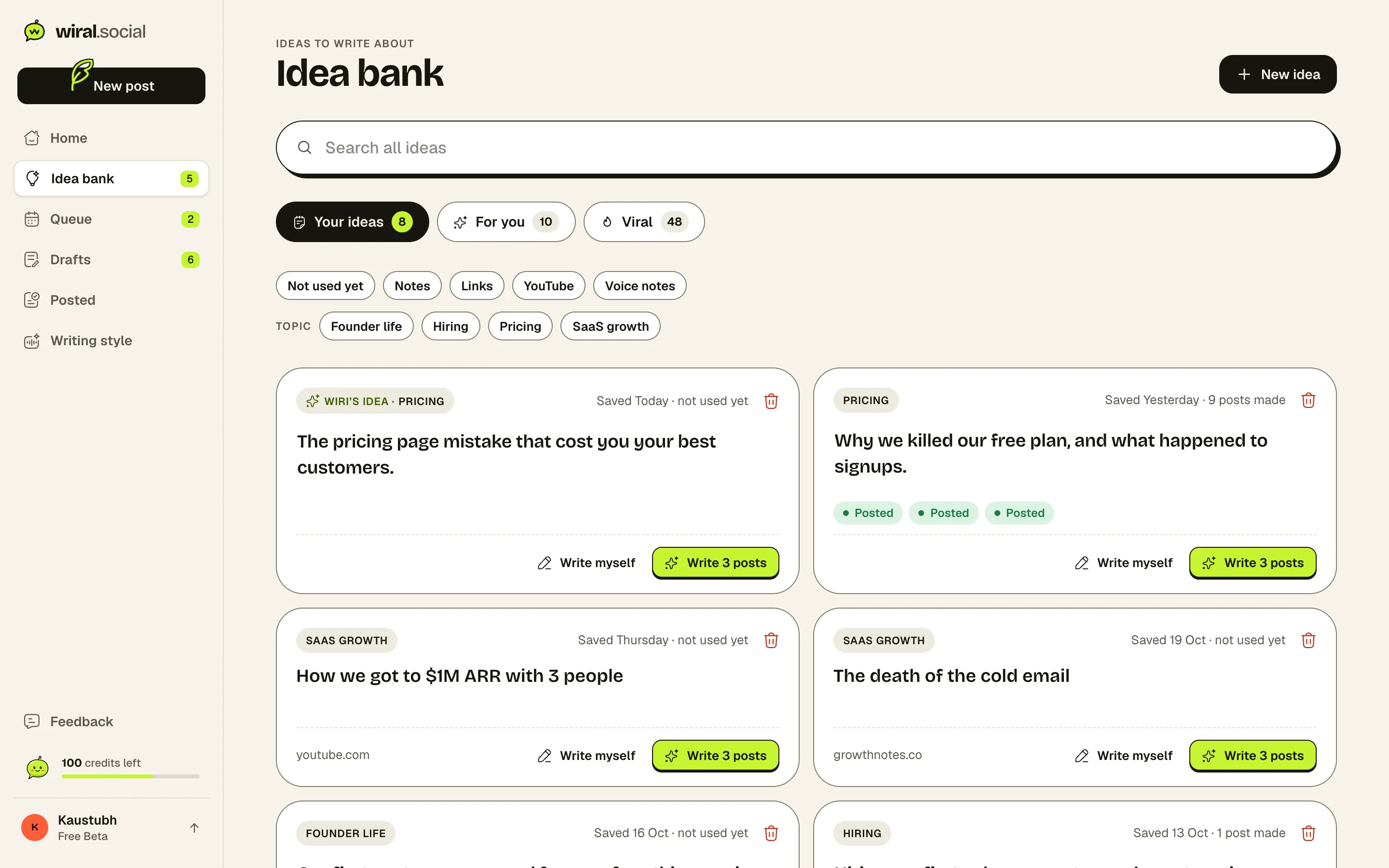
Ideas, before you ask.

Your own ideas, Wiri’s picks from your topics and formats that keep doing well, in one place.

Wiral’s idea bank with your ideas, Wiri’s picks and formats that do well, and filters.

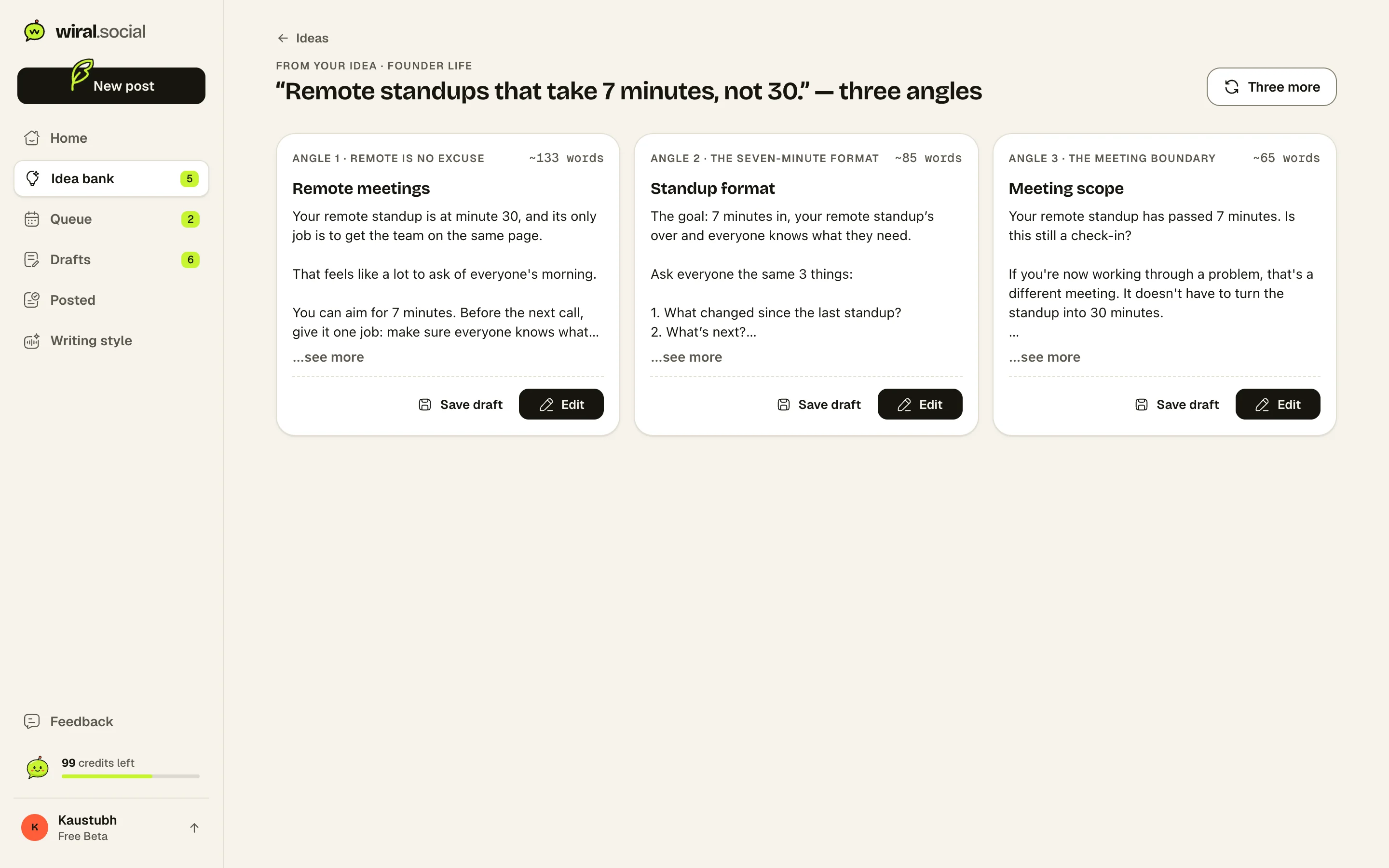
Three posts, in your voice.

Every idea comes back as three finished posts, each a different angle. Keep one, tweak a word, queue it.

Three posts Wiri wrote from one idea, side by side.
Try Wiral.Social with LinkedIn14 days, no card30% off for life until 15 NovemberNever posts without you
2

Buffer

Best for: Free scheduling with LinkedIn stats

I tried it on 10 November. A scheduler for 12 networks, free for 3 channels, with LinkedIn stats from the day you connect and an inbox for your comments. Its AI reworks text you wrote; asked for a full post from my idea, it asked me to share the idea.

Good at
  • Free plan for up to 3 channels, no card
  • LinkedIn stats on every plan, plus a comments inbox
  • From $6 a channel a month
Watch out for
  • The AI reworks text; it won’t write a post from an idea
  • No voice setup for posts
  • A LinkedIn profile and page are billed as two channels
Starts at
Free plan
Free trial
14 days
Connects with
LinkedIn’s own sign-in
3

Taplio

Best for: AI writing plus a viral library and outreach

I paid for it for a month. It writes posts with AI and has a 5M+ viral post library, stats and lead tools. It runs through a Chrome extension, and its posts didn’t sound like me.

Good at
  • AI writing, stats and a first comment in one
  • Viral post library on every plan
  • 30-day money-back guarantee
Watch out for
  • AI writing starts at $69 a month
  • Runs through a Chrome extension and your LinkedIn session cookies
  • The trial asks for a card
Starts at
From $39 a month
Free trial
7 days, card needed
Connects with
Chrome extension in your LinkedIn session
4

Postwise

Best for: AI drafts for X, LinkedIn and Threads

The closest to Typefully’s mix of networks, with an AI that drafts for all three, from $37 a month with 500 AI posts. I used it for a month. The first two days were good, then the posts kept repeating one pattern, and some came with stats I never gave it.

Good at
  • Three networks and 3 accounts on the $37 plan
  • LinkedIn’s own sign-in, company pages included
  • Several drafts per idea
Watch out for
  • Built for X first; its help centre was last updated in 2023
  • The terms say purchases are final, despite a 30-day refund promise
  • Cancelling deletes your posts and drafts
Starts at
From $37 a month
Free trial
7 days, no card
Connects with
LinkedIn’s own sign-in
5

Supergrow

Best for: Posts from an AI interview, with team tools

I tried it on 7 November. Its posts come from PostCast, an AI interview, and it adds stats, a first comment and team approvals. My one-line idea got “Failed to rewrite”, and the interview asked for 30 minutes.

Good at
  • Posts from an interview, videos or articles
  • LinkedIn stats, a first comment and a Kanban board
  • Company pages and team approvals
Watch out for
  • $39 a month for one LinkedIn account
  • The 7-day trial asks for a card during sign-up
  • Refunds only for billing errors
Starts at
From $39 a month
Free trial
7 days, card needed
Connects with
LinkedIn’s own sign-in
6

AuthoredUp

Best for: Writing every word yourself, with deep stats

If you like Typefully’s editor but want LinkedIn stats, this is the one. A strong editor with a feed preview, a hook library and detailed post stats. I tried it on 5 November: without its Chrome extension it’s a formatting notepad, and its AI is still a closed beta.

Good at
  • Detailed stats on your own posts
  • Formatting, preview and hook library
  • 14-day trial, no card
Watch out for
  • Posting and stats need its Chrome extension
  • No AI writing yet; Coauthor is a closed beta
  • $19.95 a month for one profile
Starts at
From $19.95 a month
Free trial
14 days, no card
Connects with
Chrome extension in your LinkedIn session
Kaustubh Katdare
About the author

Kaustubh Katdare

Founder, Wiral.Social

I’ve spent 20 years in community, marketing, growth and SEO. I founded CrazyEngineers, built the Jatra Community Platform and Wiral.Social, and I’m a 3x TEDx speaker. I live and work in Nagpur, India, by choice, and I post on LinkedIn 2 to 3 times a day.

Questions people ask.

Spotted something out of date? Tell us and we’ll check it again.

What is the best Typefully alternative for LinkedIn?

It depends on why you’re leaving. For ideas brought to you and posts in your voice, try Wiral.Social. For free scheduling with LinkedIn stats, Buffer. For a viral post library and outreach, Taplio. For AI drafts on X, LinkedIn and Threads, Postwise. To talk your posts out, Supergrow. To write every word with deep stats, AuthoredUp.

Is there a Typefully alternative that suggests post ideas?

Yes. Wiral.Social writes fresh ideas from your topics every morning and keeps a bank of formats that do well. Taplio and Supergrow let you search viral posts for ideas. In my Typefully trial, nothing suggested an idea.

Which Typefully alternative has LinkedIn analytics?

Buffer showed my last 30 days on its free plan. AuthoredUp goes deepest once its extension is connected. Taplio and Supergrow have stats too. Typefully’s LinkedIn analytics are still “coming”, and Wiral.Social’s wait on LinkedIn’s approval.

Which Typefully alternatives have a trial without a card?

Wiral.Social (14 days) and AuthoredUp (14 days) need no card, and Buffer’s free plan asked for none. Postwise says no card, but also that you’re subscribed when the trial ends. Taplio and Supergrow ask for a card, and so did Typefully’s trial.

Is there a cheaper alternative to Typefully?

For scheduling alone, Buffer is free for 3 channels. Typefully’s Creator plan is good value at $99 a year if you only need an editor. Wiral.Social starts at $9 a month, or less billed yearly, and brings the ideas and writes the posts.

How do I delete my Typefully account?

Settings, Your user, Request Account Deletion, then type DELETE. My deletion was scheduled 60 days out. Remove Typefully from LinkedIn too, under Data privacy, Permitted services, or it keeps its posting rights.

Are the Typefully screenshots real?

Yes. I took them in my own Typefully account on 12 November 2026, on the Creator trial, with my LinkedIn profile connected. My card details are cropped out.

See if it sounds like you.

Try Wiral.Social with LinkedIn14 days, no card30% off for life until 15 NovemberNever posts without you
Sources: 121 pages. Prices checked on 4 November 2026, features researched on 26 October 2026. Prices are in US dollars, billed monthly unless marked yearly.
Typefully
Buffer
Taplio
Supergrow
AuthoredUp
From someone who posts with Wiri★★★★★
“I use Wiral to turn my ideas into posts, find ideas when I’m stuck, make carousels and image cards, and keep a steady schedule. Before, I hardly ever posted because it took ages and nobody noticed my posts.”
Radhika DeshpandeQA Test Engineer