Carousel maker

Any post, now a carousel.

Wiri splits your post into slides and lays them out. Pick a template, change the colors and fonts, then add it to your post or download a PDF.

Start free with LinkedInFree while we’re in betaNo card neededNever posts without you
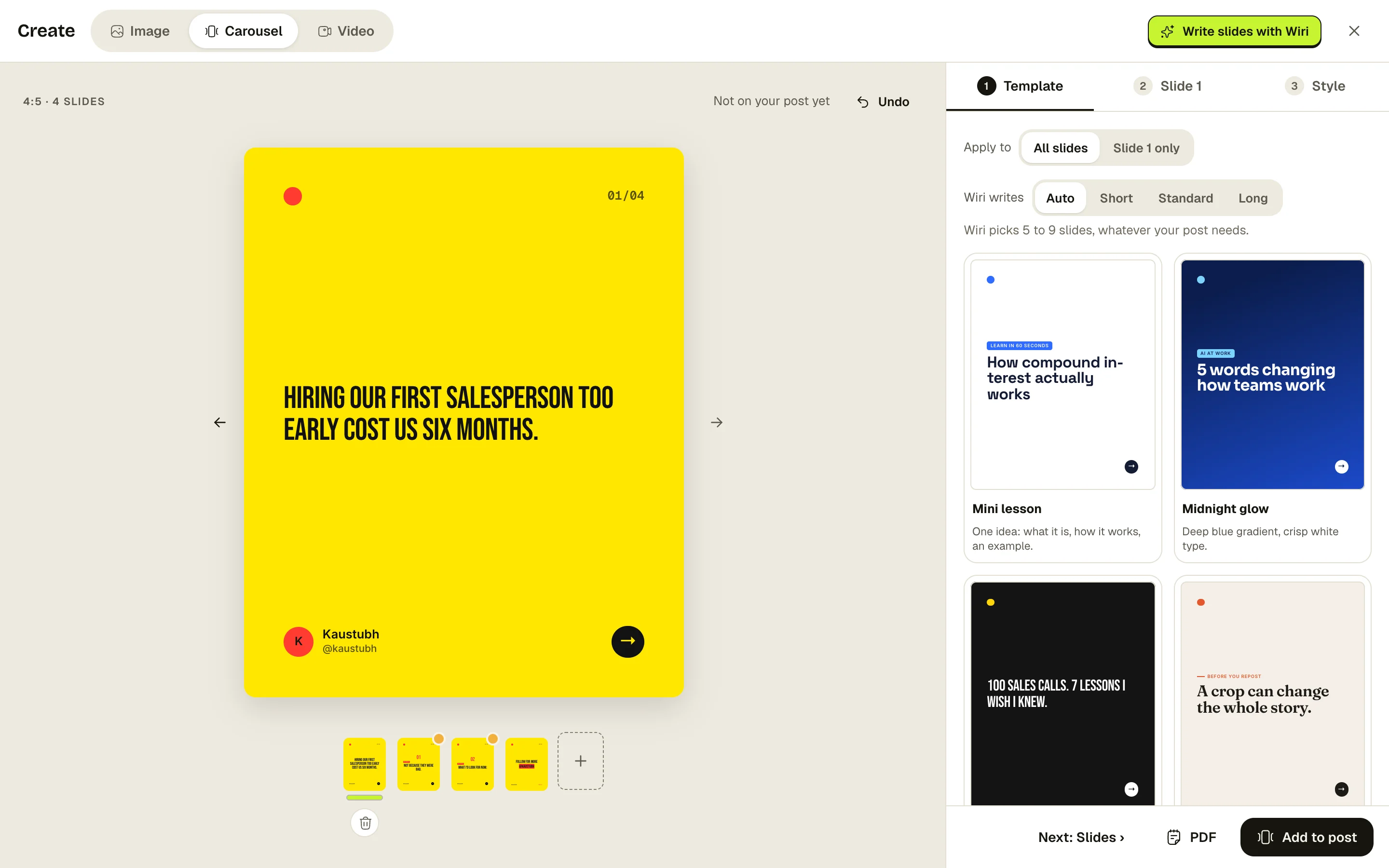
The carousel studio: a slide on the canvas, slide count options and carousel templates.
Try it here

See it working.

01/05

5 ways to keep a quick call quick

Steal these for your next invite

→
02/05
GLOW UP 1

Put the end time in the invite.

A 15 that ends at :15 stays a 15.

→
03/05
GLOW UP 2

Start with the decision you need.

If there isn’t one, it’s an email.

→
04/05
GLOW UP 3

Say “I have a hard stop.”

Then actually stop.

→
05/05

Which one will you try first?

Save ✦
Quick calls1 / 5
01/05

5 ways to keep a quick call quick

Steal these for your next invite

→
02/05
01STEP 1

Put the end time in the invite.

A 15 that ends at :15 stays a 15.

→
03/05
02STEP 2

Start with the decision you need.

If there isn’t one, it’s an email.

→
04/05
03STEP 3

Say “I have a hard stop.”

Then actually stop.

→
05/05

Which one will you try first?

Save ✦
Quick calls1 / 5
01/05

5 ways to keep a quick call quick

Steal these for your next invite

→
02/05
WRITING ONLINE 1

Put the end time in the invite.

A 15 that ends at :15 stays a 15.

→
03/05
WRITING ONLINE 2

Start with the decision you need.

If there isn’t one, it’s an email.

→
04/05
WRITING ONLINE 3

Say “I have a hard stop.”

Then actually stop.

→
05/05

Which one will you try first?

Save ✦
Quick calls1 / 5

How it works.

  1. 1Open the studio

    From any post, tap Carousel.

  2. 2Pick a template

    Wiri writes the slides from your post.

  3. 3Add it or download

    Post it with your words, or save a PDF.

Your colors. Your fonts.

Change the look for every slide or just one. Save a template with your brand colors and use it every time.

  • Beautiful font pairs and patterns
  • Fix hard-to-read slides in one click
  • Add, remove and reorder slides from the strip

Questions about carousel maker.

Still curious? A real person reads every message.

How many slides can a carousel have?

Wiri writes 5, 7 or 9 slides, or picks the right number for your post on Auto. You can add or delete slides yourself.

Can I post it straight to LinkedIn?

Yes. Add it to your post and it goes out as a document carousel at your scheduled time. You can also download a PDF.


Your next post is one thought away.

Start free with LinkedInFree while we’re in betaNo card neededNever posts without you