Taplio vs AuthoredUp Which one fits how you write?
Both are LinkedIn-only tools that run through a Chrome extension, and that’s about where the likeness ends. Taplio writes posts for you and helps you find leads. AuthoredUp helps you polish the posts you write yourself and shows you deep stats on them. I paid for Taplio for a month and tried AuthoredUp on 5 November 2026; the AuthoredUp screenshots below are mine.
 By Kaustubh Katdare · Founder, Wiral.SocialPrices checked 4 November 2026 · features researched 26 October 2026
you want AI to write posts for you, a big library of viral posts to borrow formats from, and outreach tools, and $69 a month is fine.
- Starts at
- From $39 a month
- Free trial
- 7 days, card needed
you write your own posts and want the best preview, formatting and stats for $19.95 a month, with a 14-day trial that needs no card.
- Starts at
- From $19.95 a month
- Free trial
- 14 days, no card
5 differences that matter.
- 1
Who writes the post
TaplioTaplio’s AI writes posts, hooks and carousels. The $39 Starter plan has no AI at all; Growth ($69) gives 250 full-quality credits a month, then a slower mode.
AuthoredUpYou do. Its AI helper, Coauthor, is a closed beta you apply for. It gives you 300+ hooks and endings to start from instead, many of them fill-in-the-blank templates.
- 2
What it costs to start
Taplio$39, $69 or $199 a month. The 7-day trial asks for a card and turns paid early if you hit its AI limit. 30-day money-back guarantee.
AuthoredUp$19.95 a month for one profile, with unlimited company pages. 14-day trial, no card, and it simply stops. No refunds after you pay.
- 3
How scheduling works
TaplioIts own posting queue and calendar, and it can add a first comment for you.
AuthoredUpIt uses LinkedIn’s own scheduler through the extension: at least 30 minutes ahead, and some attachments can’t be scheduled. No first comment.
- 4
Stats
TaplioPost, audience and engagement stats, company page stats and a monthly email.
AuthoredUpThe deeper of the two: saves, sends, reach, follower growth and years of past posts, with CSV export and an API. Stats only update when you view posts with the extension on.
- 5
How it connects to LinkedIn
TaplioThrough its extension and your signed-in LinkedIn session. It reads your LinkedIn session cookies, and asks you to open LinkedIn every 2 to 3 days to keep it working.
AuthoredUpThrough its extension inside your own LinkedIn session. It says it doesn’t take your cookie and does no automation.
One wrote posts that weren’t me. One wrote nothing at all.
Kaustubh KatdareFounder, Wiral.Social
I took Taplio’s $69 plan for the AI writing. The posts were clean, with no made-up stats, but the writing style, the sentence construction, the way a thought was presented: nothing was like me. I cancelled after a month.
AuthoredUp is the opposite problem. Its AI is still a closed beta, so I had to do all the thinking. Its hooks are templates that paste into your editor, and most didn’t fit what I was writing.
Both want a browser extension inside your LinkedIn account. I don’t install those. From my development experience, they’re very powerful and can do a lot of manipulative things, and LinkedIn’s own help page says it doesn’t permit extensions that scrape, change or automate its site.
So pick by what you actually need. Leads and outreach: Taplio. Every word written by you, with deep stats: AuthoredUp. Posts in your own voice, without an extension, is why I built Wiral.
Inside Taplio, screen by screen.
Screenshots I took myself. The numbered notes take turns; tap one to see its part.
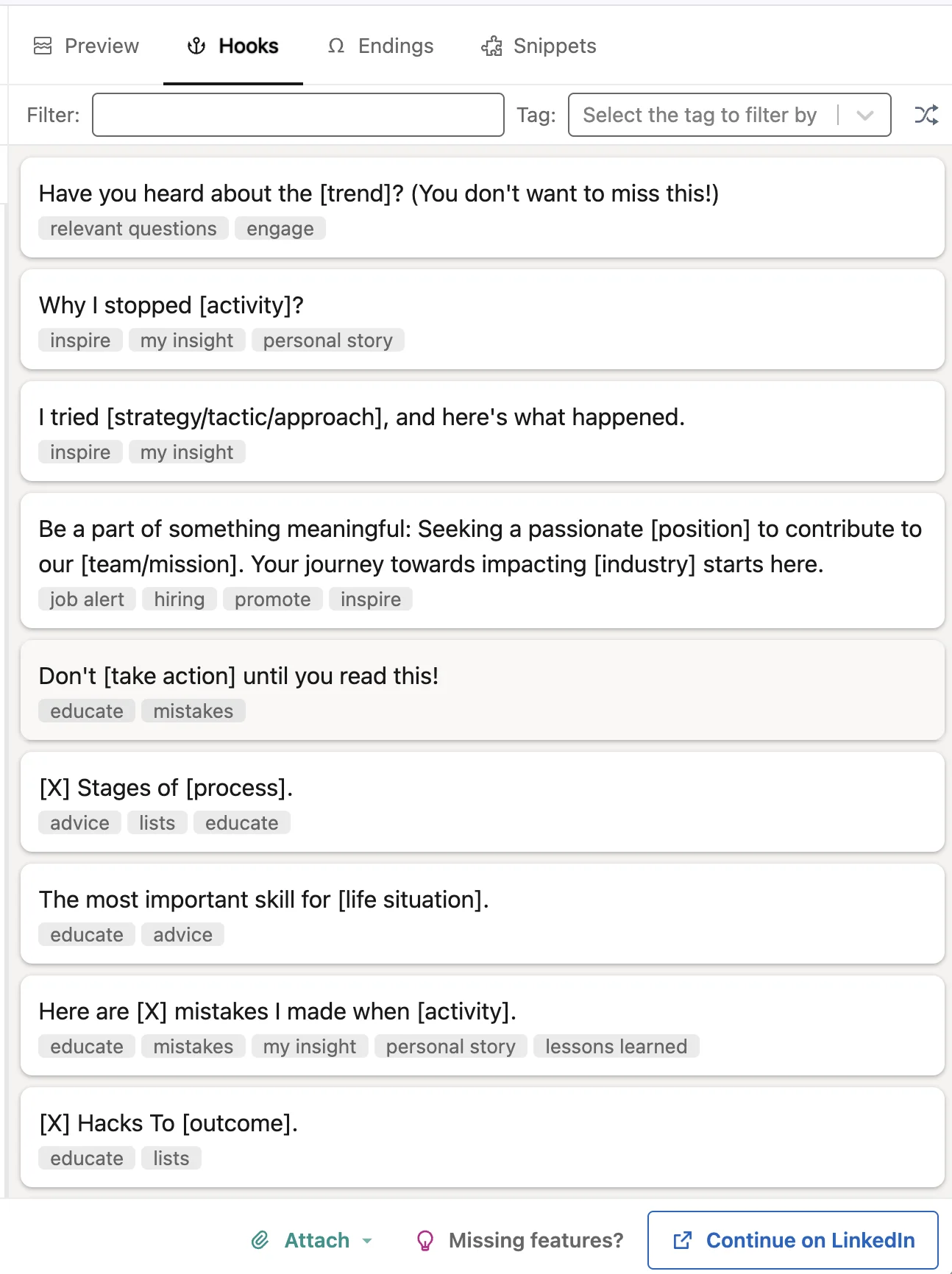
AuthoredUp’s hooks: [blanks] to fill.
Click one and it pastes. The rest of the post is yours to write.
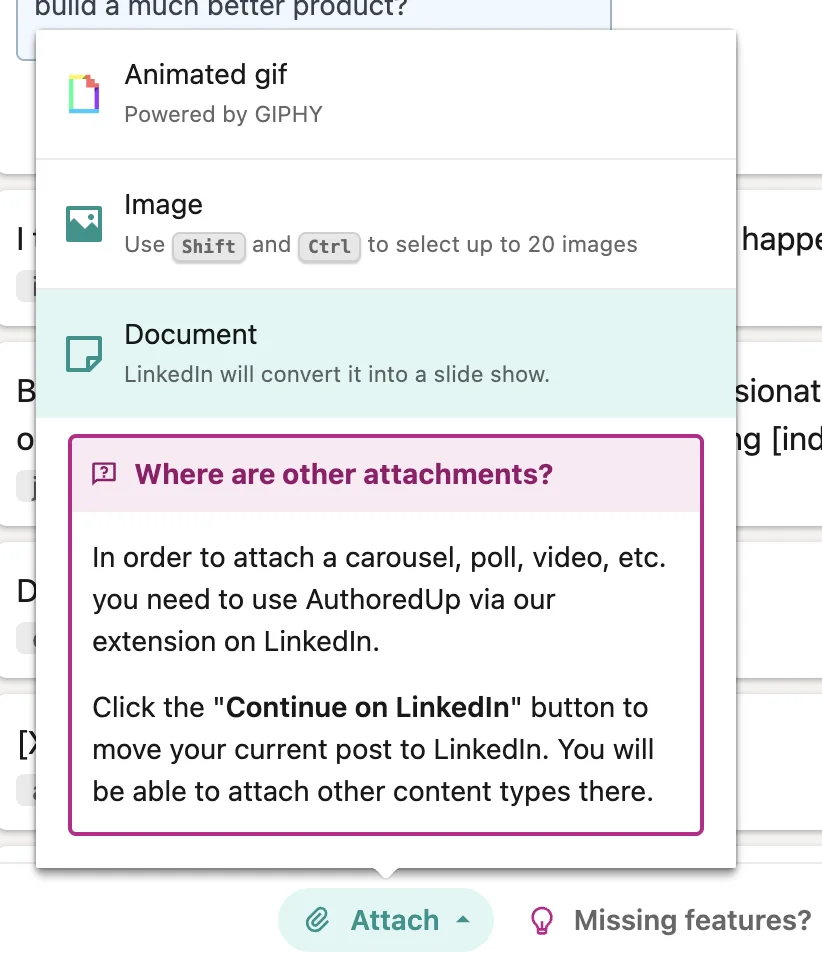
On the web, most things need the extension.
GIFs, images and PDFs attach on the web. Carousels, polls and video send you to LinkedIn through the extension.
Every feature, side by side.
| Side by side | TaplioFrom $39 a month | AuthoredUpFrom $19.95 a month |
|---|---|---|
| Price and trial | ||
| Starts at | From $39 a month | From $19.95 a month |
| Free trial | 7 days, card needed | 14 days, no card |
| How it connects to LinkedIn | Chrome extension in your LinkedIn sessionConnects through the Taplio Connect extension and your logged-in LinkedIn browser session. | Chrome extension in your LinkedIn sessionWorks through its Chrome extension inside your own LinkedIn session. |
| Writing | ||
| Writes posts with AI | YesPost generator, hook generator, Ask Taplio chat and AI Edit (improve, rewrite hook, fix grammar, /repurpose, /fromlink). | YesCoauthor AI assistant is in closed beta. |
| Learns your voice | YesSays it learns your voice from your past posts and edits. | YesCoauthor is described as learning your voice from your own posts; closed beta. |
| Suggests post ideas | YesAI "Help me find ideas" uses AI credits; daily idea feed for your niche. | NoNo idea generator listed. |
| Ideas from viral posts | Yes5M+ viral posts database on all plans, with saved collections. | NoNo built-in viral post database. |
| Posting | ||
| Schedules posts | Yes | YesUses LinkedIn native scheduling through the extension; no scheduler of its own. |
| Posting queue or calendar | YesCustom posting schedule (queue), monthly and daily schedule, Kanban drafts. | YesCalendar of scheduled and published posts with reminders. |
| Adds a first comment | YesListed as "Auto-comment on my post", triggered from a keyword, on all plans. | NoNot listed in the plan comparison; the company has a no-automation policy. |
| Posts to company pages | YesYou must be an admin of the page on your personal profile. | YesUnlimited pages you admin at no extra charge, with page dashboards. |
| Visuals | ||
| Makes carousels | YesAI carousel generator uses AI credits, so Growth and up. | NoNo carousel maker. |
| Images and video | YesMedia library uploads and AI image generation (AI credits). | YesAttach images, GIFs, video, documents, polls and events. |
| Feed preview | YesEdit / Preview toggle in the composer, with desktop and mobile views and where the "see more" cut falls. | YesDesktop and mobile, light and dark mode, with the "see more" fold. |
| Growth | ||
| Post stats | YesPost, audience and engagement stats, monthly stats email, company page stats. | YesDeep: dashboard, follower growth timeline, period comparisons, best type/day/length, post-vs-post compare, saves, sends, reach, profile views, historic posts, CSV and API. |
| Help with comments | YesCurated engage feeds, AI smart replies, auto-reply to comments, auto-like replies. | NoNo engage feed or comment assistant; reminders to come back and reply only. |
| Leads and outreach | YesContact lists on all plans; lead database, auto-DM, bulk DMs and auto connection requests on Pro only. | No |
| Team and client accounts | YesWriter collaboration on all plans; managing an organisation and multiple accounts from Growth; admin, writer and client roles on team plans. | YesBusiness plan: roles, unlimited non-posting members, shared drafts, team analytics. |
| Getting set up | ||
| Needs a Chrome extension | YesTaplio Connect (required, links LinkedIn) and Taplio Boost (optional, features inside LinkedIn). | YesThe extension is the core product; publishing, scheduling and stats collection run through it. |
| Native mobile app | NoMobile browser only, after first setup on a desktop Chromium browser. | NoProgressive Web App you add to the home screen; no native app. |
Where Wiral.Social fits.
If you’d like AI to write your posts but want them to sound like you, Wiral.Social sits between the two. Type what’s on your mind and Wiri writes three takes in your voice, adds a carousel, image or video, and posts at your times. It connects with LinkedIn’s official sign-in, so there’s no extension and nothing reads your cookies.
- Starts at
- From $9 a month
- Free trial
- 14 days, no card
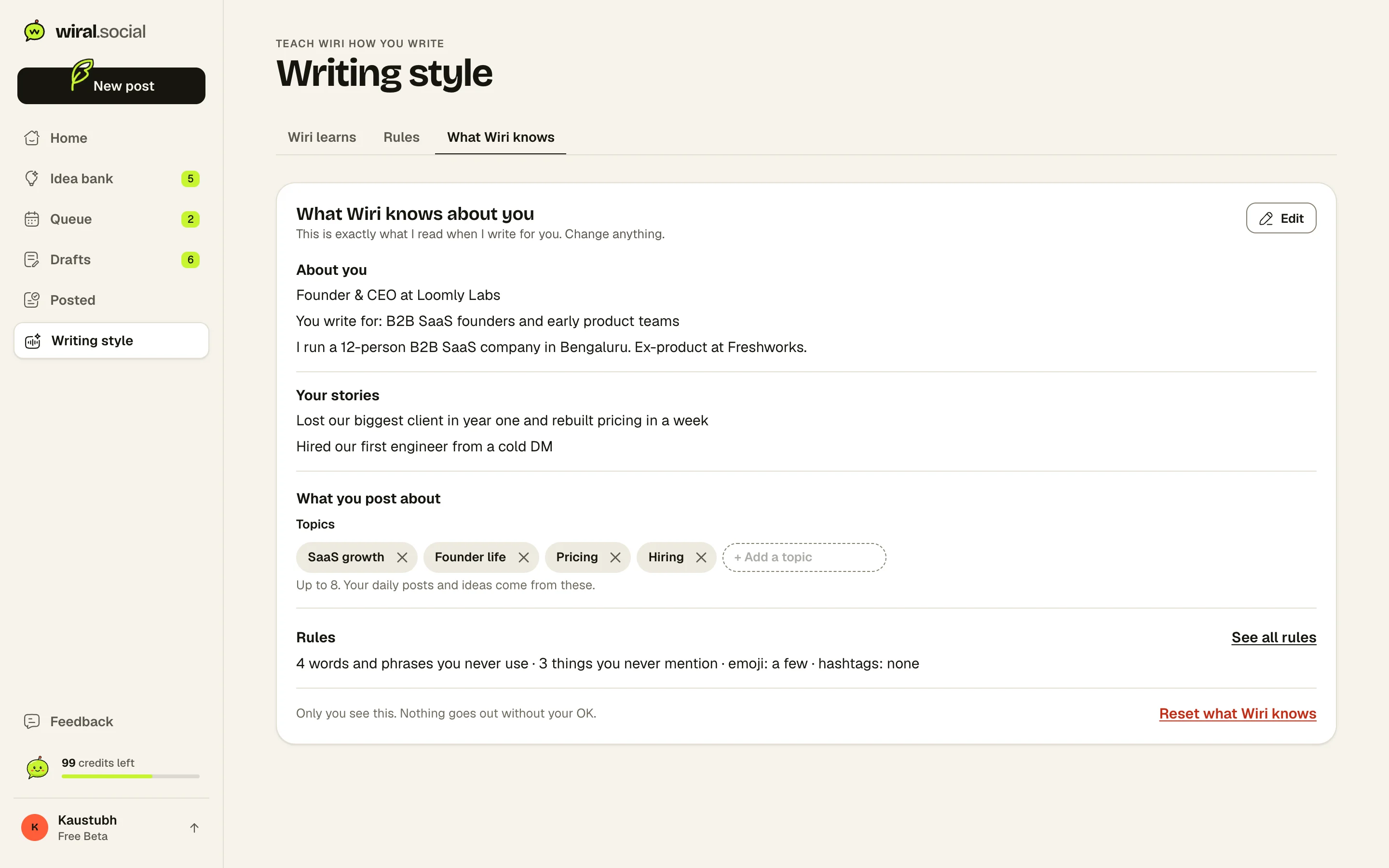
Real details, in your voice.
Wiri writes from a page of what it knows about you. You can read every line, change it or delete it.
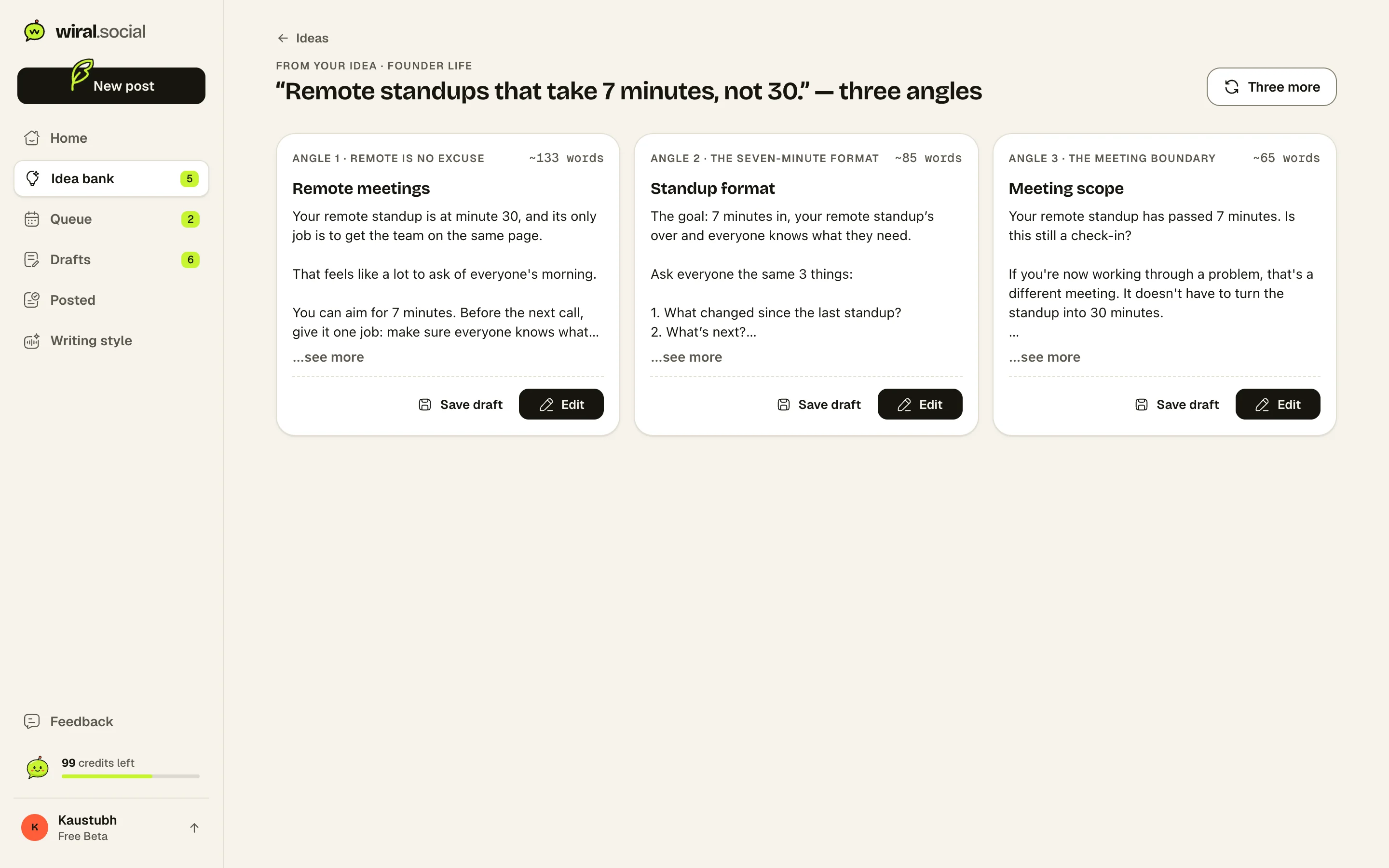
Three posts, no [blanks].
Every idea comes back as three finished posts. Keep one, tweak a word, queue it.
Where Wiral.Social is behind: Post stats and an automatic first comment are waiting on LinkedIn’s approval. Personal profiles only, no company pages yet. No team accounts or outreach tools. Ask for what you need
Plans and prices.
As listed on Taplio and AuthoredUp’s own pricing pages, 4 November 2026.
Taplio plans
- Starter$39/mo
Scheduling, queue, analytics, viral post library, text formatting. No AI credits and no comment credits.
- Growth$69/mo
250 AI credits and 500 comment credits a month, AI posts, carousels and images, team collaboration, Zapier.
- Pro$199/mo
Unlimited AI and comment credits, lead database, auto-DM, bulk DMs, auto connection requests, 90-day auto-reply window.
Trial: 7 days, card needed. 30-day money-back guarantee; refund can be requested within 30 days of the first payment of the contract.
AuthoredUp plans
- Individual$19.95/mo
1 LinkedIn profile, unlimited company pages, drafts and snippets, editor with preview, hooks and endings, analytics, saved posts, analytics API.
- Business$14.95/mo
Per profile, minimum 3 profiles ($44.85 a month). Adds organisation management, roles, draft collaboration, team analytics and calendar.
- Custom GrowthAsk them
Contact sales; minimum 10 profiles, billed annually, onboarding and invoicing.
Trial: 14 days, no card. Fees are non-refundable; cancelling stops renewal at the end of the paid period. Pro-rated refund only if the service is discontinued.
What reviewers say.
What people say about Taplio
“It's hands-down the best LinkedIn marketing tool I've used for turning vague ideas”
Picked as the best LinkedIn tool for AI-helped ideas and drafts, thanks to its library of viral posts.Zapier (Kiran Shahid)
“I initially used Taplio to find trending LinkedIn posts for ideas”
The writer cancelled Taplio (about $40 a month) because a general AI chatbot gave post ideas just as well.Zapier (Kiran Shahid)
- The most common complaint is billing: renewals without notice, charges after the free trial, and trouble cancelling; Taplio replies and refunds some
- Several users praise fast, helpful support and say it helped them grow followers
- Price is the top complaint on Product Hunt; users want a cheaper or free basic plan
- One tester found the AI output often off-topic, got better results from ChatGPT directly, and found loading and post search slow
What people say about AuthoredUp
“That's the main problem AuthoredUp solves.”
A long-time user says it solves not knowing how a post will look in the feed before it goes live.Product Hunt (launch comment by Lars Kamp)
- Users say the drafts, preview, hooks, readability counts and post reuse help them write on LinkedIn consistently
- One user likes having publishing and personal-profile analytics in one tool, which most schedulers cannot show
- Customer service and a team that listens to users get praise
- One user said LinkedIn sync broke for weeks: some posts vanished and carousels and polls did not show in the calendar
Is Taplio better than AuthoredUp?
They’re built for different people. Taplio is better if you want AI to write for you and tools to find leads. AuthoredUp is better if you write your own posts and care most about formatting, preview and stats.
Which is cheaper, Taplio or AuthoredUp?
AuthoredUp, at $19.95 a month. Taplio starts at $39 a month, but that plan has no AI writing; AI starts on the $69 Growth plan.
Does AuthoredUp write posts with AI?
Not yet for most people. Its AI assistant, Coauthor, is a closed beta you apply for. Today it is mainly a tool for writing and polishing posts yourself.
Do Taplio and AuthoredUp need a Chrome extension?
Yes, both do. Taplio needs Taplio Connect to link your LinkedIn account, and AuthoredUp’s extension does the publishing, scheduling and stats.
Can I try Taplio and AuthoredUp for free?
Taplio has a 7-day trial that needs a card. AuthoredUp has a 14-day trial with no card that simply ends. Neither has a free plan.
See if it sounds like you.
Sources: 40 pages. Prices checked on 4 November 2026, features researched on 26 October 2026. Prices are in US dollars, billed monthly unless marked yearly.
- taplio.com/pricing
- taplio.com/
- producthunt.com/products/taplio/reviews
- taplio.com/terms-of-service
- intercom.help/taplio/en/articles/17357647-how-taplio-free-trial-works
- intercom.help/taplio/en/articles/17233358-credits-explained-what-you-need-to-know
- intercom.help/taplio/en/articles/8807234-setting-up-your-queue-posting-schedule
- intercom.help/taplio/en/articles/17173404-how-to-use-the-carousel-generator
- intercom.help/taplio/en/articles/17453867-publishing-your-first-post-with-taplio
- intercom.help/taplio/en/articles/17000723-how-can-i-manage-my-personal-linkedin-profile-and-linkedin-company-pages-using-taplio
- intercom.help/taplio/en/articles/8807283-posting-from-a-company-page
- intercom.help/taplio/en/articles/17173540-taplio-boost-user-manual
- intercom.help/taplio/en/articles/17749426-can-i-use-taplio-on-a-mobile-device
- intercom.help/taplio/en/articles/9559361-using-taplio-in-another-language
- intercom.help/taplio/en/collections/19726453-integrations
- intercom.help/taplio/en/articles/17059097-how-do-i-reconnect-or-refresh-my-linkedin-connection-in-taplio
- g2.com/products/taplio/reviews
- capterra.com/p/10015825/Taplio/
- trustpilot.com/review/taplio.com
- chromewebstore.google.com/detail/taplio-connect/kkooohiglcfemghmbnodlobcgpkjplmm
- platform.authoredup.com/auth/sign-up
- authoredup.com/
- authoredup.com/about-us
- authoredup.com/terms-and-conditions
- authoredup.com/pricing
- help.authoredup.com/articles/how-do-i-cancel-trial
- help.authoredup.com/articles/collect-advanced-post-stats
- help.authoredup.com/articles/linkedin-scheduling-native-how-it-works
- help.authoredup.com/articles/authoredup-mobile-app
- help.authoredup.com/articles/why-no-automation
- help.authoredup.com/articles/individual-business-plan-differences
- chromewebstore.google.com/detail/authoredup/dkkmpkpjimkollpfgbbglcikcmgmdlhn
- help.authoredup.com/articles/language-support
- help.authoredup.com/articles/how-to-connect-and-use-mcp
- help.authoredup.com/articles/do-you-take-my-cookie
- g2.com/products/authoredup/reviews
- capterra.com/search/?query=authoredup
- trustpilot.com/review/authoredup.com
- chromewebstore.google.com/detail/authoredup/dkkmpkpjimkollpfgbbglcikcmgmdlhn/reviews
- producthunt.com/products/authoredup
“I use Wiral to turn my ideas into posts, find ideas when I’m stuck, make carousels and image cards, and keep a steady schedule. Before, I hardly ever posted because it took ages and nobody noticed my posts.”