- When
- 20 November 2026, from India
- Plan
- 3-day Creator trial (the length it gives in India), no card
- My personal LinkedIn profile, through LinkedIn’s official sign-in
- I tried
- The ideas generator, by topic and by link. Writing a first post from an idea. Visuals and the AI carousel editor. Leads and metrics.
- Not tested
- Scheduling and publishing. AI visuals and hooks, which are paid only. Writing in my style after a LinkedIn import.
MagicPost vs Wiral.Social Leads and stats, or your voice.
Both are built only for LinkedIn and post through its official sign-in. MagicPost is strong on stats, leads and image templates, and its AI writing starts at $69 a month ($39 billed yearly). But you bring the idea, and its first draft for me was a post I’d never publish. Wiral.Social brings the ideas and writes the post in your voice, from $9 a month with a 14-day trial and no card. I used MagicPost on 20 November 2026. I built Wiral, so I’m biased; the facts come with sources.
 By Kaustubh Katdare · Founder, Wiral.SocialPrices checked 20 November 2026 · features researched 20 November 2026My full MagicPost review
Pick MagicPost if
you sell services on LinkedIn and want leads from the people who engage, deep stats against accounts your size and good image templates, and you can come up with ideas on your own.
- Starts at
- From $49 a month
- Free trial
- Depends on country (3 days from India), no card
Pick Wiral.Social if
you want AI to do the heavy lifting: ideas waiting for you and posts in your voice, checked before they go out, so you publish with confidence and little or no editing, from $9 a month.
- Starts at
- From $9 a month
- Free trial
- 14 days, no card
6 differences that matter.
- 1
Where the idea comes from
MagicPostA chat box asks “What are we writing today?” Its idea generator needs your topic, link or file first, and “Use the idea” only pastes the idea back into the chat.
Wiral.SocialYour own saved ideas, ideas Wiri drafts from your topics each morning, and a bank of formats that keep doing well on LinkedIn.
- 2
Who writes the post
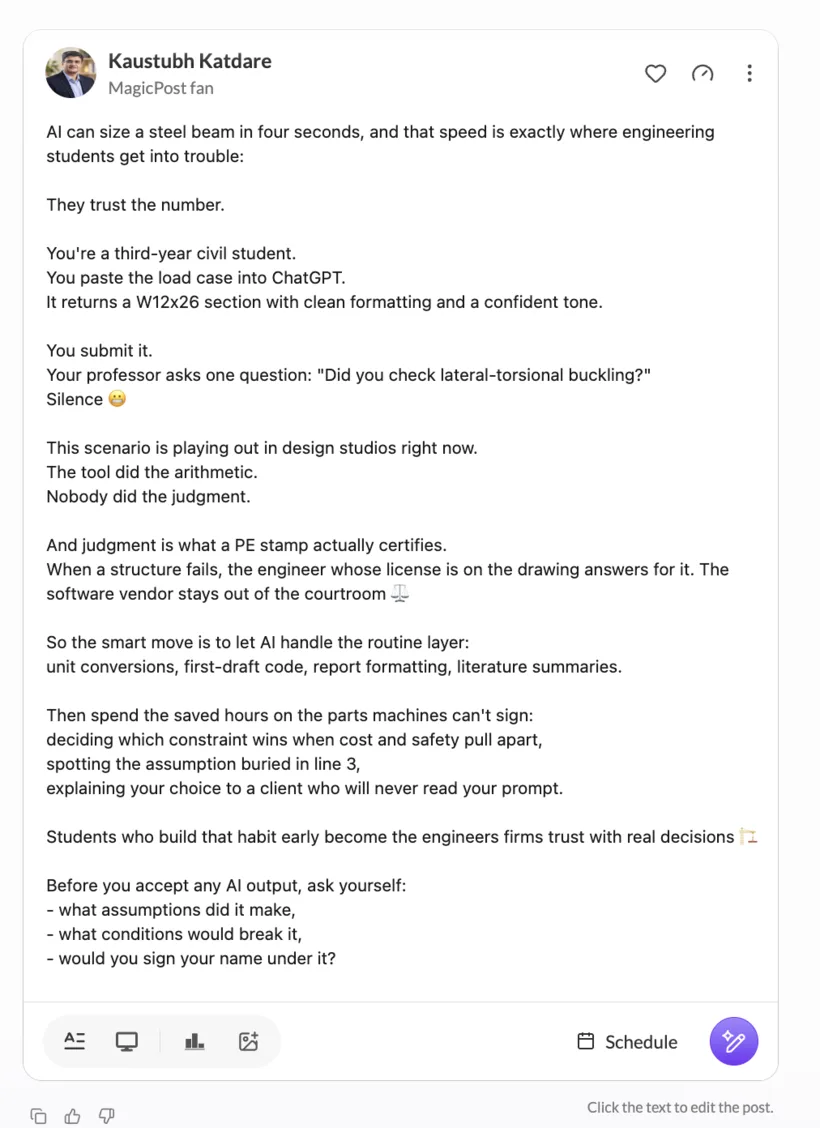
MagicPostOne post per send. Mine borrowed a US civil-engineering scene, with one-line beats, “Silence 😬” and a checklist at the end. It did flag its own unchecked claim. The trial gives you 3 posts.
Wiral.SocialWiri writes three ways into the same idea from one line, a link or a voice note, each a different angle, and checks them before you post: unfilled gaps, the “…more” cut, hashtags and claims to verify.
- 3
Learning your voice
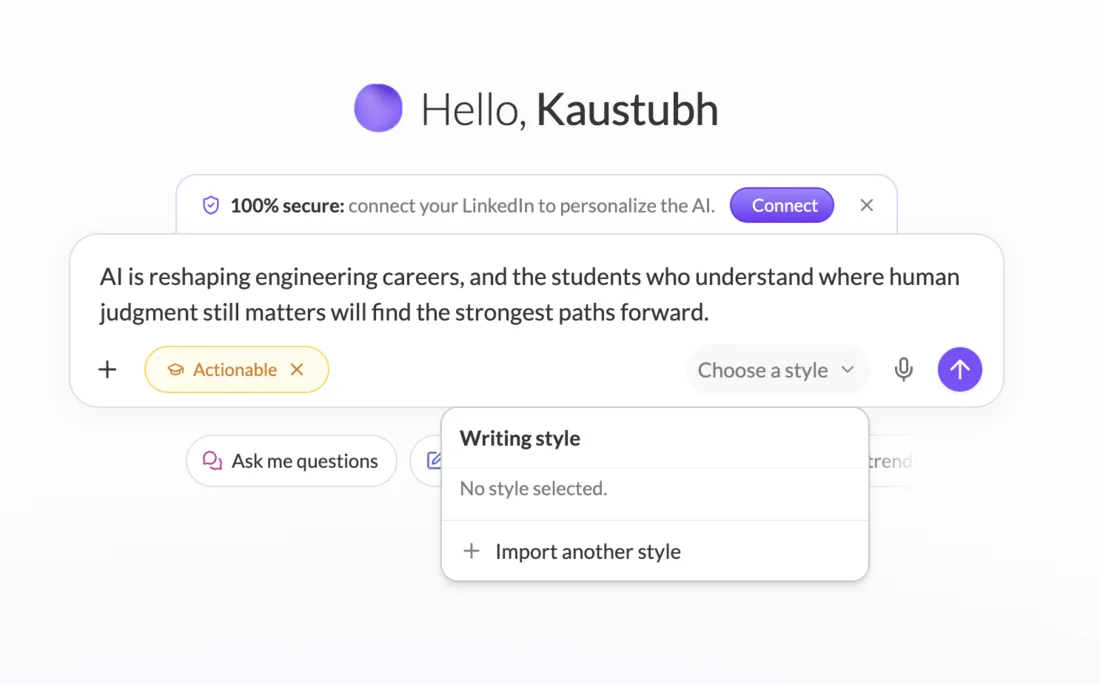
MagicPostIt imports your style from your LinkedIn posts once you connect. Before that, the style menu says “No style selected”, and nothing asked me how I write.
Wiral.SocialA two-minute chat or a few old posts, and Wiri keeps notes on you in plain words. You can read and edit every line, from day one of the trial.
- 4
Price and trial
MagicPostGrowth is $49 a month with no AI writing; AI starts on Creator at $69 a month, $39 billed yearly. The trial needs no card, but its length depends on your country: 3 days for me, with hooks and AI visuals locked. Refunds are case by case.
Wiral.Social$9 to $49 a month across six plans, AI writing on every plan, monthly or yearly. 14-day trial, no card, and a full refund within 14 days of your first payment.
- 5
Where MagicPost is ahead
MagicPostStats with every post scored against your own median and benchmarks against accounts your size, lead detection with CRM sync, engagement lists, AI visuals, company pages, teams and agencies, and a scheduled first comment.
Wiral.SocialWiral has carousels, image cards and videos but no lead tools, no post stats or automatic first comment for everyone yet (both are in a small invite-only beta), no company pages and no team accounts.
- 6
Leaving
MagicPostDelete your account from Settings with a code sent to your email. No offer to stay. Remove MagicPost from LinkedIn’s permitted services too.
Wiral.SocialExport your ideas and posts from Settings, then delete. The account goes at once.
First-hand
An idea, in MagicPost.
Kaustubh KatdareFounder, Wiral.Social
I signed up with Google and got a 3-day trial with no card. Onboarding offered to import my writing style from LinkedIn. I skipped it, and the only writing setting left was the language.
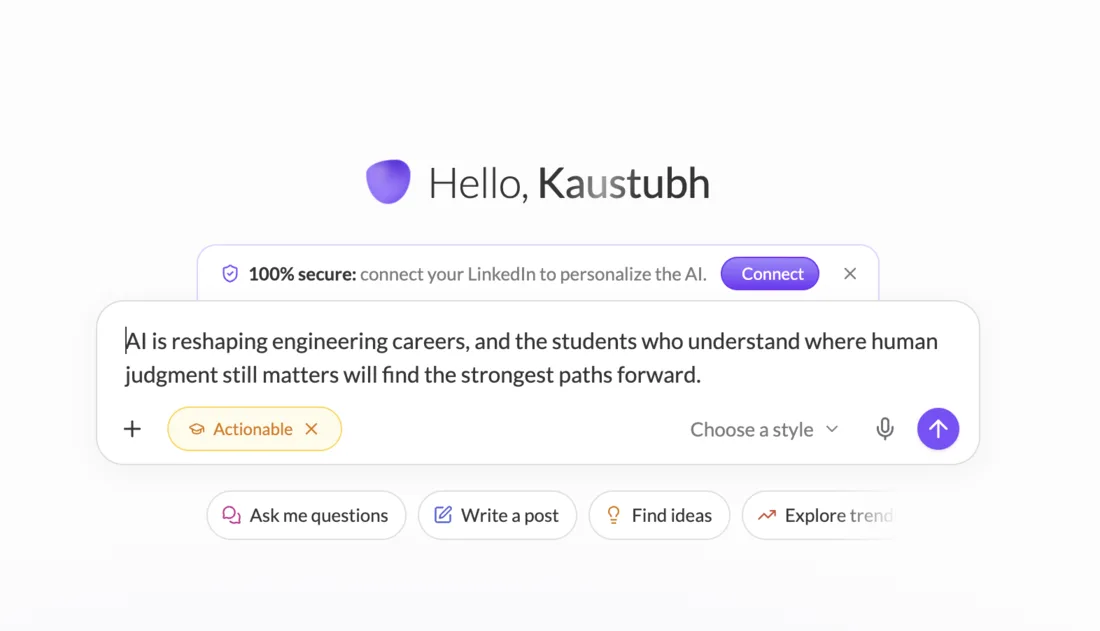
The home screen is a chat box that asks what we’re writing today. That’s the problem. It asks me for an idea, and that’s exactly where most people get stuck. Its idea generator still wants a topic from you. I gave it one and got six listicle angles. I picked one, pressed “Use the idea”, and it pasted the idea back into the chat. The style menu said “No style selected”.
The post it wrote opened with a steel beam and a third-year civil student who pastes a load case into ChatGPT. Short one-line beats, “Silence 😬”, a checklist to end. I’d never post it. I didn’t like the writing style or the formatting, and it isn’t how I write. It should have asked me for my style and topics before it wrote anything.
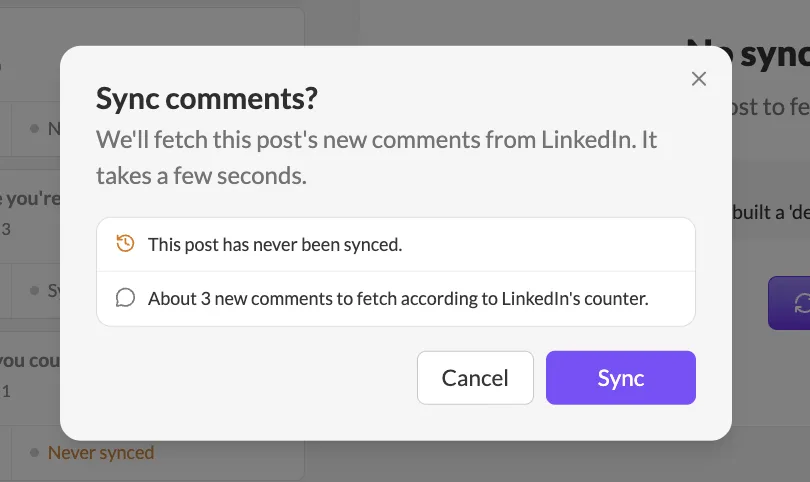
The rest felt the same. I found the overall UI confusing and overwhelming. Simple jobs take many clicks. To see three comments on a post, I picked the post, pressed Sync, confirmed, then pressed Open. It took me to LinkedIn.
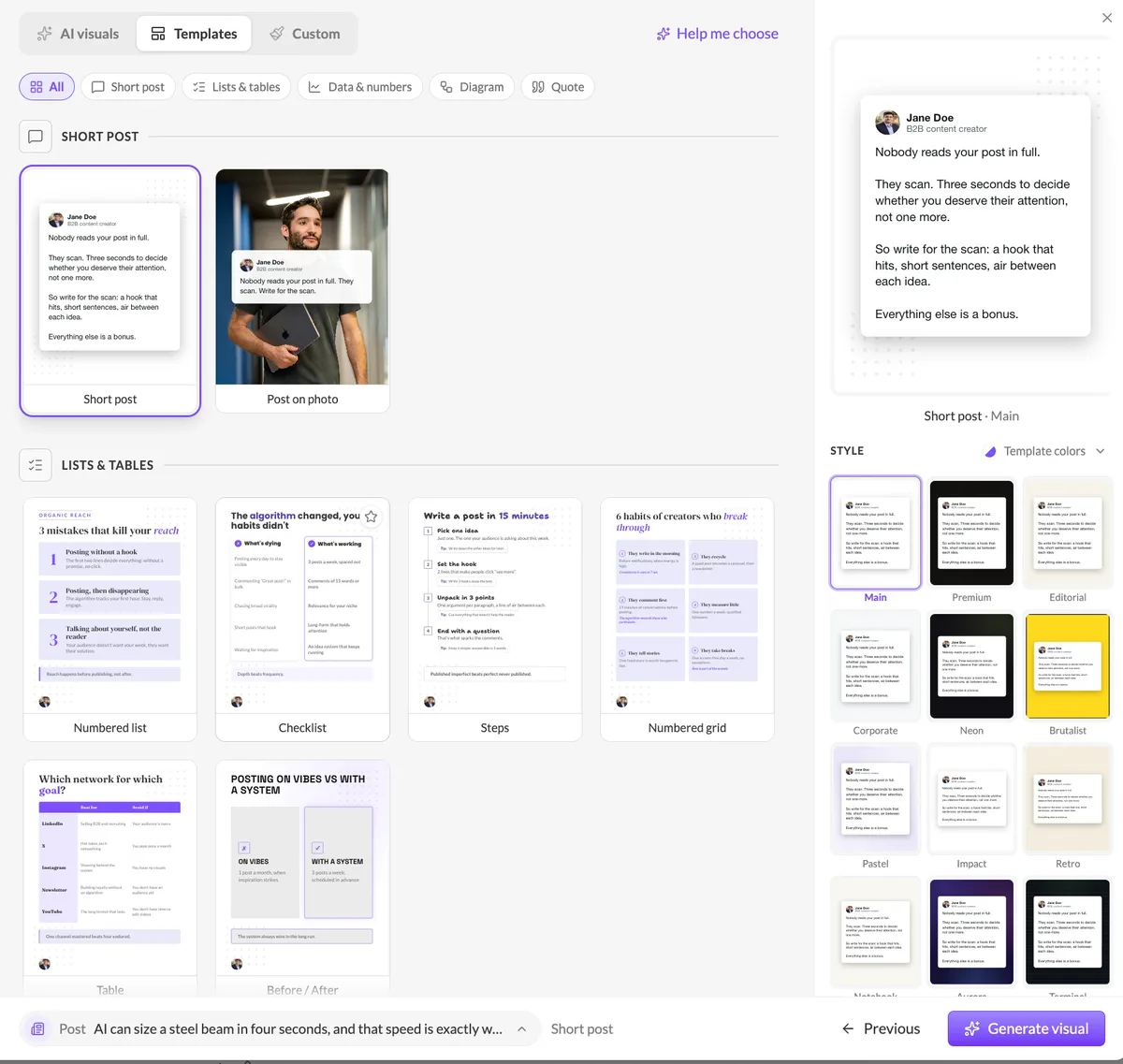
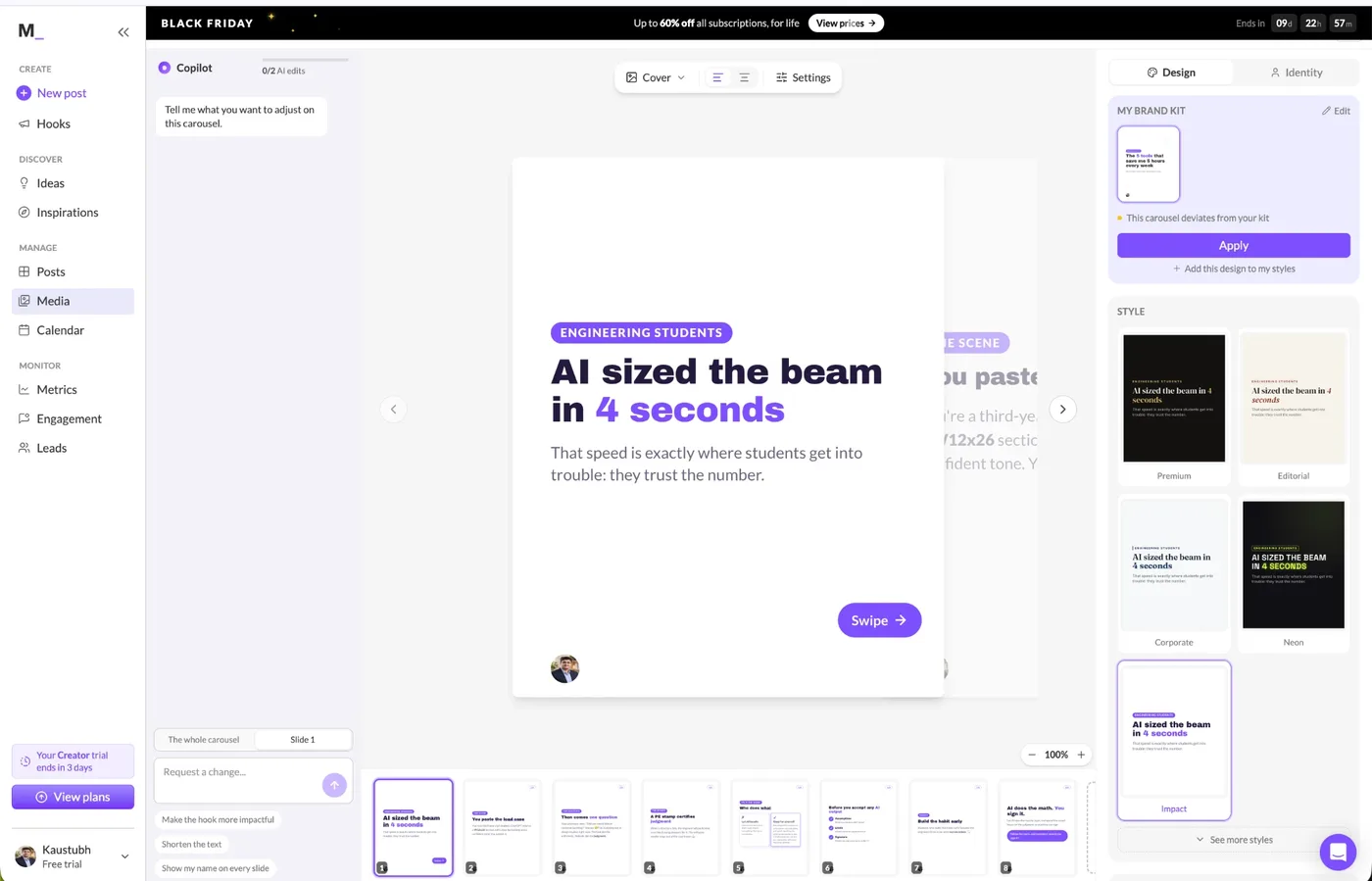
To be fair, the image templates are really good: lists, steps, tables, charts and pyramids in twelve looks, and a carousel editor that made eight clean slides in seconds. Its stats and benchmarks go deeper than most, and lead detection is a real feature if you sell on LinkedIn. Pick MagicPost if you want leads and can come up with ideas on your own. If you want the AI to do the heavy lifting, that’s why I built Wiral.
My own trial
Inside MagicPost, screen by screen.
Screenshots I took myself. The numbered notes take turns; tap one to see its part.
One idea in, a borrowed story out.
A US engineering scene, one-line beats and a checklist to end.
“Use the idea”, back to the chat.
The idea goes back into the box. You still press send.
Your style, not selected.
The only writing-style setting, tucked in a menu inside the chat box.
Three comments, four clicks.
Sync, confirm, then Open, which goes to LinkedIn.
What it does really well.
Image templates in twelve looks. Clean, and no design work.
Slides, in seconds.
Eight slides from one post, one idea each, with a Copilot to change them.
Every feature, side by side.
Wiral.Social is ours, so its column is marked. Where it’s behind, the table says so.
| Side by side | MagicPostFrom $49 a month | Wiral.SocialOurs |
|---|---|---|
| Price and trial | ||
| Starts at | From $49 a month | From $9 a month |
| Free trial | Depends on country (3 days from India), no card | 14 days, no card |
| How it connects to LinkedIn | LinkedIn’s own sign-inSays it is a LinkedIn verified partner using OAuth and the official API, with no extension and no session cookies. | Official LinkedIn sign-inSigns in with LinkedIn and posts through LinkedIn’s official sharing permission. |
| Writing | ||
| Writes posts with AI | YesWrites from a topic, link, YouTube video, PDF, image or audio. | YesThree takes on every idea, written by Wiri. |
| Learns your voice | YesImports your writing style from your LinkedIn posts, or another creator's style. | YesLearns from your posts and a few questions; you can see and remove what it learned. |
| Suggests post ideas | YesIdea generator on Creator and up. | YesDaily picks from your topics. |
| Ideas from viral posts | Yes2M+ public posts in 11+ languages with filters; Creator and up. | YesA Viral tab of ideas drawn from posts that did well. |
| Posting | ||
| Schedules posts | YesText, images, GIF, video, PDF, carousel and polls. | YesIts own scheduler, posting through LinkedIn’s official sharing. |
| Posting queue or calendar | YesMonth and week calendar with drag and drop, recommended times. | YesWeekly posting slots, any time zone. |
| Adds a first comment | YesScheduled comments from immediately up to 15 days after the post. | NoIn a small invite-only beta. |
| Posts to company pages | YesIncluded on every plan, but each seat is tied to either a personal profile or one company page. | NoPersonal profiles only. |
| Visuals | ||
| Makes carousels | YesAI carousel builder with brand kit, exports PDF. | YesCarousel maker with templates. |
| Images and video | YesAI visuals, mockups and photos on Creator and up; upload your own media on every plan. | YesImage cards and template videos. |
| Feed preview | YesMobile display and see-more preview in the editor. | YesFeed preview with the “…more” cut. |
| Growth | ||
| Post stats | YesPost-level impressions, unique views, reactions, comments, followers gained, engagement rate; audience demographics; benchmarks against creators of similar size; CSV and PDF reports. | NoPost stats are in a small invite-only beta. |
| Help with comments | YesEngagement feed from lists of up to 49 profiles, reply inbox for comments on your posts. | No |
| Leads and outreach | YesFinds people who liked or commented, scores them against your ideal customer profile, simple CRM; sends to HubSpot, Pipedrive, Lemlist, ReachBoost or a webhook. | No |
| Team and client accounts | YesTeam and Agency plans with client approval and white-label reports. | No |
| Getting set up | ||
| Needs a Chrome extension | NoMagicPost does not publish a browser extension. | NoWorks in any browser, no extension. |
| Native mobile app | Not statedNot stated on the site; none of the 119 help-centre articles mentions a phone app. | NoWorks in your phone’s browser. |
Inside Wiral.Social
How it works, screen by screen.
Real screens from the app. The numbered notes take turns; tap one to see its part.
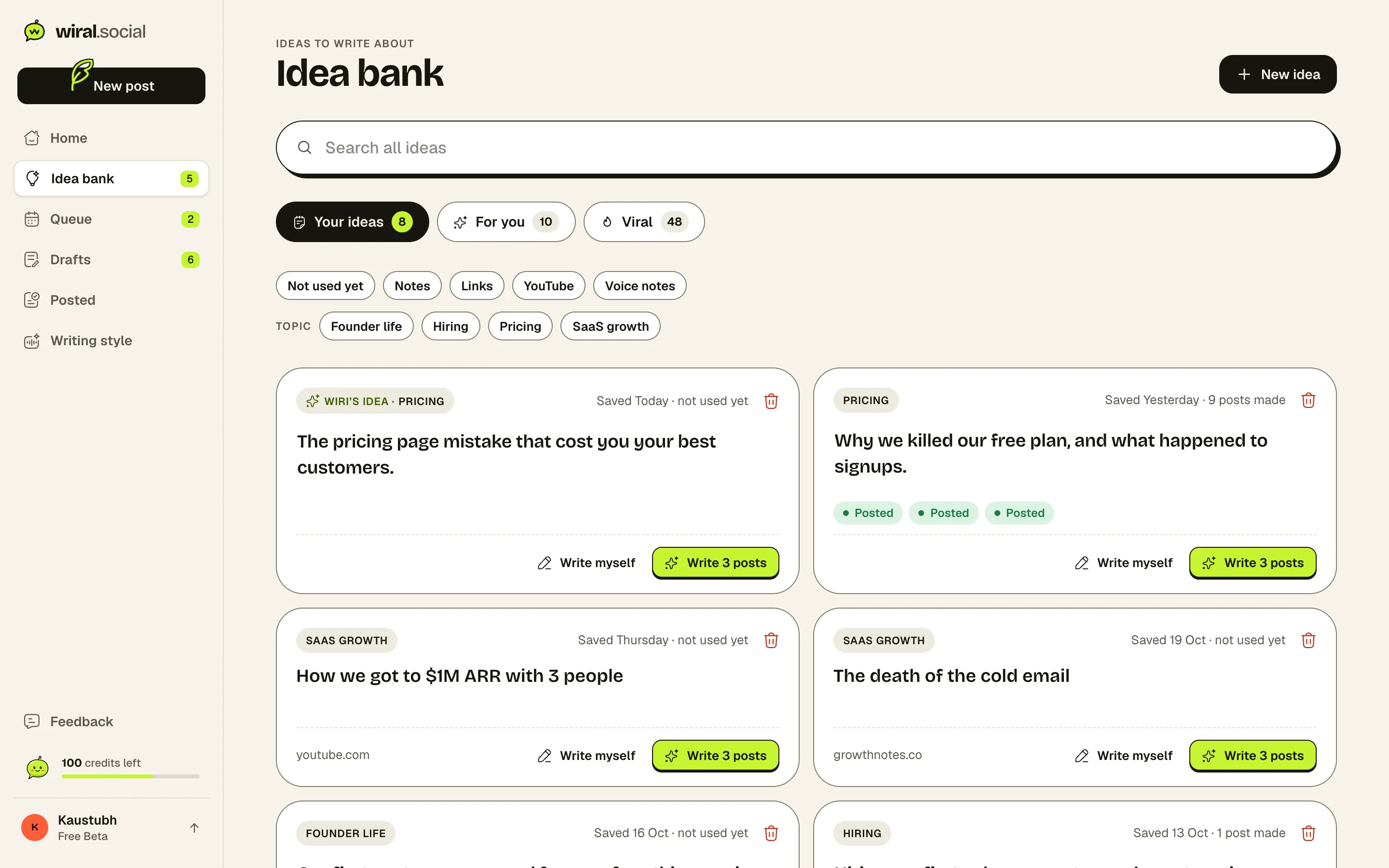
Ideas, waiting for you.
Save your own in a second, or pick from ideas Wiri writes from your topics every morning and formats that keep doing well. You never start from a blank page.
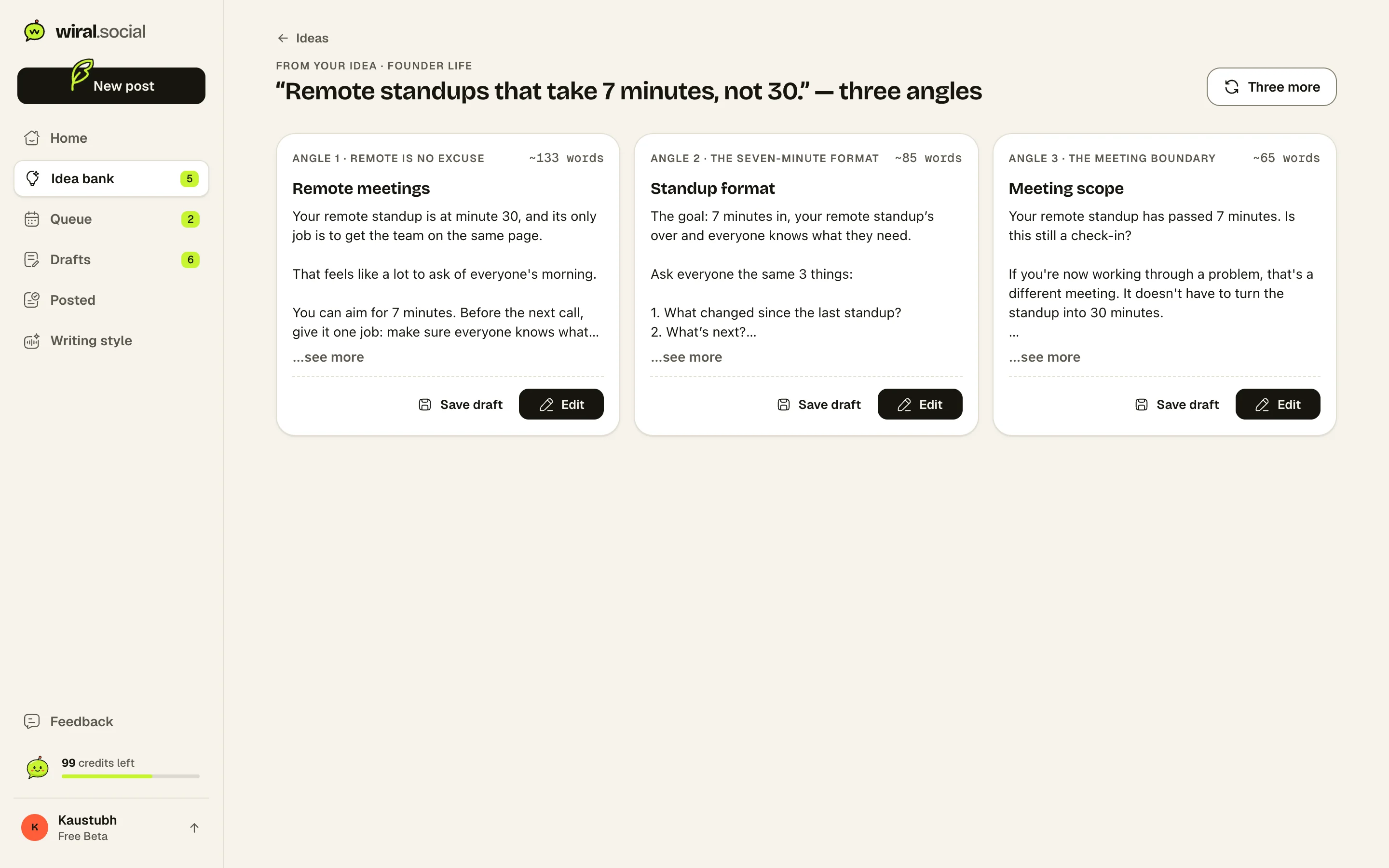
One thought in, three posts out.
Type what’s on your mind, paste a link or record a voice note. Wiri writes three different angles, in your voice, and you keep the one that sounds like you.
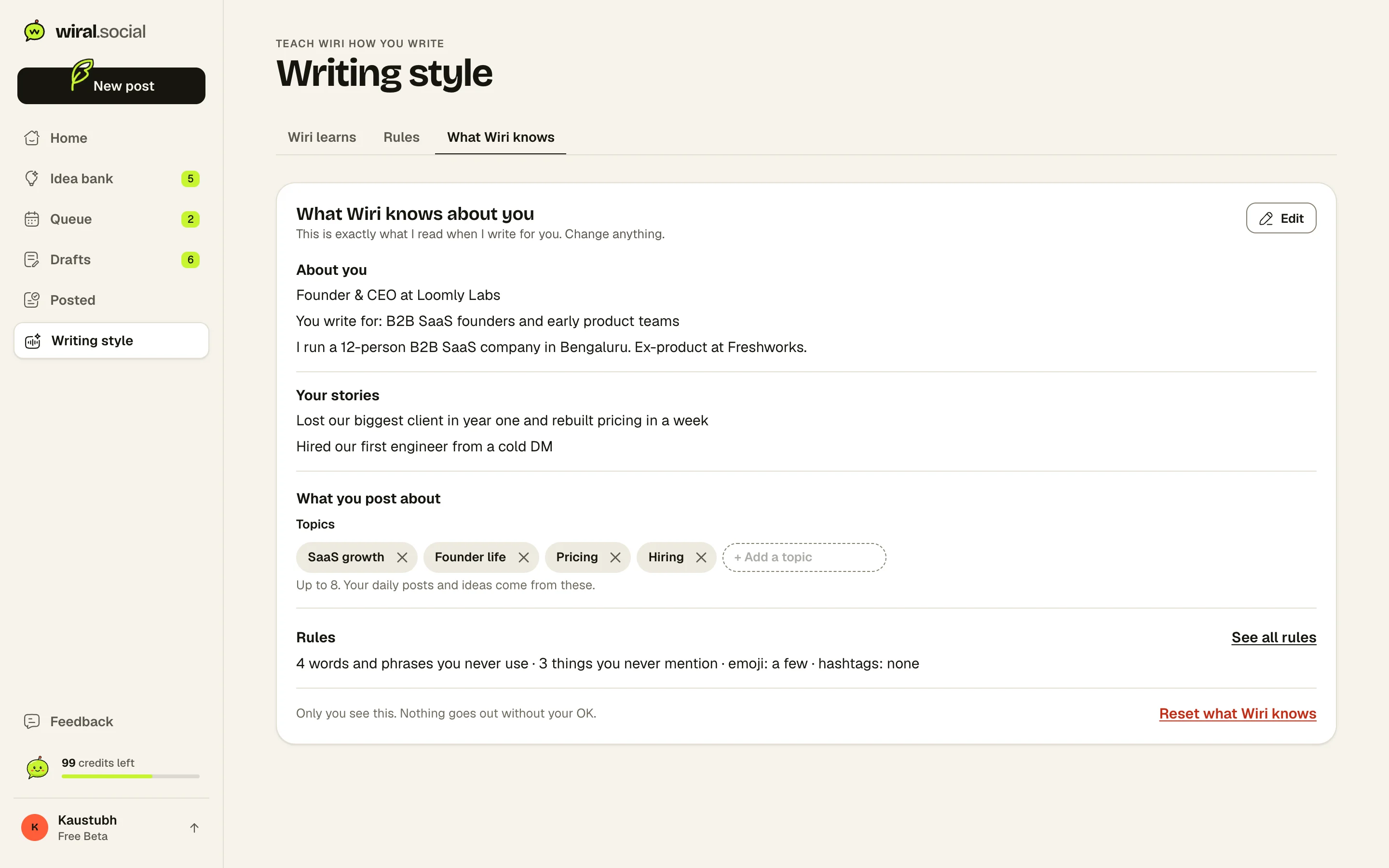
It knows what you sound like.
A two-minute chat or a few old posts, and Wiri keeps a plain page of what it knows about you. Open on the trial, no card.
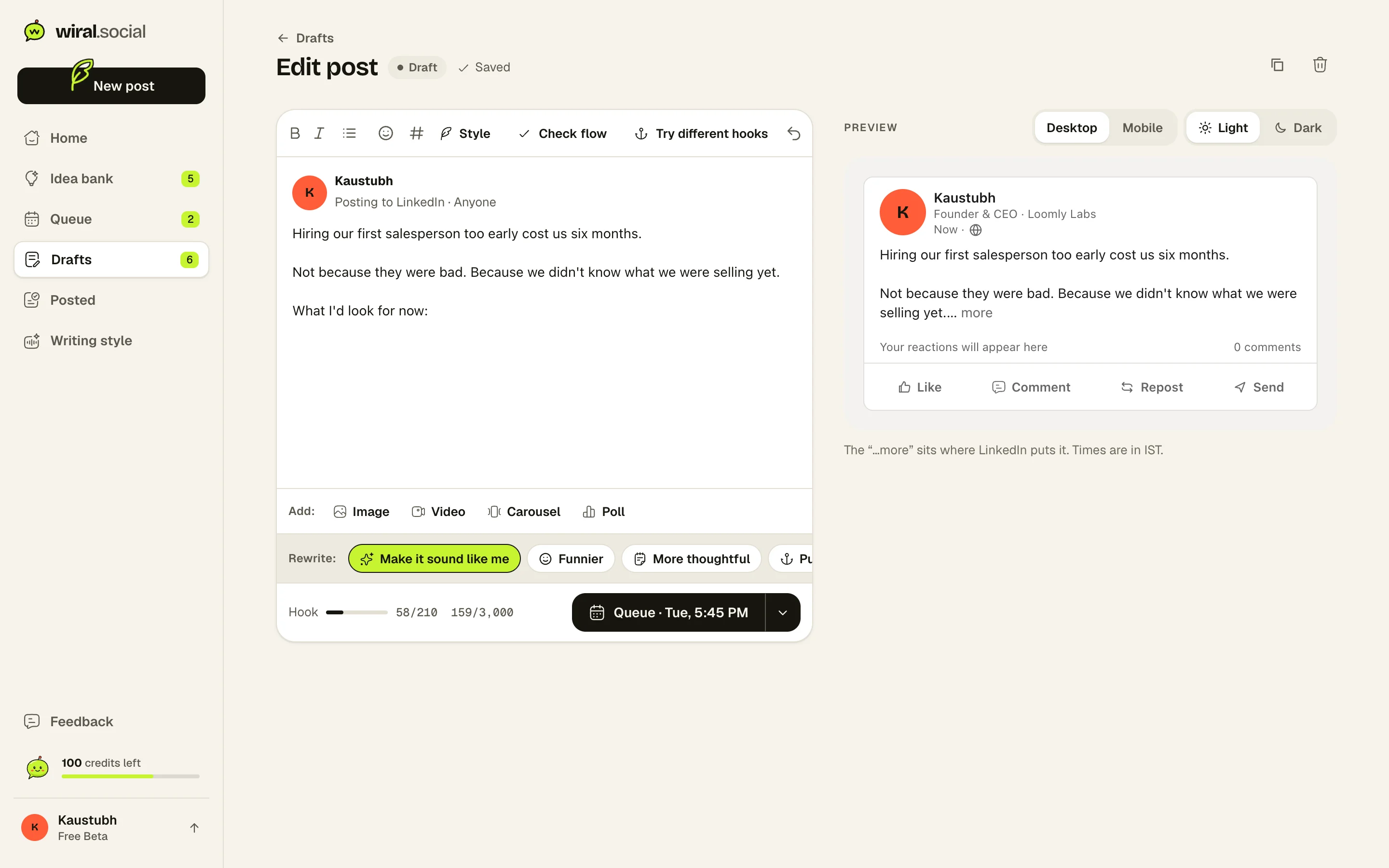
Change it your way, see it as LinkedIn will.
Bold a line, change the length, get new hooks, or tell Wiri what to change in your own words. The preview shows exactly where LinkedIn cuts the post with “…more”.
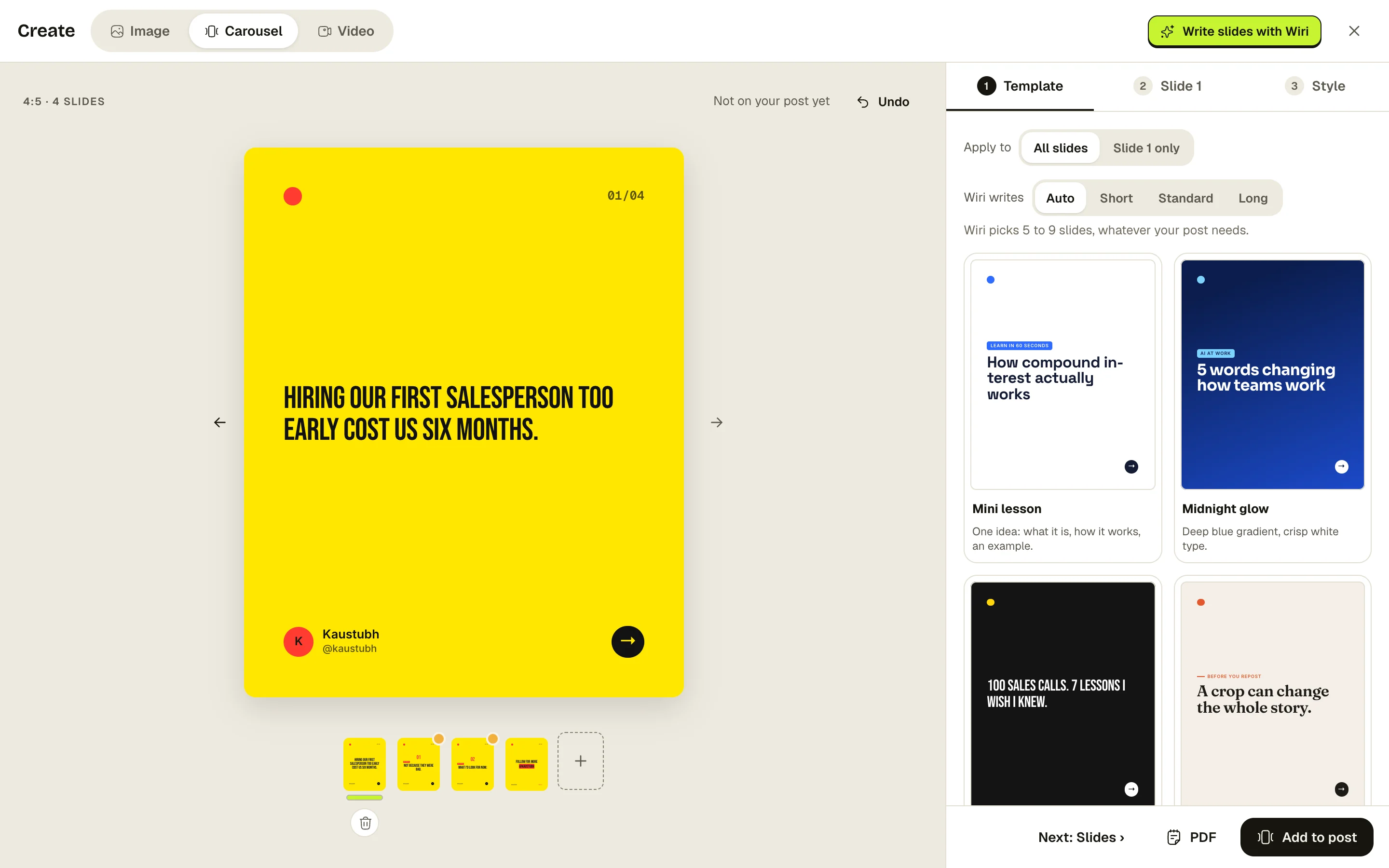
Carousels from the same post.
Turn any post into slides in the studio, along with image cards and short videos. Words always fit. Which extras come with which plan is on the pricing page.
Where Wiral.Social is behind: Post stats and an automatic first comment are only in a small invite-only beta so far. Personal profiles only, no company pages yet. No team accounts or outreach tools. Ask for what you need
Try Wiral.Social with LinkedIn14 days, no card20% off for life until 24 NovemberNever posts without you
Not ready to sign up? Test the writing with the free post generator, see how the AI post writer learns your voice, or compare plans.
Plans and prices.
As listed on MagicPost and Wiral.Social’s own pricing pages, 20 November 2026.
MagicPost plans
- Growth$49/mo
Manual writing and scheduling, analytics, engagement and replies, lead detection (100 leads a month). No AI post generation, carousels or visuals.
- Creator$69/mo
Everything in Growth plus unlimited AI posts, AI photos and visuals, carousels, idea generator, inspiration library, scheduled comments, API and MCP, 200 leads a month
- Agency$59/mo
Per client seat, from 2 seats. Client approval, shareable calendars, white-label reports, free admin seats. AI images capped at 100 a month.
- Team$59/mo
Per seat, from 2 seats. One seat is one LinkedIn profile or company page; admin seats free. Team dashboards, brand guidelines. AI images capped at 100 a month.
Trial: Depends on country (3 days from India), no card. No guaranteed refund period; refunds are reviewed case by case by support.
Wiral.Social plans
- Starter$9/mo
60 AI credits a month. Text posts, polls and your own images, 500 MB storage.
- Starter+$12/mo
85 AI credits a month. A taste of the Green zone: 3 premium carousel templates and 5 AI image cards a month, videos up to 1 minute.
- Growth$19/mo
135 AI credits a month. Every carousel template, colours and fonts, AI image cards, videos up to 3 minutes.
- Growth+$25/mo
180 AI credits a month. Growth, plus 10 advanced image styles a month, 1 saved brand template, videos up to 5 minutes.
- Pro$39/mo
280 AI credits a month. Advanced image styles, saved brand templates, videos up to 10 minutes, priority email support.
- Pro+$49/mo
355 AI credits a month. Everything in Pro, videos up to 15 minutes, 50 GB storage.
Trial: 14 days, no card. Full refund within 14 days of your first payment, no questions needed. Cancel any time.
What reviewers say.
What people say about MagicPost
“The best tool I've ever tested for writing LinkedIn posts!”
Five reviews, all 5 stars: users like the idea generator and drafting speed; one says results only matched their voice after filling in their offer and persona.Product Hunt user reviews
- Users say posts come out close to their own style after it reads their LinkedIn posts, which cuts editing time
- Users like the analytics and calendar, and one finds the analytics clearer than LinkedIn's own
- One user picked it because it is a LinkedIn-verified app rather than a cookie scraper, to avoid account bans
- Users say the idea generator helps when they are stuck for something to post
Is Wiral.Social a good MagicPost alternative?
For writing on LinkedIn, yes, if you want ideas brought to you and posts written in your voice, checked before they go out, from $9 a month with no card to try it. If you want lead detection, benchmarks against accounts your size, company pages or team seats, MagicPost has them and Wiral doesn’t.
Can MagicPost write LinkedIn posts in your style?
It imports your style from your LinkedIn posts once you connect your profile, on the Creator plan and up. Before I connected, its style menu said “No style selected” and it never asked how I write. Its first post for me borrowed a US civil-engineering scene and ended with a checklist, and I wouldn’t post it.
How long is the MagicPost free trial?
It depends on your country. From India on 20 November 2026 it was 3 days on the Creator plan, with no card, 3 AI posts, one visual or carousel and 10 lead credits. Hook generation and AI visuals still said they need a paid plan. Wiral.Social’s trial is 14 days, with no card.
How much is MagicPost?
Growth is $49 a month ($29 billed yearly) with no AI writing. Creator, the plan that writes posts, is $69 a month or $39 a month billed yearly. Team and Agency are $59 per seat a month, from two seats. Its Black Friday deal runs to 6 December 2026: Creator at $48 monthly or $27 a month yearly, kept while you stay subscribed.
Does MagicPost find leads on LinkedIn?
Yes. It looks at the people who liked or commented on your posts, scores them against the ideal customer you describe and can send them to HubSpot, Pipedrive or lemlist. On one of my posts it scored 11 people in seconds and kept 3 as fits, which used 3 of my 10 trial credits.
Is MagicPost safe for my LinkedIn account?
It connects through LinkedIn’s official sign-in, with no browser extension and no cookies. Connecting asks for your posts, comments, reactions, profile stats and any company pages you manage. You can remove it any time under LinkedIn’s Data privacy, Permitted services.
How do I cancel or delete MagicPost?
Manage your subscription from your MagicPost dashboard; its terms say purchases aren’t refundable and cancelling takes effect at the end of the paid term. Deleting the account is in Settings and takes a code sent to your email. Remove MagicPost from LinkedIn’s permitted services as well.
Are these screenshots real?
Yes. I signed up for MagicPost with Google on 20 November 2026, used the trial with no card, connected my LinkedIn profile for stats and leads, and deleted the account the same day.
See if it sounds like you.
Try Wiral.Social with LinkedIn14 days, no card20% off for life until 24 NovemberNever posts without you
Not ready to sign up? Test the writing with the free post generator, see how the AI post writer learns your voice, or compare plans.
How I tested
Anything I couldn’t try myself comes from the tool’s own pages, listed in the sources below.
Sources: 28 pages. Prices checked on 20 November 2026, features researched on 20 November 2026. Prices are in US dollars, billed monthly unless marked yearly.
MagicPost
- app.magicpost.in/signup
- magicpost.in/pricing
- annuaire-entreprises.data.gouv.fr/entreprise/921774725
- magicpost.in/terms
- magicpost.in/help-center/is-magicpost-free-can-i-try-it-and-how-much-does-it-cost
- magicpost.in/help-center/can-i-get-a-refund-for-my-magicpost-subscription
- magicpost.in/features/ai-linkedin-post-generator
- magicpost.in/help-center/how-to-import-any-writing-style-on-magicpost
- magicpost.in/features/linkedin-post-inspiration
- magicpost.in/features/linkedin-schedule-posts
- magicpost.in/features/linkedin-schedule-comments
- magicpost.in/features/linkedin-carousel-generator
- magicpost.in/help-center/how-many-visuals-and-carousels-can-i-generate
- magicpost.in/help-center/how-to-write-and-schedule-a-post-in-the-editor
- magicpost.in/features/linkedin-analytics
- magicpost.in/help-center/how-to-publish-on-a-company-page
- magicpost.in/features/linkedin-engagement
- magicpost.in/help-center/what-is-the-leads-module
- magicpost.in/help-center/do-i-need-a-browser-extension-for-magicpost
- magicpost.in/help-center
- magicpost.in/help-center/what-languages-does-magicpost-support
- magicpost.in/help-center/how-to-connect-zapier-lemlist-pipedrive-or-hubspot
- magicpost.in/features/safe-linkedin-connection
- g2.com/products/magicpost/reviews
- capterra.in/software/1099254/magicpost
- trustpilot.com/review/magicpost.in
- producthunt.com/products/magicpost
- kleo.so/blog/magicpost-review
“I’d tell a friend Wiral makes LinkedIn easier to keep up with: I can write from my stories when I have time, then generate and schedule posts in one place. I can’t do without it now, and engagement’s gone 10x.”